
Si vous souhaitez développer votre présence sur LinkedIn, l'analyse des concurrents est indispensable. Voici pourquoi : Les profils personnels génèrent 561% plus de portée que les pages d'entreprise, ce qui fait de votre profil individuel le champ de bataille clé pour attirer l'attention. Mais comment savez-vous si vous performez bien ? Est-ce que 10 000 vues de publication, c'est bien, ou vos pairs obtiennent-ils un engagement bien meilleur ?
En évaluant les profils des concurrents, vous pouvez :
- Comparer vos performances avec des métriques comme le taux d'engagement et la croissance des abonnés.
- Identifier les stratégies que les concurrents utilisent pour optimiser leurs profils et leur contenu.
- Trouver les lacunes dans le contenu de votre secteur que vous pouvez combler pour vous démarquer.
Ce guide explique comment :
- Identifier les concurrents dans votre domaine.
- Suivre les métriques clés comme l'engagement et les thèmes de contenu.
- Améliorer votre profil et votre stratégie de publication en fonction des insights concurrentiels.
Avec des outils comme Acedit, vous pouvez simplifier ce processus en automatisant l'analyse LinkedIn et en affinant votre marque personnelle avec des recommandations alimentées par l'IA. Explorons comment utiliser les données des concurrents pour affiner votre stratégie LinkedIn.
Pourquoi l'analyse des concurrents est importante pour la marque personnelle
Qu'est-ce que la marque personnelle sur LinkedIn
La marque personnelle sur LinkedIn consiste à mettre en avant votre expertise pour établir votre autorité dans votre domaine [11]. Ce n'est pas seulement de l'auto-promotion ; il s'agit de partager régulièrement vos connaissances, vos insights et votre perspective unique pour établir la confiance au sein de votre réseau professionnel. Tout, de votre profil à vos publications et interactions, contribue à la façon dont les autres perçoivent votre valeur et votre crédibilité, et vous pouvez même exploiter vos données LinkedIn pour améliorer d'autres domaines professionnels comme la préparation aux entretiens. Bien que la définition de votre marque soit la base, l'analyse des concurrents vous aide à voir comment vos efforts se comparent.
Ce que vous gagnez de l'analyse des concurrents
Analyser les profils les plus performants de votre secteur vous donne un repère clair pour mesurer votre performance. Sans ce contexte, il est facile de mal juger votre progression. Comme le partage Kate Meyers Emery, Senior Digital Manager chez Candid :
"J'aime regarder les données des concurrents car cela me donne un aperçu de ce qui rend notre marque unique et m'aide à rester en avance" [2].
L'analyse des concurrents met en évidence les lacunes de contenu, les opportunités inexploitées et les tendances émergentes - qu'il s'agisse de hashtags tendance ou des derniers styles de contenu. Ces insights vous aident à vous positionner stratégiquement [2][6].
Cela affine également votre positionnement unique en montrant comment les autres optimisent leurs titres, intègrent des mots-clés et utilisent les sections de profil pour établir la crédibilité. Vous pouvez approfondir les métriques comme les taux d'engagement (un taux supérieur à 2% est solide, et plus de 5% est exceptionnel) et le ratio des commentaires aux likes pour voir ce qui génère une véritable interaction par rapport à une approbation passive [1].
Houston Golden, Fondateur et PDG de BAMF, le résume parfaitement :
"Si vous ne vous adaptez pas, vous disparaissez. Les organisations réussies ont appris à s'adapter rapidement aux besoins changeants de leurs prospects, et vous ne pouvez vous adapter que si vous comprenez le marché et les différents acteurs qui le composent" [6].
Ce principe s'applique tout autant aux marques personnelles. Si vous voulez rester pertinent et développer votre influence, comprendre votre paysage concurrentiel est non négociable.
sbb-itb-20a3bee
Agents IA 101 : Analyse LinkedIn
Comment mener une analyse des concurrents LinkedIn
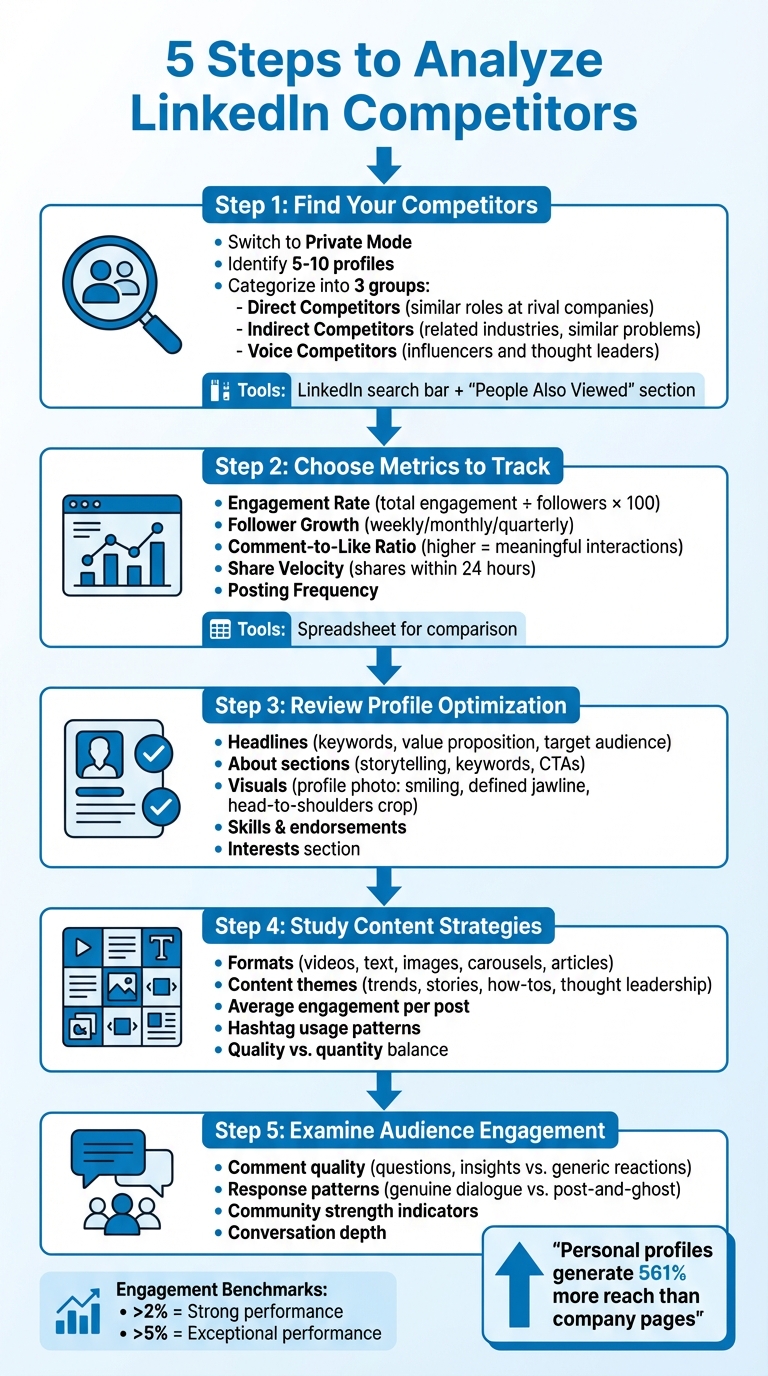
Étape 1 : Trouvez vos concurrents
Commencez par passer en mode privé sur LinkedIn. Cela empêche les concurrents d'être notifiés lorsque vous consultez leurs profils. Identifiez 5 à 10 profils à analyser, mais rappelez-vous que les concurrents ne sont pas seulement ceux qui occupent des postes identiques. Ils incluent quiconque concurrence pour attirer l'attention de votre public cible. Pour rendre les choses plus gérables, organisez-les en trois groupes :
- Concurrents directs : Professionnels dans des rôles similaires dans des entreprises rivales.
- Concurrents indirects : Ceux dans des secteurs connexes résolvant des problèmes similaires.
- Concurrents de voix : Influenceurs et leaders d'opinion dans votre secteur [1].
Utilisez la barre de recherche LinkedIn avec des mots-clés pertinents ou des titres de poste pour trouver des profils éminents. Consultez la section "Les gens ont aussi consulté" sur les profils des concurrents pour découvrir des professionnels similaires. De plus, explorez l'onglet "Personnes" sur la page d'entreprise d'un concurrent pour identifier les figures clés comme les fondateurs ou les PDG qui représentent la marque [8].
Une fois que vous avez compilé votre liste, vous êtes prêt à plonger dans les métriques de performance.
Étape 2 : Choisissez les métriques à suivre
Concentrez-vous sur les métriques qui donnent une image fidèle de la performance. Voici quelques indicateurs clés à surveiller :
- Taux d'engagement : Calculez-le en divisant l'engagement total par le nombre d'abonnés, puis en multipliant par 100.
- Croissance des abonnés : Surveillez les changements sur des périodes spécifiques (hebdomadaire, mensuel ou trimestriel).
- Ratio commentaires-likes : Un ratio plus élevé suggère des interactions plus significatives.
Vous pouvez également suivre la vélocité de partage, qui mesure la fréquence à laquelle une publication est partagée dans les 24 heures, et la fréquence de publication pour comprendre comment les concurrents maintiennent leur visibilité. Un simple tableur peut vous aider à comparer ces métriques entre les profils pour une image plus claire.
Étape 3 : Examinez l'optimisation du profil
Observez comment les concurrents structurent leurs profils pour plaire à leur audience. Commencez par leurs titres - notez les mots-clés qu'ils utilisent, comment ils présentent leur valeur et si leur public cible est clairement défini. Consultez les sections À propos pour le style de narration, l'utilisation des mots-clés et les appels à l'action clairs.
Faites attention aux visuels aussi. Leurs photos de profil et images de couverture sont-elles cohérentes ? Selon la recherche de Snappr, les photos de profil les plus efficaces montrent un sujet souriant (dents visibles), une mâchoire définie et un cadrage de la tête aux épaules ou de la tête à la taille [12]. De plus, examinez leurs compétences mises en avant et les approbations pour voir l'expertise qu'ils soulignent. Ne négligez pas la section Intérêts - elle peut révéler les influenceurs, les groupes et les entreprises qu'ils suivent.
Une fois que vous avez analysé ces éléments, vous pouvez passer à la façon dont leur contenu s'aligne avec leur stratégie de profil.
Étape 4 : Étudiez les stratégies de contenu
Examiner les stratégies de contenu fait la lumière sur la façon dont les concurrents engagent leur audience. Notez les formats qu'ils utilisent - vidéos, publications texte, images, carrousels ou articles - et identifiez lesquels génèrent le plus d'engagement. Catégorisez leur contenu par thèmes, tels que les tendances du secteur, les histoires personnelles, les guides pratiques ou la pensée leadership. Ensuite, calculez l'engagement moyen par publication pour déterminer si leur succès provient de la qualité ou de la quantité.
Aussi, gardez une trace des hashtags qu'ils utilisent régulièrement. Cela peut vous aider à repérer les tendances émergentes et à identifier les voix montantes du secteur.
Étape 5 : Examinez l'engagement de l'audience
Ne comptez pas seulement les likes et les partages - approfondissez. Lisez les commentaires sur les publications des concurrents pour comprendre la qualité de la conversation. Les gens posent-ils des questions, partagent-ils des insights, ou laissent-ils simplement des réactions génériques ? Observez comment les concurrents répondent aux commentaires. Favorisent-ils un véritable dialogue, ou publient-ils du contenu et passent-ils à autre chose ? Cela peut révéler la force réelle de leur communauté et de leur influence.
Si vous souhaitez appliquer ces insights pour améliorer votre propre profil LinkedIn, des outils comme Acedit peuvent vous aider. Bien qu'Acedit soit principalement conçu pour la préparation aux entretiens et la croissance professionnelle, ses fonctionnalités d'analyse de profil LinkedIn peuvent vous aider avec la marque personnelle, ce qui facilite l'affinage de votre présence en utilisant des repères concurrentiels.
Outils qui simplifient l'analyse des concurrents LinkedIn
Plonger dans l'analyse des concurrents LinkedIn peut être chronophage, surtout si vous le faites manuellement. Cela prend généralement 2 à 3 heures par concurrent chaque semaine, et il y a toujours le risque d'erreur humaine [1]. Heureusement, les outils automatisés peuvent vous faire gagner du temps et des efforts considérables. Ces plateformes non seulement accélèrent le processus mais fournissent également des insights en temps réel, transformant les données brutes en tableaux de bord clairs et exploitables.
Comment Acedit améliore l'optimisation LinkedIn
Acedit est un outil qui offre l'intégration LinkedIn pour se connecter directement à votre profil, offrant des suggestions alimentées par l'IA pour affiner votre présence professionnelle [4][9]. Il évalue votre style d'écriture et vos antécédents professionnels pour vous aider à créer une marque personnelle plus forte. Au-delà de l'optimisation du profil, Acedit génère du contenu personnalisé comme des lettres de motivation et des réponses d'entretien qui s'alignent avec votre image professionnelle.
Les résultats parlent d'eux-mêmes : 94% des utilisateurs d'Acedit signalent de meilleures réponses aux candidatures, et ils voient un taux de réponse 3,1 fois plus élevé des employeurs lorsqu'ils utilisent les matériaux générés par l'IA [9]. La plateforme offre une extension Chrome avec un niveau gratuit, et des options premium sont disponibles pour un paiement unique de 45 $ ou 75 $ pour un accès à vie [5].
Utiliser Acedit pour l'amélioration du profil
Acedit analyse votre historique professionnel et suggère des mises à jour qui correspondent aux exigences du poste et aux attentes du secteur [4][9]. Ses recommandations de marque alimentées par l'IA aident à assurer que votre profil reste aligné avec vos objectifs professionnels.
Les utilisateurs apprécient particulièrement les fonctionnalités comme les invites en direct et le coaching en temps réel, qui ont valu à la plateforme une note de 4,8/5 [9]. Ces outils non seulement renforcent la confiance mais assurent également la cohérence entre votre profil LinkedIn, votre CV et d'autres documents professionnels. En fournissant des insights exploitables, Acedit simplifie le processus de transformation de l'analyse en améliorations significatives du profil.
Transformer l'analyse en action
Maintenant que vous avez rassemblé des insights sur vos concurrents, il est temps de mettre ces données au travail et d'affiner votre stratégie LinkedIn. Comme le dit Olga Logunova, experte en écoute des médias sociaux et stratégie :
"Les données concurrentielles sont à la fois votre repère et votre contexte. Sans cela, vous ne savez pas si 10 000 vues, c'est un succès - ou un échec comparé aux concurrents qui atteignent des centaines de milliers" [2].
L'objectif est d'identifier les lacunes exploitables et de faire des améliorations ciblées.
Trouver les lacunes et les opportunités
Commencez par organiser vos insights concurrentiels en utilisant une analyse SWOT - Forces, Faiblesses, Opportunités et Menaces [3][10]. Cela vous aidera à découvrir les domaines où les concurrents sous-performent et à mettre en évidence les faiblesses de votre propre présence LinkedIn qui nécessitent une attention.
Par exemple, comparer votre profil peut révéler des opportunités d'amélioration. Comparez vos mots-clés de titre et votre image d'en-tête avec ceux des profils les plus performants [6]. Examinez de plus près les résumés des concurrents pour analyser comment ils utilisent la narration, les liens et la preuve sociale [6].
Une autre étape clé consiste à identifier les sujets du secteur que les concurrents ignorent [1][2]. Ces domaines négligés sont votre chance d'intervenir et de vous établir comme leader d'opinion. Kate Meyers Emery, Sr Digital Manager chez Candid, explique sa méthode :
"Je vais regarder leurs meilleures publications par rapport à nos meilleures publications pour voir comment ils attirent l'attention, si nous le faisons mieux, et comment nous pouvons nous démarquer davantage" [2].
Faites attention aux métriques d'engagement aussi. Un ratio commentaires-likes élevé signale souvent des interactions significatives [1]. Le contenu avec un taux d'engagement supérieur à 2% indique une performance solide, tandis que les taux supérieurs à 5% suggèrent que vous frappez fort [1].
Une fois que vous avez identifié ces lacunes, concentrez-vous sur des améliorations précises.
Faire des améliorations de profil et de contenu
Utilisez les métriques et les insights que vous avez rassemblés pour guider vos prochaines étapes. Par exemple, si les concurrents mieux classés dans la recherche LinkedIn utilisent des mots-clés spécifiques dans leurs titres ou résumés, assurez-vous d'incorporer ces termes dans votre propre profil [6]. Les profils personnels sont particulièrement importants car ils génèrent 561% plus de portée que les pages d'entreprise [1]. Cela fait de l'optimisation de votre présence LinkedIn personnelle une priorité absolue.
Ajustez votre stratégie de contenu en fonction de ce qui fonctionne pour les concurrents. Suivez les formats - vidéos, publications texte ou articles - qui génèrent le plus d'engagement et adaptez votre approche en conséquence [1][10]. Aussi, égalez ou dépassez leur fréquence de publication pour rester visible.
Les tactiques d'engagement sont importantes aussi. Observez comment les concurrents interagissent avec leur audience - leur ton de voix, la rapidité avec laquelle ils répondent aux commentaires et l'authenticité de leurs interactions [2][6]. Les réponses rapides et authentiques peuvent renforcer vos connexions communautaires et augmenter l'engagement.
Enfin, assurez-vous de protéger votre avantage concurrentiel. Désactivez la fonctionnalité "Les gens ont aussi consulté" dans vos paramètres pour empêcher les visiteurs d'être dirigés vers les profils des concurrents [3]. De plus, définissez votre liste de connexions sur "Seulement vous" pour empêcher les concurrents de parcourir votre réseau et d'identifier vos clients ou prospects [3].
Ces ajustements, lorsqu'ils sont mis en œuvre réfléchis, peuvent vous aider à vous démarquer et à maximiser votre impact LinkedIn.
Conclusion
Analyser vos concurrents sur LinkedIn n'est pas une tâche ponctuelle - c'est un processus continu qui assure que votre marque personnelle reste pertinente et compétitive. Comme Houston Golden, Fondateur et PDG de BAMF, le dit :
"Si vous ne vous adaptez pas, vous disparaissez" [6].
Pour rester en avance, prenez l'habitude de mener des examens trimestriels, surtout dans les secteurs qui changent rapidement [2][13]. Utilisez ces insights pour affiner votre stratégie. Commencez par identifier 5 à 10 profils clés à surveiller. Faites attention à leurs tendances d'engagement et à la performance de leur contenu, puis ajustez votre approche pour égaler ou surpasser leur efficacité [1].
Des outils comme Acedit peuvent rendre ce processus plus fluide en s'intégrant directement à votre profil LinkedIn. Cette plateforme analyse votre messagerie et offre des suggestions basées sur les repères du secteur [5][14]. Selon les utilisateurs, ce coaching alimenté par l'IA peut augmenter les niveaux de confiance de manière impressionnante de 98%, prouvant comment la technologie peut élever vos efforts de marque [14].
Pour traduire les insights concurrentiels en action, envisagez d'utiliser un cadre SWOT. Cela vous aide à identifier les domaines où vous pouvez vous améliorer, à repérer les opportunités de contenu que vos concurrents pourraient manquer, et à affiner votre titre LinkedIn, votre résumé et votre stratégie de contenu globale [3][7]. Gardez un œil sur les taux d'engagement - tout ce qui dépasse 2% indique une performance solide, tandis que les taux supérieurs à 5% montrent une connexion d'audience exceptionnelle [1].
La cohérence et la curiosité sont vos meilleurs alliés. Laissez ce que vous apprenez des concurrents guider votre croissance en tant que leader d'opinion sur LinkedIn.
FAQ
Comment identifier les concurrents sur LinkedIn pour améliorer ma marque personnelle ?
Pour commencer, identifiez votre public cible et établissez votre niche professionnelle. Les filtres de recherche de LinkedIn - comme l'industrie, le titre du poste et les mots-clés - sont des outils inestimables pour trouver des personnes et des influenceurs qui servent des audiences similaires à la vôtre. Examinez attentivement leurs profils pour avoir une idée de leur stratégie de contenu, de la façon dont leur audience s'engage activement avec eux, et de leurs nombres d'abonnés. Ce type de recherche non seulement vous aide à repérer les concurrents clés mais révèle également des façons de différencier votre marque personnelle.
Quelles métriques clés dois-je suivre pour améliorer ma marque personnelle sur LinkedIn ?
Pour construire une marque personnelle plus forte sur LinkedIn, gardez un œil sur les métriques clés comme les vues de profil, la croissance des abonnés et l'engagement du contenu - cela inclut les likes, les commentaires, les partages et les impressions de publication. N'oubliez pas de suivre les clics sur vos publications, les données démographiques de l'audience et, si vous cherchez un emploi, faites attention aux vues des recruteurs et aux demandes de connexion des entreprises que vous ciblez.
Ces chiffres offrent une image claire de la façon dont vous résonnez avec votre audience et vous présentez professionnellement. En les vérifiant régulièrement, vous pouvez affiner votre approche et vous rapprocher de la réalisation de vos objectifs LinkedIn.
Comment Acedit peut-il m'aider à améliorer mon profil LinkedIn ?
Acedit exploite l'IA pour analyser votre profil LinkedIn et offre des suggestions personnalisées pour améliorer votre titre, vos mots-clés et votre contenu global. En examinant vos données de profil, il fournit des recommandations qui s'alignent avec vos aspirations professionnelles et l'audience que vous souhaitez atteindre.
En utilisant Acedit, vous pouvez rendre votre profil plus visible, répondre aux attentes du secteur et mettre en avant vos compétences et votre expérience d'une manière qui attire les opportunités potentielles.