
Visual resumes and traditional resumes serve different purposes, especially for designers. Visual resumes use graphics, colors, and creative layouts to showcase design skills, while traditional resumes rely on text-based formats for clarity and ATS (Applicant Tracking System) compatibility.
Key Takeaways:
- Visual resumes are ideal for direct interactions, networking, or creative roles, as they highlight design abilities and personal style.
- Traditional resumes work best for online applications and industries that prioritize professionalism and ATS compliance.
- A dual-resume strategy is often recommended: one ATS-friendly version and one visually appealing version for direct presentations.
Quick Comparison:
| Feature | Visual Resume | Traditional Resume |
|---|---|---|
| Content Type | Graphics, icons, charts | Text-based, bullet points |
| ATS Compatibility | Low | High |
| Layout | Non-linear, creative | Linear, reverse-chronological |
| Best Use | Networking, creative industries | Online applications, formal jobs |
Choosing the right format depends on the job, industry, and application method. Visual resumes can make an impact in person, but traditional resumes are safer for ATS-driven processes. For designers, balancing creativity with practicality is key.
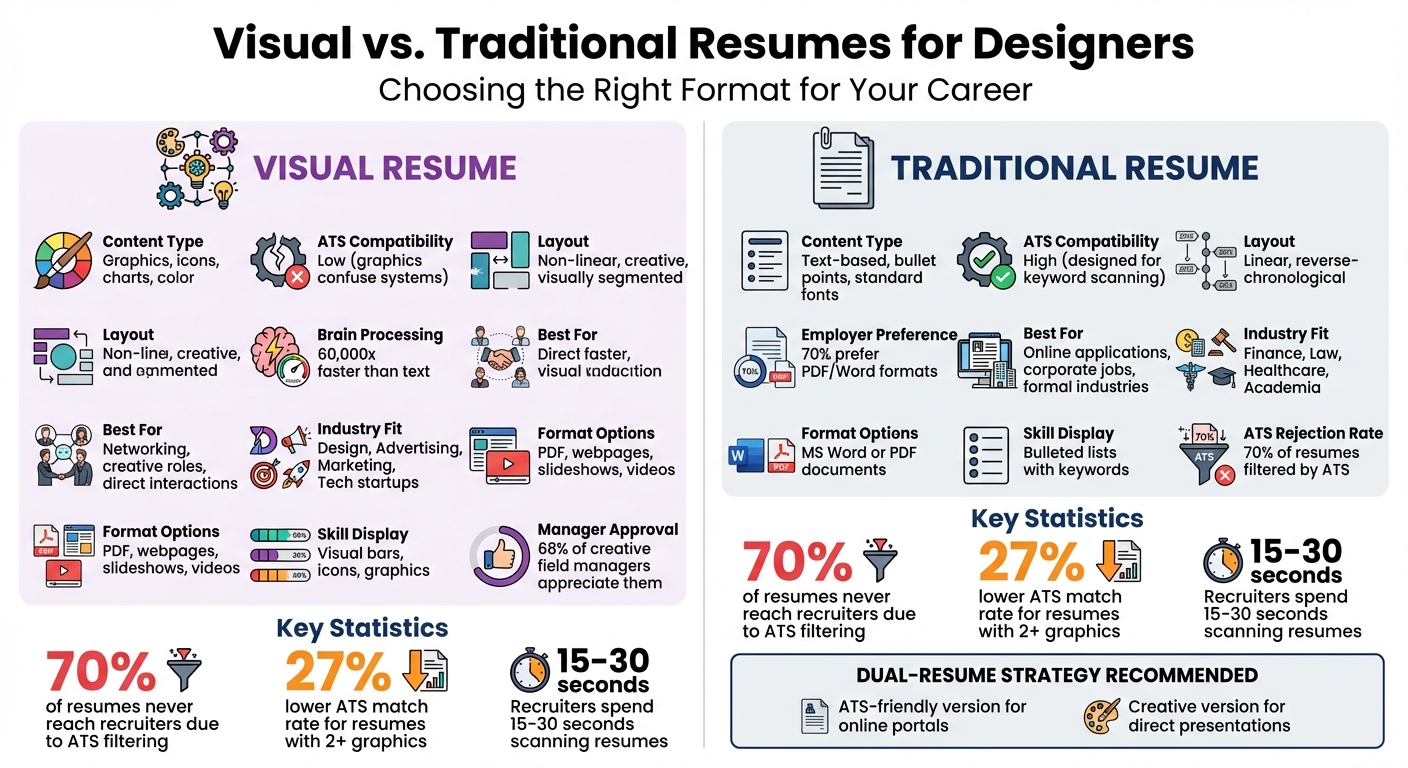
Visual vs Traditional Resumes Comparison Chart for Designers
Get HIRED With This Graphic Design Resume | ATS Friendly Resume Tips
Main Differences Between Visual and Traditional Resumes
The gap between visual and traditional resumes goes beyond just how they look. Traditional resumes stick to a straightforward, standardized layout - usually reverse-chronological, functional, or hybrid - relying on text blocks and bullet points to organize information in a way that's familiar to recruiters. Visual resumes, on the other hand, break from convention, using creative layouts that often present information in a non-linear, more dynamic style. These structural differences shape how each format tells your professional story.
When it comes to design, the contrast becomes even more apparent. Visual resumes include graphic elements like icons, color schemes, photos, slider bars to represent skills, and charts to display data. Traditional resumes, however, are text-heavy, using standard fonts and simple formatting to ensure they’re easy to read on any platform. This makes visual resumes stand out instantly - if they make it in front of a human recruiter.
Another key difference lies in how they prioritize information. Traditional resumes focus on professional experience and keywords, making them easy for both people and software to scan quickly. Visual resumes, however, use design elements like font size, color, and white space to draw attention to specific achievements or creative skills. While traditional resumes are typically shared as MS Word or PDF files, visual resumes can take the form of interactive webpages, slideshows, or even videos. Choosing the right format depends on how you want to showcase your strengths and creativity.
The biggest practical issue with visual resumes is their compatibility with Applicant Tracking Systems (ATS). Around 70% of resumes never make it to a recruiter because ATS software filters them out. Graphics and unconventional layouts in visual resumes often confuse these systems, leading to automatic rejection. Traditional resumes, designed for text-based scanning, easily pass through ATS software. This makes it crucial to match your resume format to the application process.
Comparison Table: Visual vs. Traditional Resumes
| Feature | Visual Resume | Traditional Resume |
|---|---|---|
| Primary Content | Graphics, icons, charts, and color | Text-based, standard layout |
| ATS Compatibility | Low; graphics may confuse ATS | High; designed for keyword scanning |
| Layout Structure | Non-linear, visually segmented | Linear, reverse-chronological |
| Customization Level | High; reflects personal branding | Standardized for professional use |
| Industry Fit | Creative fields (Marketing, Design, Tech) | Formal fields (Finance, Law, Academia) |
| Best Use Case | Networking, creative roles | Online job portals, corporate jobs |
| Skill Display | Visual bars, icons, graphics | Bulleted lists of keywords |
| Format Versatility | PDFs, webpages, slideshows, videos | MS Word or PDF documents |
Advantages and Disadvantages of Visual Resumes for Designers
Visual resumes offer a unique way for designers to showcase their skills, but they come with their own set of pros and cons. On the plus side, they can make a powerful first impression. Studies show that the human brain processes visuals 60,000 times faster than text, and with 90% of information being visual, a well-designed resume can grab attention instantly. For designers, this format can double as a portfolio, highlighting expertise in typography, layout, and use of white space. This approach is particularly helpful for those with limited work experience, allowing them to emphasize technical skills over a traditional job history.
However, the downside lies in compatibility with Applicant Tracking Systems (ATS). These systems, which filter about 70% of resumes, often struggle to interpret resumes heavy on graphics, charts, or icons without accompanying text. As a result, important keywords may be missed, disqualifying otherwise strong candidates. In fact, resumes featuring more than two graphics show a 27% lower ATS match rate.
"Applicant Tracking Systems or ATS's are the biggest enemies of designer resumes... if ATS misinterprets design elements - such as graphics, tables, or charts - the resume may be discarded." - Noelle Gross, Career Coach and Executive Recruiter
Even among hiring managers, opinions on visual resumes are divided. While 68% of creative field managers appreciate them for quickly assessing design skills, traditional resumes (PDF or Word formats) remain the preferred choice for 70% of employers, even in creative roles. Only 20% show interest in infographic-style resumes. Additionally, design being subjective means a recruiter who dislikes certain elements might reject the candidate outright.
To sum it up, visual resumes can be a double-edged sword - impressive for showcasing creativity but risky when it comes to ATS compatibility or subjective recruiter preferences.
Pros and Cons Table: Visual Resumes
| Advantages | Disadvantages |
|---|---|
| Highlights design skills and creativity | Often incompatible with Applicant Tracking Systems (ATS) |
| Processed faster by the brain than text | May appear unprofessional in traditional industries |
| Showcases personality and branding | Can distract from core skills and experience |
| Helps stand out in competitive creative fields | Harder to update or tailor for specific roles |
| Ideal for emphasizing skills over work history | Design elements may take space from key achievements |
| Makes a strong impression during networking events | Graphics can be flagged as corrupt or exceed file size limits |
sbb-itb-20a3bee
Advantages and Disadvantages of Traditional Resumes for Designers
Traditional resumes, compared to visual resumes that highlight creative design, excel in practicality and recruiter familiarity. These resumes are widely preferred in online applications because they work seamlessly with Applicant Tracking Systems (ATS). Their straightforward, text-based format - commonly in MS Word or standard PDFs - ensures smooth ATS scanning, making them a go-to option across industries like finance, healthcare, and law, where simple and clean designs are often expected. However, this functionality often comes at the expense of creative expression.
Recruiters appreciate the no-nonsense layout of traditional resumes, which makes it easy to locate key details like work experience and education. They’re also convenient for printing during interviews or for jotting down notes. As Robert Half points out:
"Most hiring managers are just more comfortable with a resume that they can easily open, print and make notes on. It's hard to break old habits and it's a comfort level people have with traditional resumes".
That said, traditional resumes fall short when it comes to showcasing creativity. They don’t provide a platform to highlight a designer’s aesthetic style, layout skills, or overall creative personality. Instead, recruiters must rely on external portfolio links to assess design capabilities. In highly competitive creative fields, these text-heavy resumes tend to blend into a crowd of similar-looking documents, making it harder for candidates to stand out. Additionally, they miss opportunities for cohesive branding - such as integrating colors, typography, or custom icons that align with a portfolio or personal website. Describing technical skills in text form also takes up more space compared to using visual elements. And while visual information is processed by the human brain 60,000 times faster than text, traditional resumes require recruiters to sift through dense blocks of text, which can feel time-consuming and less engaging.
Pros and Cons Table: Traditional Resumes
| Advantages | Disadvantages |
|---|---|
| High ATS compatibility; easily scanned by software | Minimal visual appeal; doesn’t directly highlight design skills |
| Accepted across all industries | Blends in with other applicants; harder to stand out |
| Easy for recruiters to scan, print, and annotate | Lacks personality and branding elements |
| Allows for optimized keywords to match job descriptions | Relies on portfolio links to showcase creativity |
| Professional perception in non-creative industries | Large text blocks take longer to process than visuals |
| Simple to update and tailor for different jobs | Describing technical skills takes more space compared to visuals |
How to Choose Between Visual and Traditional Resumes
Deciding on the right resume format depends on how you're submitting it, who will see it, and the industry you're targeting. While a visually appealing resume can stand out, the content is what truly matters - especially since recruiters typically spend just 15 to 30 seconds scanning a resume. Even in creative fields, your design should make your qualifications easier to read, not harder. For online applications, sticking to a traditional format ensures compatibility with Applicant Tracking Systems (ATS). However, if you're emailing a hiring manager directly or attending a networking event, a visual resume can leave a lasting impression and showcase your creativity.
Before choosing a format, take a moment to research the company's style and culture. Creative industries like advertising, design, and PR often welcome visual resumes because they provide an immediate glimpse into your creative abilities. As Adrienne Burke, Senior Recruiter at Artisan, puts it:
"In the creative field, you have to serve as your own publicist, and your resume should serve as an example of your talent and reflect your personality".
On the other hand, fields like finance, law, and healthcare lean toward traditional resumes that emphasize professionalism and make it easy to find key information quickly. This difference often prompts designers to keep two versions of their resume on hand.
A "two-resume" approach is common - one clean, ATS-friendly version for online applications and a more creative version for direct outreach or interviews. If you're using a visual resume, save it as a PDF to preserve the layout and keep the file size manageable for easy emailing. Instead of cramming your portfolio into the resume, include a clear link to your online portfolio in the contact section. Below is a quick guide to help match your resume format to the right scenario:
Industry Suitability Table
| Industry/Role Type | Recommended Format | Reason |
|---|---|---|
| Creative Agencies (Design, Advertising, PR) | Visual / Infographic | Highlights creative skills and personality for human reviewers |
| Tech Companies / Startups | Hybrid / Modern | Balances technical expertise with a fresh, innovative look |
| Corporate / Finance / Legal | Traditional / Text-based | Ensures ATS compatibility and quick access to key details |
| Direct Networking / Email | Visual / Creative | Makes a memorable first impression and serves as an icebreaker |
| Online Job Portals | Traditional (Word/PDF) | Prevents issues with ATS software during the application process |
No matter which format you choose, make sure the design enhances readability and keeps the focus on your qualifications. Align your resume style with the job application method and the expectations of the industry you're targeting.
Conclusion
Deciding between a visual and traditional resume boils down to understanding the context. Traditional resumes are ideal for online applications, where Applicant Tracking Systems (ATS) need to process your details accurately. On the other hand, visual resumes shine during direct interactions with hiring managers, offering a chance to leave a lasting impression.
For designers, a dual-resume strategy often makes sense. Keep a straightforward, text-based resume for corporate portals and a creatively designed PDF for situations where you want to stand out. As Amanda Augustine from TopResume wisely says:
"If content is king, then design is most certainly queen".
Striking the right balance is key. A visually appealing resume should never compromise clarity. If important details can’t be grasped within 7.4 seconds, the design isn’t doing its job. Always ensure the layout is clear and includes a direct link to your portfolio.
Before submitting any resume, take the time to research the company's culture and application process. A startup might welcome a bold, creative design, while a law firm will likely expect a more traditional approach. Your resume should align with the expectations of the industry you’re targeting. When in doubt, focus on readability and ATS compatibility. You can always bring your creative version to the interview, ensuring your resume works hand-in-hand with your portfolio to showcase your skills effectively.
FAQs
How can designers create resumes that are both creative and ATS-friendly?
Designers can balance creativity with ATS compatibility by starting with a clean, text-based resume format that's easy for applicant tracking systems to process. Stick with standard headings like Experience, Education, and Skills, and opt for simple, sans-serif fonts. Avoid using elements that ATS software often struggles with, such as tables, charts, or background images. Instead, you can add subtle design touches - like color accents, icons, or simple graphics - sparingly, ensuring they don’t disrupt text readability.
To boost your chances of passing ATS filters, include a keyword-rich summary and tailor your bullet points to reflect the language used in the job description. Once your resume successfully navigates the ATS, you can let your creativity shine during the interview stage. Tools like Acedit can support your preparation by generating tailored interview Q&A, offering real-time practice sessions, and creating AI-driven cover letters that align seamlessly with your resume’s branding. This strategy helps you maintain a professional yet creative edge throughout the hiring process.
What challenges might designers face when using a visual resume for online job applications?
When applying online, visual resumes can pose challenges because they often fail to pass through applicant tracking systems (ATS) - the software many employers use to filter resumes. These systems are designed to prioritize resumes in simple, text-based formats, so a heavily designed resume might be skipped or even rejected.
Another concern with visual resumes is that, if not done carefully, they can come across as unprofessional or distracting. While they may highlight your creativity, recruiters generally value clarity and ease of reading, especially when they’re sifting through a high volume of applications. To strike a balance, consider preparing a clean, ATS-friendly version of your resume in addition to your visually designed one.
When should designers use a traditional resume instead of a visual one?
A plain, text-based resume works best when applying for roles that don't call for a visually creative format. These straightforward resumes are more likely to make it through Applicant Tracking Systems (ATS), which can have trouble processing intricate designs or graphic elements.
Moreover, traditional resumes meet the expectations of hiring managers in industries or workplaces that prioritize simplicity and clear communication. If you're uncertain about what the employer prefers, opting for a clean and easy-to-read layout is generally the smartest move.