
I use AI keyword feedback to fix wording - not add qualifications I don’t have. My rule: edit one keyword at a time, rerun the scan, and keep the change only if it matches my experience.
Here’s my process:
- Save the job posting and make a working copy of my master resume.
- Match flagged terms to work, skills, or credentials I can verify.
- Keep accurate edits, revise overstated wording, and reject unsupported claims.
- Check facts, readability, and the exported file before saving.
- Log my decisions and use the same verified accomplishments for interview practice.
A higher score doesn’t guarantee an interview. Before submitting, I ask: <u>Can I explain every claim on this resume?</u>
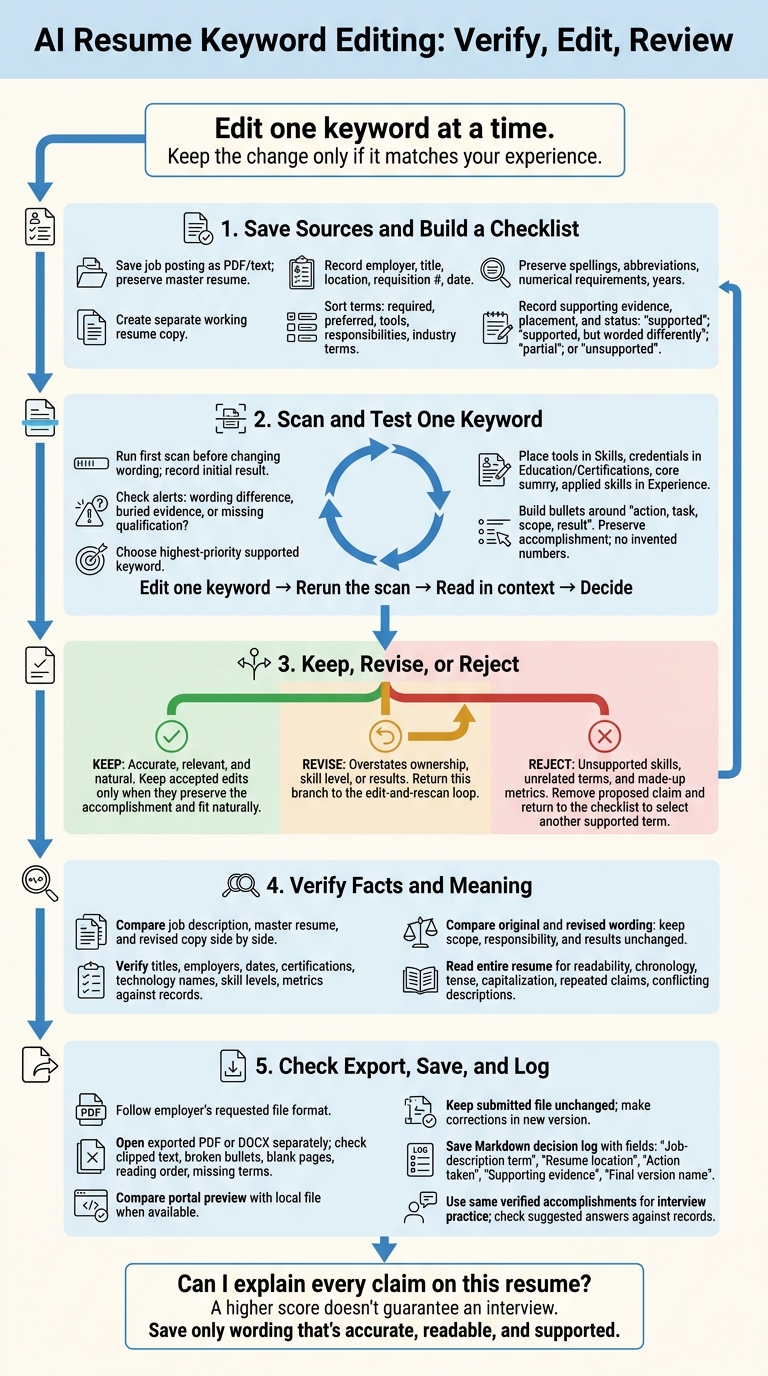
AI Resume Keyword Editing: Verify, Edit, Review
Check Job Requirements and Make a Working Copy
Gather the current job description, your master resume, and a resume editor with live keyword feedback. Keep the source files unchanged so the feedback stays useful. Save the posting as a PDF or text file before it changes or disappears. In your tracking log, record the employer, exact job title, location, requisition number, and date saved. Read all requirements and responsibilities - not just the title. This gives you a saved source to check every keyword decision against.
Keep your master resume read-only or in a separate folder. Create an application copy with your name, target role, employer, date, and Working in the filename. Load only this working copy and the saved job description into the editor.
Create a Job Keyword Checklist
Sort the posting’s terms into required qualifications, preferred qualifications, tools, responsibilities, and industry terms. Give repeated core duties priority, but don’t assume repetition makes something a requirement. Record exact spellings, abbreviations, and numerical requirements, including years of experience.
For each term, note the resume evidence that supports it, where you plan to place it, and its status: supported; supported, but worded differently; partial; or unsupported. Label partial experience clearly so it doesn’t suggest full expertise. The checklist links the employer’s wording to facts you can back up - not just words to squeeze into your resume.
Check the First Keyword Suggestions
Run the first scan before changing any wording. Check for missing exact terms, related phrases, and skills that are hard to find. Compare each alert with your checklist before editing. Does it flag a wording difference, buried evidence, or a qualification you don’t have?
Record the initial result and your decision for each suggestion. Exact-match scans can miss context, so check an alert before accepting it. Use those notes to choose your next edits.
sbb-itb-20a3bee
Edit Keywords and Check Updated Feedback
Use the updated scan to test each edit before moving to the next. Start with the highest-priority supported keyword on your checklist. Edit one keyword at a time, rerun the scan, and read the revised sentence in context.
Place Keywords Where Your Experience Supports Them
Add keywords only where your experience backs them up: tools in Skills, credentials in Education or Certifications, and core qualifications in the summary. Use Experience bullets to show how you applied each skill. Spread terms across relevant sections rather than repeating them in every bullet.
Build each bullet around action, task, scope, result, using details you can verify. Preserve the original accomplishment when adding a keyword. If you don't have a metric, describe the deliverable or outcome without inventing numbers. Make sure verbs like led or managed don't overstate your responsibility.
Once you've revised the wording, decide whether to keep the change.
Keep, Revise, or Reject Each Suggestion
Keep wording that's accurate, relevant, and natural. Revise suggestions that overstate ownership, skill level, or results. Reject unsupported skills, unrelated terms, and made-up metrics. Stop when the keyword fits naturally and preserves the accomplishment. A higher score isn't a reason to repeat it.
Describe supporting roles accurately, and reject keywords that suggest you did work you didn't perform.
After the wording passes this check, compare it with the job description and master resume before saving. This preparation ensures you are ready to master your interview once the application is submitted.
Review Changes Against the Job and Master Resume
Keep the job description, master resume, and revised copy side by side. Check each live-feedback edit against the job requirements and your records. Reject any claim you can’t verify, even if it sounds stronger.
Verify Claims and Keep Accomplishments
Check job titles, employers, employment dates, certifications and their status, technology names, and skill levels against your records. Verify metrics, percentages, dollar amounts, and time frames using project documents or performance reports. Treat your master resume as the source of truth, and keep revised details consistent with LinkedIn and other submitted materials.
For every number, identify the source, baseline, measurement period, and your personal contribution. Keep the accomplishment’s scope and outcome clear. If you can’t explain how a result was measured, remove the number or replace it with a description you can support.
Compare Original and Revised Wording
Once you’ve checked the facts, compare the original and revised wording line by line. The meaning should stay the same - not just the keywords.
- Keep the scope, responsibility, and results unchanged.
- Reject wording that adds unsupported claims.
Before saving, read the entire revised resume, including sections you didn’t edit. Check chronology, tense, capitalization, repeated claims, and conflicting skill descriptions. Read edited sentences aloud to catch awkward wording, and keep your strongest job-relevant accomplishments prominent.
If the revised copy passes these checks, save it in your saved version log and record the keyword decision.
Check and Save Each Tailored Resume
After your final edit, run one last export check before saving. Review grammar, punctuation, and US English spelling. Use standard headings, a single-column layout, and contact information in the header. Confirm that the employer, role, location, and application details match the posting.
Follow the employer’s requested file format. Open the exported PDF or DOCX in a separate viewer. Look for clipped text, broken bullets, blank pages, reading-order errors, and missing terms. If the application portal has a preview, compare it with your local file before submitting.
Name Versions and Log Keyword Decisions
Compare the final export with your master resume to confirm that every change was intentional. Save the export as a separate file. Include your name, role, employer, and the date in YYYY-MM-DD format in the filename. Add v02 for revised exports, and stick with one filename style. Leave the submitted file unchanged; make any corrections in a new version.
Once the export passes your checks, save a Markdown decision log alongside it. Record each keyword decision, the evidence behind it, and which changes remained after the final comparison. Use this log when preparing future versions.
| Job-description term | Resume location | Action taken | Supporting evidence | Final version name |
|---|---|---|---|---|
| Added | Section and bullet | Added | Experience supporting the addition | Exact saved filename |
| Revised | Section and bullet | Revised | Why the new wording remains accurate | Exact saved filename |
| Kept | Section and bullet | Retained | Why the original wording still fits the job | Exact saved filename |
| Rejected | Proposed location | Rejected | Missing evidence or relevance | Exact saved filename |
Use Verified Claims for Interview Practice
Use those same verified accomplishments for interview prep. Reviewing interview prep questions can help you connect your resume edits to verbal responses. Practice STAR answers in Acedit, and check every suggested response against your records before using it.
Conclusion: Save Only Accurate, Reviewed Edits
Keep only edits that fit the job, your records, and your actual experience. Use live feedback to check alignment, then verify each edit against the job posting and your master resume.
Before saving, read your resume once without the tool. Can you explain every skill you kept, what you contributed, and the evidence behind it? Remove unsupported terms and unclear wording. Save only wording that’s accurate, readable, and supported.
Cut any keyword edit you can’t verify - even if it improves your score.
FAQs
Do I need exact keywords or are synonyms enough?
Modern applicant tracking systems (ATS) are getting better at recognizing synonyms and related terms. But exact wording still matters. Use the language in the job description first, since recruiters and ATS filters give those terms priority.
Keep specific phrases unchanged, and use synonyms alongside your main keywords - not in place of them. Include both full terms and acronyms. Work keywords naturally into descriptions of your experience rather than listing them on their own.
How should I describe partial experience?
Turn your accomplishments into a clear story, not a task list. Use the STAR method - Situation, Task, Action, and Result - to describe the context, your responsibilities, what you did, and the outcome.
Show your transferable skills through examples of planning, coordination, and measurable results. Work relevant keywords from the job description into your wording naturally, and stay accurate about your contributions.
When should I stop optimizing my keyword score?
Stop editing when your resume sounds natural and professional and accurately reflects your experience. Aim to match at least 70% of the job description’s keywords instead of chasing a perfect score.
Keep keyword density around 2% to 3%, or roughly one keyword per 50 words. Natural wording matters more than keyword volume. Over-optimization can make your phrasing awkward and leave recruiters questioning your resume.