
I tested 8 resume tools on the same resume and the same job posts, and the result was simple: no single tool did everything well. If you want keyword matching, I’d look at Jobscan or SkillSyncer. If you want bullet edits, Resume Worded was stronger. If you apply to lots of roles each week, Teal made more sense because it ties scoring to a job tracker.
Here’s the short version:
- Best for ATS keyword checks: Jobscan
- Best for bullet-by-bullet writing feedback: Resume Worded
- Best for repeated tailoring across many job posts: Teal
- Best lower-cost ATS-first option: Rezi
- Best for template-led help: Kickresume
- Best for polished recruiter-style review: Enhancv
- Best for simple keyword category gaps: SkillSyncer
- Best for narrow ATS readability checks: ResumeSifu
I judged each tool on 6 points:
- score or match-rate quality
- wording feedback
- ATS formatting checks
- job-description matching depth
- U.S. pricing
- free-plan limits
That matters because a high score alone can mislead you. A tool can give you 90/100 and still push stiff wording or overdo keyword stuffing. In this test, the stronger picks were the ones that matched a clear job-search need, not the ones with the most features.
My main takeaway: pick by task.
If you need a last ATS pass, use Jobscan, Rezi, or Teal.
If you need sharper bullets, use Resume Worded or Enhancv.
If you need to tailor many resumes fast, use Teal or SkillSyncer.
Use Microsoft Copilot AI to Evaluate Your Resume and Land Your Dream Job
sbb-itb-20a3bee
Quick Comparison
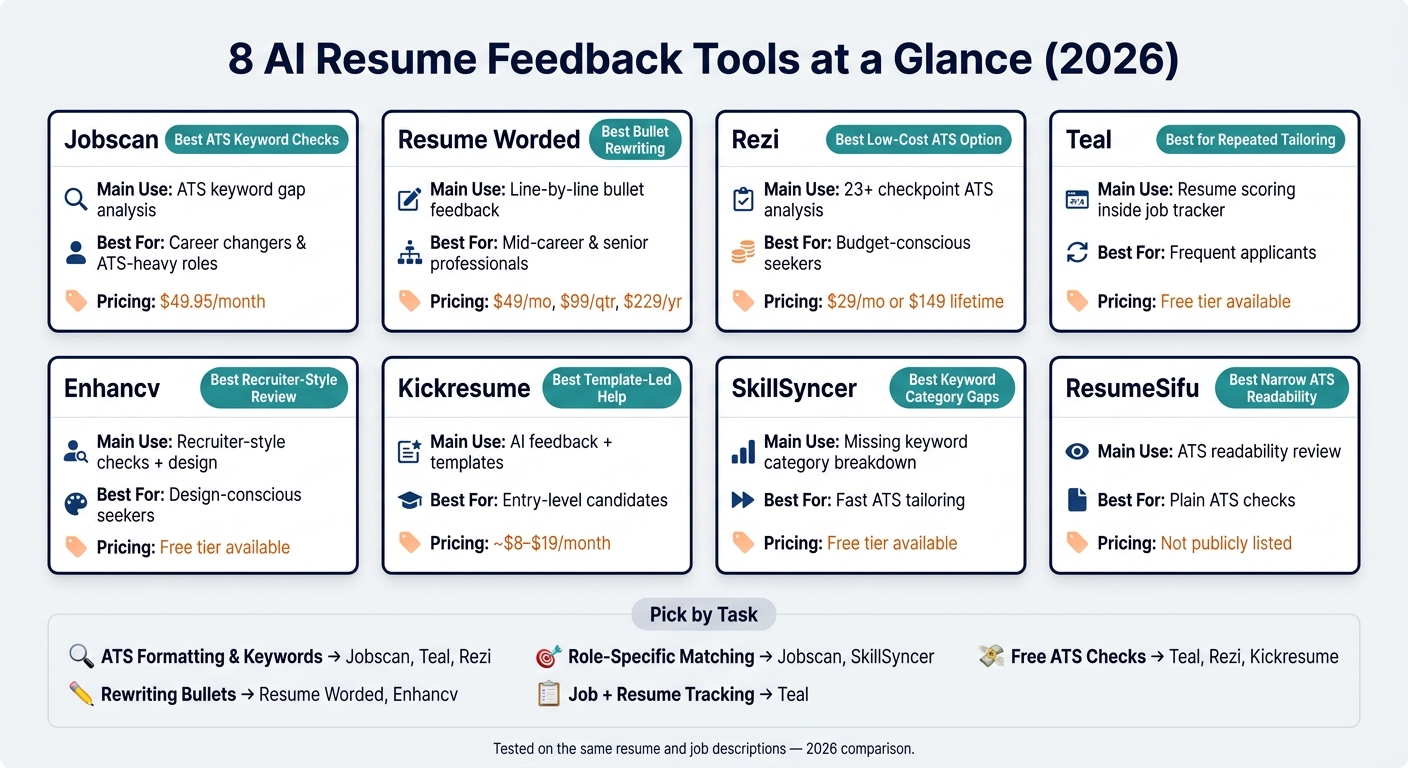
8 AI Resume Tools Compared: Features, Best For & Pricing (2026)
| Tool | Main Use | Best For | Pricing |
|---|---|---|---|
| Jobscan | Keyword gap checks | Career changers, ATS-heavy roles | $49.95/month |
| Resume Worded | Line-by-line bullet feedback | Mid-career and senior job seekers | $49/month, $99/quarter, $229/year |
| Rezi | ATS-first resume scans | Lower-cost seekers | $29/month or $149 lifetime |
| Teal | Resume scoring inside job tracking | Frequent applicants | Free tier available |
| Enhancv | Recruiter-style checks + design balance | People who want polish | Free tier available |
| Kickresume | AI feedback plus templates | Entry-level candidates | About $8–$19/month |
| SkillSyncer | Match score + missing keyword groups | Fast tailoring | Free tier available |
| ResumeSifu | ATS readability review | Plain ATS checks | Pricing not listed |
Beyond resumes, there are many ways to use AI in your job search to streamline your applications and interview prep.
Hands-on results for 8 tools
These results show how each tool handled the same resume and same job descriptions. That makes the differences easier to spot.
Jobscan and Resume Worded
Jobscan compares your resume to a job description at the keyword level. You paste in the job post, upload your resume, and it gives you an ATS match rate plus a list of missing keywords. It’s best when you want a fast keyword gap check. Pricing is $49.95/month or $89.95/quarter.
Resume Worded gives your resume a 0–100 score and reviews your bullet points line by line. It flags weak wording and places where your impact doesn’t come through. That makes it a strong pick for experienced professionals who need tighter, sharper bullets. Plans cost $49/month, $99/quarter, or $229/year.
The next set moves beyond simple scoring and leans more into ATS checks and workflow tools.
Rezi, Teal, and Enhancv
Rezi runs a 23+ checkpoint analysis with a clear ATS-first focus. It looks closely at readability and works well for job seekers who want a plain ATS check without story coaching or design help. If you need to practice your delivery, AI interview coaching can help refine your responses. Pricing starts at $29/month, with a $149 lifetime option.
Teal places its resume analyzer inside a job tracker. You save a job description, then Teal scores your resume against that specific posting. So instead of giving you one general score, it ties feedback to an actual role. That setup works well for frequent applicants juggling several applications at once. The free tier includes basic scoring, and Teal also handles ATS formatting for you.
Enhancv runs 27 distinct checks and presents the feedback in a recruiter-style format. It tries to balance ATS readability with design quality, which makes it a good fit for job seekers who want a polished resume that still reads cleanly in ATS systems.
The last group is lighter and more focused on simple keyword checks or template-led help.
Kickresume, SkillSyncer, and the 8th tool
Kickresume combines AI-driven recruiter-style feedback with a library of recruiter-vetted templates. The feedback is simple to follow, and paid plans range from about $8 to $19/month, depending on billing cycle. There’s also a free tier. It tends to work well for entry-level candidates and people who want a template-first workflow.
SkillSyncer gives you a 0–100 match score along with a breakdown of missing keyword categories. It stays focused on ATS matching and doesn’t add resume-building or design features. That makes it useful when you want a keyword audit without extra stuff getting in the way.
ResumeSifu was the eighth tool tested. It works as an AI-powered analyzer aimed at ATS readability and application performance. Like SkillSyncer, it stays narrow in scope and gives structured feedback on overall resume performance instead of design help or full resume building.
Use the table below for a fast side-by-side view.
| Tool | Primary Strength | Best For | Pricing |
|---|---|---|---|
| Jobscan | ATS keyword gap analysis | Career changers | $49.95/mo |
| Resume Worded | Line-by-line wording feedback | Experienced professionals | $49/mo |
| Rezi | 23+ checkpoint ATS analysis | Budget-conscious seekers | $29/mo or $149 lifetime |
| Teal | Match scoring inside job tracker | Frequent applicants | Freemium |
| Enhancv | Recruiter-style checks | Design-conscious seekers | Freemium |
| Kickresume | AI recruiter feedback + templates | Entry-level candidates | $8–$19/mo |
| SkillSyncer | Missing keyword category breakdown | ATS-heavy applications | Freemium |
| ResumeSifu | ATS and application performance analysis | General ATS optimization | Pricing not listed |
Where each tool did best
The fastest way to choose among the eight is to start with ATS fit, wording help, or workflow.
Best for ATS checks, keyword matching, and fast scoring
Jobscan stood out most for keyword matching. Paste in a job post, and it quickly gives you a match rate plus a list of missing keywords.
Teal and Rezi were the strongest ATS parsers in the group, so they make a solid last check before you apply.
ResumeSifu fits a very specific need: a plain ATS readability check without extra add-ons.
If two tools land close together here, the next thing to check is wording quality.
Best for rewriting bullets and improving clarity
The sharpest wording feedback came from Resume Worded. It reviewed bullets one by one and pointed out weak phrasing right where it showed up. Enhancv came next, with recruiter-style clarity checks across 27 criteria. Kickresume gave simpler AI rewrites that fit entry-level candidates well. Rezi and Teal offer some wording help too, but that’s more of a side feature than the main point.
Use the table below to line up the right tool with where you are in your job search.
Best by job seeker type
Pick based on your stage in the process, not on how many features a tool piles on.
| Job Seeker Type | Best Tool(s) | Why It Fits |
|---|---|---|
| First-time applicants | Kickresume, Rezi | Template-led workflow with guided ATS feedback |
| Career changers | Jobscan, Teal | Keyword gap analysis tied to specific job postings |
| Frequent tailors | Teal, SkillSyncer | Fast, repeatable scoring against multiple job descriptions |
| Budget-conscious seekers | Rezi, Teal, Kickresume | Freemium tiers with ATS formatting and role-tailoring |
| ATS-focused, no extras needed | Jobscan, SkillSyncer, ResumeSifu | Narrow tools built around ATS analysis and keyword matching |
Across the eight tools tested, dedicated resume analyzers kept producing more dependable ATS results than broad scoring tools. That means the best pick usually comes down to one simple thing: choose the analyzer that fits your point in the search.
How to pick the right tool for your job search
Use two filters next: budget and workflow.
Pick by budget, limits, and how often you use it
If you’re only sending a handful of applications, start with a free tier. That’s usually enough to test the tool, run a few scans, and make basic fixes without spending money.
If you’re applying a lot and need to tailor your resume again and again, a paid plan makes more sense. At that point, you’re not just paying for access. You’re paying to save time.
Pick by workflow: one-time fixes vs. repeated tailoring
Budget tells you what you can pay for. Workflow tells you what you’ll keep using.
One-time cleanup: You already have a solid resume and just want a quick ATS check before applying to a few roles. In that case, the free tiers from Rezi or Kickresume are often enough. Run the scan, fix what gets flagged, and move on. Once your resume is ready, you can also practice your interview skills with AI to prepare for the next stage.
Repeated tailoring: You’re applying to a lot of different roles every week. Now version tracking matters just as much as feedback. Teal works well here because it combines application management with resume scoring, so you can keep multiple resume versions organized right next to your job tracker.
Final takeaways from testing 8 AI resume feedback tools
After comparing scores, wording, and ATS checks across all eight tools, one thing stood out: the best pick depends on the job you need the tool to do. There wasn’t one option that nailed everything. Each tool had its own strong point.
For ATS checks and keyword matching, Jobscan did the best job spotting keyword gaps. Teal stood out for role-specific tracking, and Rezi worked well for ATS-first checkpointing.
For rewriting bullets and improving wording, Resume Worded gave the clearest line-by-line feedback. Enhancv leaned more toward recruiter-style polish. In practice, the strongest results came when you brought the metrics and let the tool tighten the phrasing.
For role-specific matching, Teal led on role-specific tracking, while Jobscan and SkillSyncer were the best picks for fast keyword-driven matching. Teal makes the most sense if you want scoring tied to a live job tracker.
So the takeaway is pretty simple: pick by task, not by feature count. This includes looking beyond the resume to create professional cover letters that match your new document.
| Your priority | Best pick |
|---|---|
| ATS formatting and keyword density | Jobscan, Teal, or Rezi |
| Rewriting bullets for clarity and impact | Resume Worded or Enhancv |
| Role-specific matching | Jobscan or SkillSyncer |
| Free ATS checks | Teal, Rezi, or Kickresume |
| Tracking jobs and resume versions | Teal |
FAQs
Which tool is best if I only need a quick ATS check?
For a quick ATS check, use Acedit. It helps you keep your resume clean and standard, and it flags keyword or structure problems that may trip up parsing.
It also nudges you toward a plain, easy-to-read resume layout, so ATS software can process it with fewer issues before you submit.
Should I prioritize keyword matching or bullet rewriting first?
Do both at the same time, not in separate steps. Use AI to spot job-description terms you’re missing, work your top 3–5 keywords into your summary, skills, and experience in a natural way, and rewrite your bullets so they focus on results and include metrics tied to those keywords.
Don’t force keywords in. Write for fit and readability, and aim to match about 70% of the target terms. Then run an ATS check to make sure your formatting is clean and your keyword use doesn’t hurt parsing.
How many resume tools do I actually need?
You don’t need to stress over using some set number of tools. What matters is having a simple workflow that helps you tune your resume for ATS and match it to each job description.
A good tool should help you spot key skills, keep your formatting ATS-friendly, and show a clear, professional story across your application materials.