
Your LinkedIn profile is easier to judge when it shows proof, not just claims. If recruiters spend 30 seconds or less on a first review, media like videos, PDFs, slide decks, images, and work links can help them see your results fast.
Here’s the short version:
- Text alone blends in when many profiles use the same job titles and bullet points.
- Media shows proof of your work, results, and communication style.
- Best formats include videos, presentations, documents, images, and links.
- Best placement is usually:
- Featured for top proof
- Experience for role-specific proof
- Education for capstones, demos, or student work
- Best approach: add 3 to 5 job-focused assets, lead with your strongest piece, and write short descriptions tied to outcomes.
A few numbers stand out: portfolio media has been linked to up to 384% more profile views and 888% more impressions, and 86% of recruiters and hiring managers review profiles in 30 seconds or less. That means your profile needs to make its point fast.
In plain English: if you want your profile to stand out, I’d show samples that back up your claims, keep them easy to scan, and put the strongest proof near the top.
How to Add Media to Your LinkedIn Profile (Step-by-Step Tutorial)
sbb-itb-20a3bee
Why Text-Only Profiles Are Harder to Evaluate
Recruiters move fast through packed LinkedIn search results, and text-only profiles tend to blur together. If dozens of people use the same job titles, the same headline style, and the same bullet-point language, it gets tough to spot who stands out and who just sounds the part.
When every profile follows the same formula - headline, summary, job titles, and bullets - recruiters are left looking for proof, not just polished wording. That sameness makes it harder to separate strong candidates from average ones.
Claims Without Proof Are Less Persuasive
Phrases like "led cross-functional projects", "improved sales performance", or "drove key initiatives" show up on a lot of profiles. By themselves, they don't say much. Recruiters see those lines so often that they start to fade into the background instead of acting as clear signals.
A marketing manager saying they improved ROI sounds a lot more convincing when a slide deck shows the ad creatives, the budget, and the results. In plain English: examples do some of the heavy lifting. Portfolio pieces can carry more weight during candidate review.
Text Alone Misses Context and Personality
Written summaries also have a hard time showing scale. "Managed a team" could mean 3 interns or 40 engineers. "Led a product launch" could mean a small internal tool or a company-wide rollout. Text often leaves out those details, which makes it harder for hiring managers to line up your past work with what their own team needs.
The gap gets even bigger in leadership, sales, design, marketing, training, and public speaking roles. Those jobs depend a lot on how someone communicates - their tone, clarity, presence, and their ability to connect with people. A written "About" section can't show that. A short webinar clip, recorded presentation, or conference presentation can show communication style and clarity before the live interview. In cases like that, format matters just as much as the words on the page.
How Multimedia Builds Credibility and Keeps Attention
Media Turns Experience Into Proof
When proof sits right on your profile, trust comes faster and scanning gets easier. A slide deck attached to a marketing role can show ad creatives, before-and-after performance charts, and the thinking behind the results. A product manager can pin a video walkthrough of a shipped feature next to a linked PRD. That changes the whole feel of a profile. You're showing the work, not just saying you did it.
Place media in Featured, Experience, About, and Education. Featured works like a highlight reel near the top of the profile. Media in Experience connects proof to each role. Education is a smart spot for capstones, demos, or other proof if your work history is still light.
Media Helps Recruiters Scan Faster
Research on LinkedIn screening behavior shows that 86% of recruiters and hiring managers spend 30 seconds or less on initial profile reviews. That's not much time. In that short window, visuals can do what a long paragraph can't.
Eye-tracking studies on recruiter behavior show they tend to scan in an F-pattern or Z-pattern, with attention pulled toward the top of the page and visually distinct elements. So placement matters. Put your strongest asset first.
A clear case study thumbnail with a title like B2B Demand Gen Campaign: +48% Qualified Pipeline in Q2 tells a recruiter the role, scope, and result almost instantly, often before they click anything.
A few small choices can make that media work harder:
- Put the strongest asset first in Featured
- Keep thumbnails clean and easy to read
- Make each file name and description about results, not just tasks
Those same assets can also help you move faster when it's time to interview.
Media Can Help with Interview Prep
The case studies, decks, and project snapshots on your profile become a built-in reference point for behavioral interview questions. If you review your own media before a call, it's much easier to pull up exact metrics, timelines, and stakeholder details. Your answers sound sharper because they're tied to specific proof.
Acedit can use this profile context to generate more relevant interview questions and practice prompts. The more substance your profile gives it, the more personalized the coaching can be.
Next, choose the formats that fit your role.
The Best Multimedia Types to Add to a LinkedIn Profile
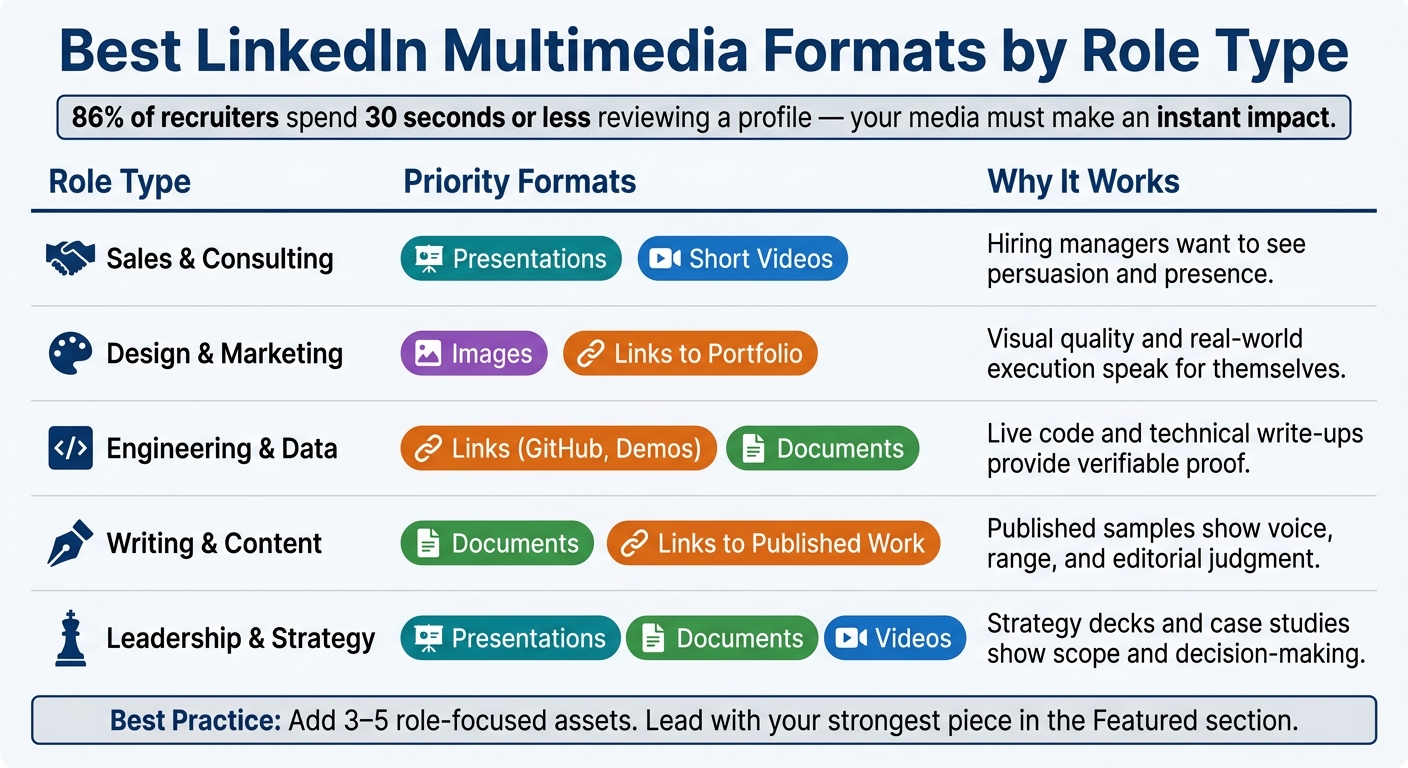
Best LinkedIn Multimedia Formats by Role Type
Choose formats that show your work, not just describe it. LinkedIn profiles tend to perform best with five asset types: videos, presentations, documents, images, and links.
Videos and Presentations for Communication and Expertise
A 30- to 90-second video lets people see how you communicate. That makes it a strong fit for client-facing, sales, leadership, and teaching roles. For example, a sales professional can share a short clip walking through a pitch structure. That shows tone, clarity, and confidence instead of merely saying, “I’m good at sales.”
Presentations reveal how you think. A strategy deck with clear U.S. market segments and revenue targets, or a product roadmap with milestones and decision logic, gives recruiters proof that you can sort through messy ideas and explain them to other people. Keep decks to 10–15 slides and put outcomes first, not process.
If your work is easier to judge in another format, use written, visual, or link-based assets instead.
Documents, Images, and Links for Work Samples
Documents make sense when depth matters. A one-page case study with a simple structure - context, your role, actions taken, measurable result - how Acedit uses LinkedIn data to help you highlight these achievements gives a recruiter something solid to review. Analysts can share redacted reports or executive summaries with key charts. Writers can group published pieces into one PDF. Project managers can upload postmortems or status reports. In each case, put the result at the top so someone skimming can get the point fast.
Images are best when the output is visual by nature: UI screens, marketing banners, data dashboards, or before-and-after process diagrams. Add a short caption to each image that explains the goal and the outcome, not just which tool you used.
Links add one more layer by sending recruiters to live work they can check for themselves: a GitHub repo, a published article, a live product, or a portfolio site. Those pages need to stay live and up to date. Broken links damage trust.
How to Pick the Right Format for Your Role
Match the format to the skill a recruiter needs to confirm. Here’s a simple guide:
| Role Type | Priority Formats | Why It Works |
|---|---|---|
| Sales & consulting | Presentations, short videos | Hiring managers want to see persuasion and presence |
| Design & marketing | Images, links to portfolio | Visual quality and real-world execution speak for themselves |
| Engineering & data | Links (GitHub, demos), documents | Live code and technical write-ups provide verifiable proof |
| Writing & content | Documents, links to published work | Published samples show voice, range, and editorial judgment |
| Leadership & strategy | Presentations, documents, videos | Strategy decks and case studies show scope and decision-making |
A good rule of thumb is to pick 3 to 5 assets that back up the metrics your role cares about most. Then use supporting media under each Experience and Education entry to support the claims you make there.
Where to Place Multimedia and How to Keep It Focused
Once you know which formats fit your role, placement shapes what recruiters notice first.
Use Featured for Your Strongest Work Near the Top
Use Featured for your strongest proof. Keep this section tight and selective. A portfolio piece, a signature presentation, a short intro video, or a case study with clear results can all work well here.
Aim for 3–8 assets, with your strongest piece first. Give each item a clear title and a 1–3 sentence description that shows what the viewer is looking at and why it matters.
Use Experience and Education for proof tied to specific entries.
Add Supporting Media to Experience and Education
Once your Featured section is in place, add media to individual Experience entries to back up specific claims. If a bullet says you improved reporting speed by 60%, attach the deck or technical note that shows the before-and-after workflow. That makes the claim feel concrete, not just stated.
Match each asset to one claim. For Education, use one asset per degree or certificate, which can help a lot if you're early in your career or making a career change.
Featured should show your best work. Experience should back up role-specific claims.
Keep Every Asset Relevant and Job-Focused
Placement works best when each asset supports the same career story.
Only add assets that support the roles you want next. No matter where an asset appears, it needs three things:
- a clear title
- a short, outcome-focused description
- a direct link to your career story
If an asset doesn't help your case in a clear way, cut it. Acedit can surface the projects and stories that matter most, helping you decide what belongs in Featured and what fits better under Experience.
FAQs
What if I don’t have portfolio samples?
You can still show what you know by turning problem-solving projects into short case studies with the PSER framework: Problem, Solution, Execution, and Results.
The idea is simple. Start with the problem you faced. Then explain the fix, how you carried it out, and what happened after. Keep the spotlight on your role and any measurable results. That could mean time saved, costs cut, output improved, or a clear business win.
You can also make video presentations that walk people through your workflow, key milestones, and the roadblocks you had to deal with. This gives viewers a clearer sense of how you think and how you work.
AI tools can help here too. They can surface relevant past work and help polish the design of your visuals so your presentation looks clean and easy to follow.
Can multimedia hurt my LinkedIn profile?
No. Adding multimedia usually helps because it makes your profile more engaging and easier to remember.
When your media is up to date, it can lead to more profile views and more messages. Videos, work samples, and portfolio pieces also give people a better sense of your professional style and personality.
Acedit can help you fine-tune how these elements fit into your LinkedIn presence.
How often should I update my media?
Keep your portfolio and media up to date so they show your latest work and how your skills have grown. A good rule of thumb is to feature projects from the last three to five years. That helps your professional identity feel current instead of stuck in the past.
It also helps to review your keyword strategy every quarter so it lines up with shifts in your industry. And if you use AI tools trained on your past work, update that training data from time to time as your style changes.