
Most AI career tools do one job well, not every job at once. If I need direction, I look at career-pathway tools. If I need to find missing skills, I use skill-path tools. If I care about pay, I check salary-path tools. If I’m applying now, job-matching tools help. And if the interview is close, interview simulators matter most.
Here’s the short answer:
- Career-pathway simulators help map next roles over time
- Skill-path simulators show skill gaps for a target role
- Salary-path tools compare pay by role, level, and location
- Job-matching tools connect my profile to open jobs
- Interview simulators help me practice and respond better in live interviews
A big point runs through all five categories: AI output is directional, not guaranteed. Results depend on my inputs, the job market, and local pay data. So if a tool shows a path to a role paying $120,000+, I still need to check that against current listings and salary reports in my area.
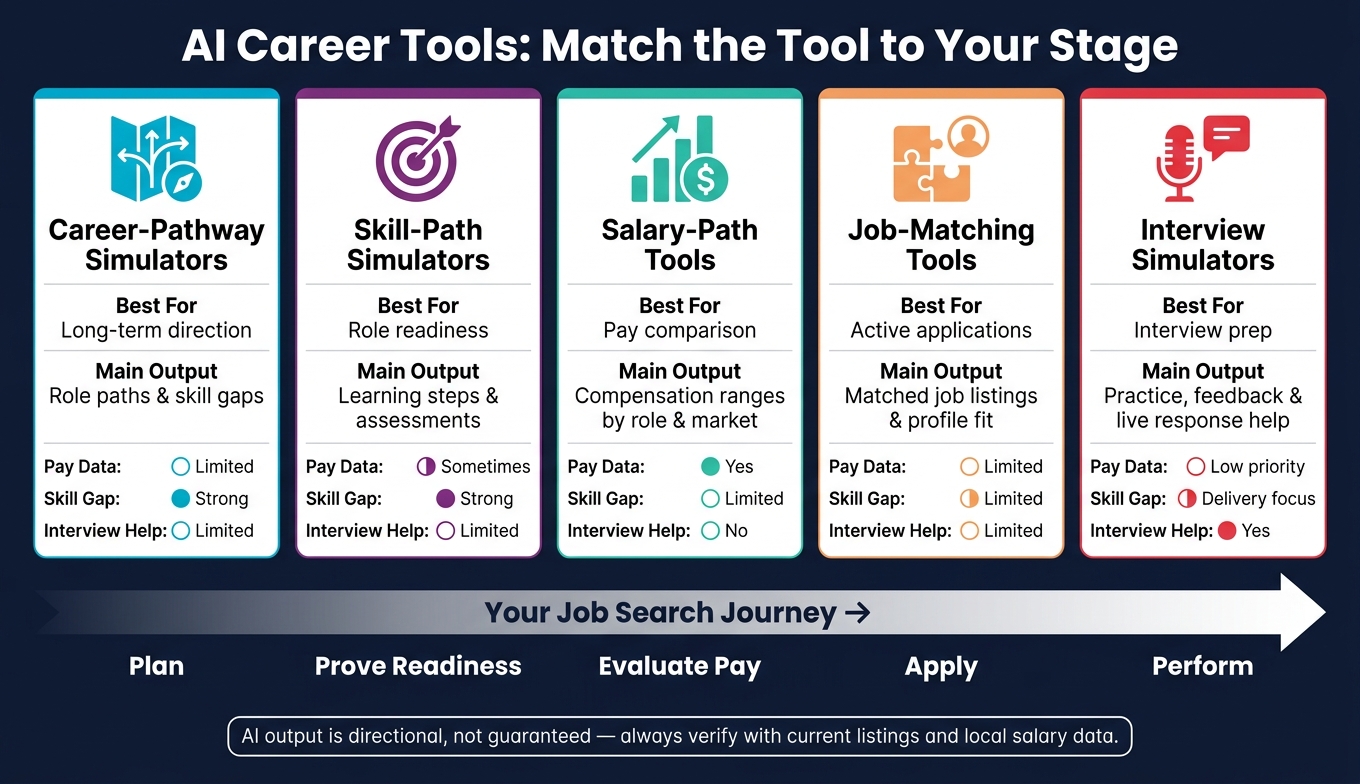
AI Career Tool Comparison: Match the Tool to Your Stage
This AI Tool That Maps Your Entire Career Journey | High school student project
sbb-itb-20a3bee
Quick Comparison
| Tool Type | Best For | Main Output | Pay Data | Interview Help |
|---|---|---|---|---|
| Career-pathway simulators | Long-term direction | Role paths and skill gaps | Limited | Limited |
| Skill-path simulators | Role readiness | Learning steps and assessments | Sometimes | Limited |
| Salary-path tools | Pay comparison | Compensation ranges by role and market | Yes | No |
| Job-matching tools | Active applications | Matched job listings and profile fit | Limited | Limited |
| Interview simulators | Interview prep | Practice, feedback, and live response help | Low priority | Yes |
If I had to reduce the whole article to one idea, it would be this: match the tool to the stage. Plan first, check skill gaps next, compare pay before a move, apply to roles that fit, then practice for the interview.
1. Career-Pathway Simulators
Career-pathway simulators map likely future roles based on your current profile.
Scenario Planning
These tools look at your skills, interests, and past experience, then map out roles that may fit where you are now. Think of it like a career GPS: you start with your current position, and the tool shows a few possible routes ahead.
Skill-Gap Modeling
They also show the gap between your current profile and the role you want. That makes it easier to see what’s missing instead of guessing.
Execution Links
Many pathway simulators don’t stop at planning. They often include automated resume builders, cover letter generators, and LinkedIn profile tools so you can move from ideas to job search tasks without bouncing between platforms.
For interview prep, Acedit adds real-time coaching and practice simulations.
If the target role is clear, the next step is figuring out which skills you need to close the gap.
2. Skill-Path Simulators
If career-path tools show the destination, skill-path tools show the fastest route. Career-pathway simulators help you see where you could go. Skill-path simulators focus on what you need to do to get there.
They compare your current profile with a target role and point out the gaps between the skills you have now and the skills the next job calls for.
Scenario Planning
These tools build personal development paths based on your current skills, interests, and experience.
Skill-Gap Modeling
This is where skill-path simulators do their best work. Some platforms use assessments to spot gaps in coding, SQL, Excel, and even video-based soft-skill assessments.
Execution Links
Skill-path simulators connect gap analysis with job-search tools, such as:
- resume building
- LinkedIn optimization
- job matching based on your target role
For AI interview preparation vs traditional methods, Acedit adds real-time coaching and response suggestions.
Salary Visibility
Not every skill-path tool includes pay data. In most cases, salary information comes second in these tools. If pay matters more than skills, salary-path tools are the next comparison.
3. Salary-Path Tools
Salary-path tools show how pay shifts by role, level, location, and experience. Unlike planning tools or skill tools, they stay focused on one thing: compensation outcomes.
Scenario Planning
These tools map salary outcomes across roles, seniority levels, and markets.
That makes it easier to compare paths side by side. A move into a new role, a step up in seniority, or a switch to a different market can all change what someone might earn.
Skill-Gap Modeling
They also show how added skills or certifications can affect earning potential.
In plain terms, they help connect skill-building with pay. If someone is weighing whether a course or certification is worth the time, this kind of modeling gives them a clearer picture of the possible upside.
Salary Visibility
Salary visibility matters most when it shows pay by role, location, and seniority.
Anything less can feel too broad to be useful. People usually want to know what pay looks like for their kind of job, in their market, at their level.
Execution Links
When pay data points to a target role, the next step is interview prep. For interview prep, Acedit adds real-time question detection and personalized response suggestions.
4. Job-Matching Tools
After salary analysis, job-matching tools show where your profile fits right now.
They compare your background to open roles and bring forward the jobs that line up best. Unlike pathway or skill tools, these tools sit between skill-gap analysis and interview readiness. The focus here is simple: execution, not long-range career planning.
Scenario Planning and Skill-Gap Modeling
These tools turn your profile into a short list of target roles, then point to the next steps. At the same time, they flag the skills you still need before you qualify.
That mix matters. It keeps your attention on fit and readiness instead of sending you into broad career exploration. Put plainly, they help answer two direct questions: Which jobs make sense for me now? And what am I missing to land one?
Salary Visibility
Salary data is not a core feature in this category.
Execution Links
These tools can also pull in LinkedIn profile data to improve matching and support interview prep. Acedit closes the loop with real-time interview question analysis, personalized response suggestions, and LinkedIn profile integration.
Once a role match is clear, the next step is interview preparation and response practice.
5. Interview Simulators and Coaching Tools
Interview simulators and coaching tools come into play at the execution stage of a job search. Once you’ve picked a target role or you’re in an active application, the job changes. It’s no longer about finding options. It’s about getting ready and performing well.
These tools help you practice, sharpen your answers, and stay steady when the pressure kicks in. From role fit to the live interview itself, this category is all about one thing: can you deliver when it counts?
Scenario Planning
In this category, scenario planning means practicing likely interview situations before the real interview happens. Acedit offers AI-simulated practice interviews that adjust to the job description you provide, so the practice stays tied to the role you want.
Skill-Gap Modeling
Here, the gap isn’t about credentials on paper. It’s about response quality: clarity, structure, and delivery. Acedit helps spot weak areas in your answers and turns your experience into custom STAR (Situation, Task, Action, Result) examples. Its LinkedIn profile integration also helps keep those examples in line with your background and the target role.
Salary Visibility
Salary visibility matters less here than it does in pay-focused tools, although interview simulators can still help you practice salary negotiation. The main goal in this category is interview readiness.
Execution Links
This is where Acedit shifts into a real-time coaching layer. As a Chrome extension, it can detect questions during live or practice sessions and show AI-generated response suggestions.
The next section compares how each tool type handles planning, skills, pay, and job readiness.
Feature Comparison: Planning, Skills, Pay, and Job Readiness
Now that each category is defined, it’s easier to see where the biggest differences show up.
The main gaps come down to planning depth, skill-gap insight, salary visibility, job links, and interview prep. Some tools help you think long term. Others are built for the next step right in front of you.
Scenario Planning
Career-pathway simulators stand out most in scenario planning. They build personalized development pathways based on your current skills, interests, and experience. That gives you a longer-view map of where you could go next.
Interview simulators like Acedit don’t handle career-path planning. They stay focused on the role you’re trying to land. You bring in a job listing, and the tool helps you get ready for that interview.
| Tool Category | Scenario Planning Role | Output Type |
|---|---|---|
| Career-Pathway Simulators | Strong | Personalized development pathways |
| Skill-Path Simulators | Narrow | Focused learning steps |
| Salary-Path Tools | Narrow | Pay visibility |
| Job-Matching Tools | Limited | Job-match links and role suggestions |
| Interview Simulators | Role-specific | Interview practice and real-time support |
Skill-Gap Modeling
When the focus is skills, career-pathway simulators are ahead. They look at your current profile, spot where you need to grow, and turn that into a development plan.
Skill-path simulators take a tighter approach. Instead of mapping your whole career, they focus on a specific learning path tied to a target skill area.
Interview simulators work differently. They’re not built to find credential gaps. Their job is to help you present the skills you already have in a clearer way. That handoff matters. Once gaps are known, the next step is often AI-driven interview practice. Acedit supports that shift with LinkedIn profile integration, which helps keep responses tied to your background and the target role.
| Tool Category | Skill-Gap Focus | Typical Output |
|---|---|---|
| Career-Pathway Simulators | Identifying growth areas | Development plan |
| Skill-Path Simulators | Focused learning path | Targeted learning steps |
| Salary-Path Tools | Limited | Compensation context |
| Job-Matching Tools | Limited role-fit signals | Broader suggestions |
| Interview Simulators | Presenting existing skills | Practice questions and feedback |
Salary Visibility
For pay, salary-path tools are the clear leader. Their main job is to show compensation data, while the other categories treat pay as a secondary detail.
Job-Search Links
Execution is where job-matching tools and interview simulators split apart.
Job-matching tools connect you to open roles and line up your profile with live opportunities. Interview simulators pick up later in the process, shifting from matching to live interview support. Acedit detects questions in real time and surfaces AI-generated response suggestions during live interviews.
| Tool Category | Job-Match Links | Interview Practice | Real-Time Coaching |
|---|---|---|---|
| Career-Pathway Simulators | Limited | Limited | No |
| Skill-Path Simulators | Limited | Limited | No |
| Salary-Path Tools | No | No | No |
| Job-Matching Tools | Yes | Limited | No |
| Interview Simulators | Limited | Yes | Yes |
These tradeoffs lead into the pros and cons of each tool category.
Pros and Cons by Tool Category
The table below shows where each tool type shines, where it falls short, and the stage where it tends to help most.
| Tool Type | Main Strengths | Main Drawbacks | Best Use Case | When to Combine |
|---|---|---|---|---|
| Career-Pathway Simulators | Personalized long-term development; maps skills to future roles | Lacks immediate job-seeking tools like resumes and interviews | Long-term career planning and skill mapping; early-stage exploration or mid-career pivots | Use with interview simulators |
| Skill-Path Simulators | Validates technical and soft skills; identifies specific gaps | Often built for employers, not job seekers; does not typically assist with salary negotiation or career-path forecasting | Verifying readiness for a specific technical role or promotion | Use with job-matching tools |
| Salary-Path Tools | Clear financial visibility; helps weigh the ROI of career moves | No skill-building or interview prep | Comparing career trajectories or preparing for salary negotiation | Use with career-pathway tools |
| Job-Matching Tools | ATS-ready resumes; cover letter support; LinkedIn optimization; job matching | High match counts do not guarantee interviews | Active job seekers scaling up applications | Use with interview simulators |
| Interview Simulators / Coaching (e.g., Acedit) | Real-time interview assistance; LinkedIn profile integration; STAR method support; practice tied to a target role; feedback on delivery | Execution-focused only; no career-path simulation or salary forecasting | High-stakes interviews and late-stage job search | Use with salary-path tools |
A simple way to think about it: some tools help you plan, some help you prove fit, and others help you perform.
Career-pathway simulators are best when you're trying to figure out where to go next. They help with long-range planning, especially if you're early in your career or thinking about a pivot. The trade-off is simple: they won't do much when you need a resume, interview prep, or fast application support.
Skill-path simulators are more narrow. They check whether your current skills line up with a target role or promotion. That's useful if you want a reality check on readiness. But many of these tools are built with employers in mind, so they often stop short of helping with things like pay discussions or longer-term career direction.
Salary-path tools answer a different question: Is this move worth it financially? They give you a clearer view of earnings across paths, which can help when you're comparing roles or getting ready for salary negotiation. What they don't do is help you build missing skills or get through interviews.
Job-matching tools are built for speed. If you're sending out a lot of applications, tools that support ATS-ready resumes, cover letters, LinkedIn optimization, and matching can save time. Still, a high match score doesn't mean an interview is coming. That's why they tend to work better when paired with interview prep.
Interview simulators and coaching tools like Acedit come into play later in the process. They're geared toward execution: handling high-pressure interviews, practicing with interview questions and answers for a target role, using the STAR method, and getting feedback on how you come across. They can be a big help when the stakes are high, but they don't map career paths or estimate future pay.
If you're trying to pick the right setup, the pattern is pretty clear:
- Use career-pathway tools when you need direction
- Use skill-path tools when you need proof of readiness
- Use salary-path tools when money is part of the decision
- Use job-matching tools when you're applying at scale
- Use interview simulators when it's time to perform under pressure
In practice, the best mix usually comes from pairing tools that solve different problems. A planning tool won't fix a weak interview. And an interview coach won't tell you whether a new role makes sense over the next five years.
Conclusion
After looking at planning, skills, pay, job matching, and interview prep, the answer depends on where you are right now. There isn't one tool that does everything. Each type helps with a different part of the job search.
If you're still trying to figure out your direction, career-pathway simulators are the best place to start. Once you know the role you want, skill-path simulators can show what's missing. Before you make a change, salary-path tools help you compare pay across different paths. When it's time to look for open roles, job-matching tools connect you with active listings. And when the interview is on the calendar, interview simulators and coaching tools like Acedit can give you live support when it matters most.
Here's the short version: use career-pathway tools for direction, skill-path tools for gaps, salary-path tools for pay, job-matching tools for open roles, and interview simulators for final prep.
The simplest way to use them is to match each tool to your stage, then move to the next one as your search moves forward.
FAQs
Which AI career tool should I start with?
If you're actively job hunting, getting ready for interviews, or planning a career move, start with Acedit. It's built to help you handle interviews with more confidence and make the application process less of a grind.
Install the Chrome extension and connect your LinkedIn profile to get more tailored support, including real-time interview coaching, AI-generated response suggestions, and mock interviews shaped around your background.
Can I use more than one tool together?
Yes. You can use Acedit alongside other career management tools as part of a more complete workflow.
Acedit pulls key details from your LinkedIn profile, resume, and target job descriptions into one place. That means less manual copying and pasting between tools. On top of that, it adds real-time interview coaching and AI-driven response suggestions.
How accurate are AI salary and career path predictions?
AI salary and career path predictions can help you spot trends, growth areas, and pay ranges.
That said, they’re only as good as the data and models behind them.
They’re not foolproof. If the source data is biased or the model spits out shaky results, the output can point you in the wrong direction. So it’s smart to treat these predictions as an informed starting point, not a final answer.
Use them to get your bearings, then check what you find against your own research and judgment.