If access is your main concern, AI tools often make practice easier to start, while human-led prep often works better when you need live help.
I’d sum it up like this: AI tools usually help with timing, privacy, written feedback, captions, and repeat practice. Human-led prep usually helps more with live changes, interpreters, and step-by-step support during the session. That matters because 26.2% of disabled candidates say interviewing is extremely challenging, and 31.2% say asking for accommodations is extremely challenging.
If I were choosing between AI and traditional prep, I’d look at six things first:
- Visual access: screen readers, keyboard use, magnification, contrast
- Hearing access: captions, transcripts, written summaries, interpreter support
- Mobility and dexterity: low physical effort, keyboard-only use, voice control
- Speech access: typed responses, no live speaking, self-paced sessions
- Cognitive load: simple layout, clear steps, pacing control, repeat use
- Situational limits: noise, privacy, transport, and internet issues
The short answer: AI tools fit best when you need independence and flexible timing. Human-led prep fits best when you need live adjustment and person-to-person support. In many cases, the best choice is a mix.
Quick Comparison
| Criteria | AI tools for interview prep | Human-Led Methods |
|---|---|---|
| Timing | 24/7, self-paced | Fixed sessions |
| Captions and transcripts | Often built in | Often requested ahead of time |
| Screen reader use | Works if the tool is built well | Depends on files and provider |
| Speech-free practice | Often possible by typing | Less common unless planned |
| Privacy | More private practice | May require disclosing needs |
| Live support | Limited | Strong |
| Interpreter use | Limited in many tools | Easier to set up |
| Physical barriers | Low for remote use | Can include travel and site access issues |
| Internet/device needs | High | Varies |
Bottom line: I wouldn’t pick based on what sounds better. I’d pick based on what you can use consistently, with the least friction, using the tools and timing that work for you.
sbb-itb-20a3bee
How AI Feedback Tools Support Accessibility
AI interview preparation cuts out two common headaches before practice even begins: travel and scheduling. For candidates dealing with chronic illness, changing energy levels, or transportation issues, that can make steady practice much more doable. This matters most when the goal is self-paced practice with as little friction as possible.
Text-Based Practice, Captions, and Pacing Control
A lot of AI tools show questions and feedback in text. Many also include captions or transcripts. That supports screen readers, magnifiers, and text-to-speech. Candidates who are Deaf or hard of hearing can follow prompts and review feedback without depending on lip-reading or needing an interpreter for each practice session. On top of that, repeatable prompts and pause-and-resume pacing can ease cognitive load. In practice, these features tend to help most with visual, hearing, and speech access needs.
Independent Access and Fewer Scheduling Barriers
Someone can open a practice session at 11:00 p.m. during a low-energy window, answer three questions, and stop when they need to. That kind of freedom is tough to match with scheduled coaching.
Acedit, an AI-powered Chrome extension, shows how this can work day to day. Its browser-based, on-demand access and custom Q&A generation let candidates build a practice set for a specific role and work through it on their own schedule. They can revisit questions, tighten up answers, and keep practicing without booking a session or waiting for feedback. Because it runs in the browser and connects with platforms like LinkedIn, it also cuts down on context switching. For users with attention or motor-related challenges, that small detail can make a big difference.
Traditional methods handle accessibility in other ways, and that becomes easier to see in the side-by-side comparison.
How Traditional Interview Preparation Supports Accessibility
Traditional interview prep - mock interviews with a coach, written question lists, structured practice, and manual feedback - can support accessibility when accommodations are set up ahead of time.
What Human-Led Preparation Does Well for Accessibility
A skilled coach can spot confusion and respond on the spot. For example, they might take a question about agreement across teams and break it into smaller, plainer steps. That kind of live adjustment helps candidates who need simpler language or a more step-by-step approach.
Shorter sessions and planned breaks also help people deal with chronic illness, anxiety, or fatigue. A coach can repeat questions, pause when needed, and switch to more concrete prompts if a candidate needs less mental strain.
Human-led prep can also include interpreters, written summaries, and practice with interpreter timing. When coaches offer these supports up front, the process can feel far easier to use.
Common Access Barriers in Manual Prep
When accommodations aren't planned in advance, traditional prep can create real barriers. Inaccessible documents - including scanned PDFs, image-based files, and small print - can shut out candidates who rely on screen readers or other assistive technology. Mock interview recordings without captions or transcripts can also exclude Deaf and hard-of-hearing candidates from reviewing their practice sessions.
Transportation and physical access are also common problems for in-person coaching. Locations without ramps, elevators, or accessible restrooms can make attendance hard or impossible for candidates with mobility disabilities. Fixed appointment windows, especially during standard business hours, can also clash with medical appointments, personal care routines, or energy patterns linked to chronic conditions.
Feedback quality can vary a lot too. Some coaches give specific, structured notes. Others offer vague comments, such as telling a candidate to be more confident, which is hard to turn into action.
These trade-offs stand out more clearly in the side-by-side comparison below. The next section compares these methods side by side across the same accessibility needs.
AI Feedback Tools vs. Traditional Methods: Accessibility Comparison
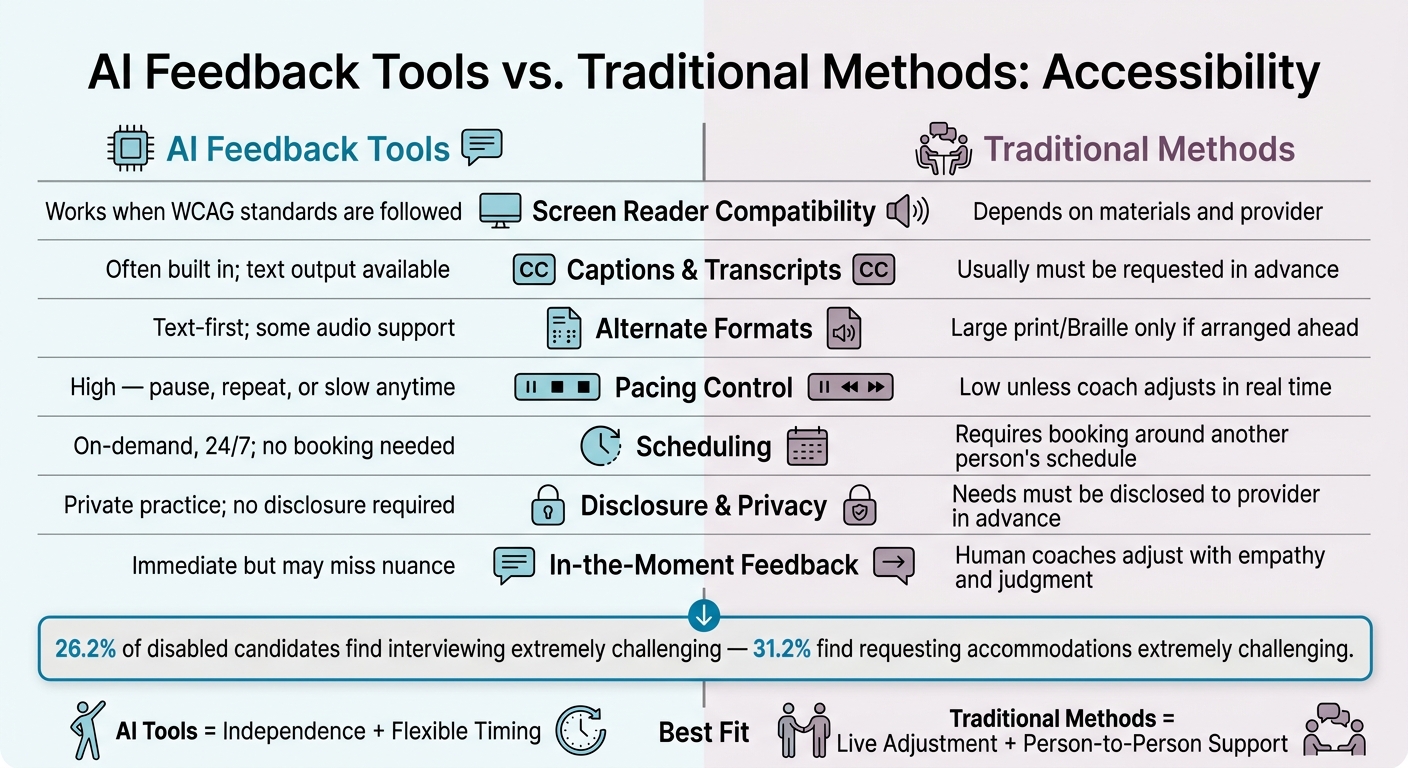
AI Feedback Tools vs. Traditional Methods: Accessibility Comparison
Side-by-Side Accessibility Criteria
The biggest differences show up in daily use, not on a feature checklist.
| Criterion | AI Feedback Tools | Traditional Methods |
|---|---|---|
| Screen reader compatibility | Works when the product follows WCAG standards | Depends on the materials and the provider |
| Captions and transcripts | Often built in; some tools provide text output and transcripts | Usually needs to be requested ahead of time |
| Alternate formats | Usually text-first, with audio support in some tools | Large print, Braille, or recorded audio are often only available if arranged in advance |
| Pacing control | High - users can pause, repeat, or slow content anytime | Low unless the coach adjusts in real time |
| Coordination and scheduling | On-demand, 24/7; no booking or human coordination needed | Requires booking and working around another person’s schedule |
| Disclosure and privacy | Practice stays private, but platform data policies still matter; no disclosure to another person required | Accommodation needs must be requested in advance and disclosed to the provider |
| In-the-moment feedback | Immediate and automated, though it may miss nuance or context | Human coaches can adjust in real time with empathy and judgment |
That said, neither option is a perfect fit. Access can still break down if a tool doesn’t work well with a device, or if a person needs live support that software can’t give.
Where Each Method Falls Short
AI tools are not open to everyone by default. Their main limit is technical dependence: users need a compatible device, stable internet, and enough digital skill to use the platform without trouble. Speech recognition can also misread atypical speech, accents, or stutters, which may lead to wrong feedback for the people who need support most.
Traditional methods have their own friction. Fixed schedules, upfront disclosure, and uneven ADA knowledge can turn a simple practice session into extra work. And that burden often falls on disabled candidates again and again, each time they book a session.
The better fit comes down to the access need itself. For those seeking a flexible alternative, personalized interview preparation through AI can bridge many of these accessibility gaps.
Best Fit by Accessibility Need and Key Takeaways
Using the criteria above, the best option comes down to what the candidate needs most: independence, live support, or a mix of both.
When AI Tools May Be the Better Fit
AI tools tend to work best when a candidate wants on-demand practice without the hassle of scheduling. If someone needs captions, transcripts, or written prompts, they can practice on their own time and move at a pace that feels right. A browser-based tool like Acedit puts questions and AI-generated response suggestions on screen, supports repeat practice sessions, and removes the need to coordinate with another person.
When a candidate needs live changes in the moment or shared back-and-forth, human-led prep starts to make more sense.
When Traditional Methods May Be the Better Fit
Live coaching is often the better choice when a candidate needs something AI still doesn't fully offer: human judgment. A coach can spot confusion, reword a question, or slow the conversation right away.
For candidates who use American Sign Language interpreters or speech-to-text reporters, traditional sessions can also make live turn-taking and clarification easier with interpreters or speech-to-text reporters. And if a candidate is getting ready to ask for formal accommodations in an actual interview, such as extended time, accessible interview locations, or written questions, a human coach can help them plan and practice that conversation.
That trade-off matters. Accessibility needs, not personal preference, should guide the choice.
Key Points to Remember
Accessibility should guide the choice. The EEOC recognizes accessible formats, sign-language interpreters, and modified procedures as reasonable accommodations during hiring.
AI tools usually give people more independence and more control over pacing. Traditional methods usually give people more room for live accommodation changes. Neither option works best for every person. The most accessible prep method is the one a candidate can use on a steady basis and with less friction - with their assistive technology, at the time they focus best, and without extra strain.
FAQs
How do I know which option is more accessible for me?
Think about what matters most day to day: 24/7 access, live help, or support for assistive tech.
AI tools like Acedit can cut scheduling hassles and lower costs by giving you instant, personalized coaching. That can be a big deal if you want help right away instead of waiting for an appointment.
If accessibility is your top concern, check for features like:
- Screen reader support
- Clear, easy-to-scan formatting
- Adjustable font sizes or contrast settings
The best fit comes down to a simple trade-off: do you want instant guidance or more human empathy?
Can AI tools work well with my assistive technology?
Yes. AI tools can help with accessibility in a few practical ways: semantic markup, a clear reading order for screen readers, descriptive alt text, contrast checks, and font size analysis.
During interviews, Acedit runs as a Chrome extension with Zoom, Microsoft Teams, and Google Meet. It uses speech-to-text processing to give discreet, real-time guidance.
Is a mix of AI practice and human coaching better?
Many job seekers do best when they combine AI practice with human coaching.
AI tools like Acedit help with fast, lower-cost, data-driven prep. That can include practice questions, resume refinement, and real-time interview coaching.
Human counselors bring the parts software can't fully cover: career strategy, emotional support, and help with messy or high-stakes job moves.
Put the two together, and you get a more complete interview plan.