
AI is transforming how global teams communicate. By tackling language barriers, cultural misunderstandings, and scheduling challenges, AI tools are making collaboration easier and more effective. Here's a quick breakdown:
- Language Barriers: Real-time AI translation tools like Microsoft Teams' Interpreter and Zoom AI Companion enable seamless multilingual communication.
- Cultural Nuances: AI adjusts tone, formality, and expressions to fit regional expectations, reducing the risk of misinterpretation.
- Meeting Productivity: AI meeting tools summarize discussions, track action items, and streamline scheduling across time zones.
- Personal Communication: Tools like Acedit offer real-time guidance to improve clarity and confidence in professional conversations.
These solutions save time, cut costs, and improve team collaboration, helping businesses thrive in an interconnected world.
The Future of Collaboration: AI's Impact on How We Work Together
sbb-itb-20a3bee
AI-Powered Real-Time Translation for Language Barriers
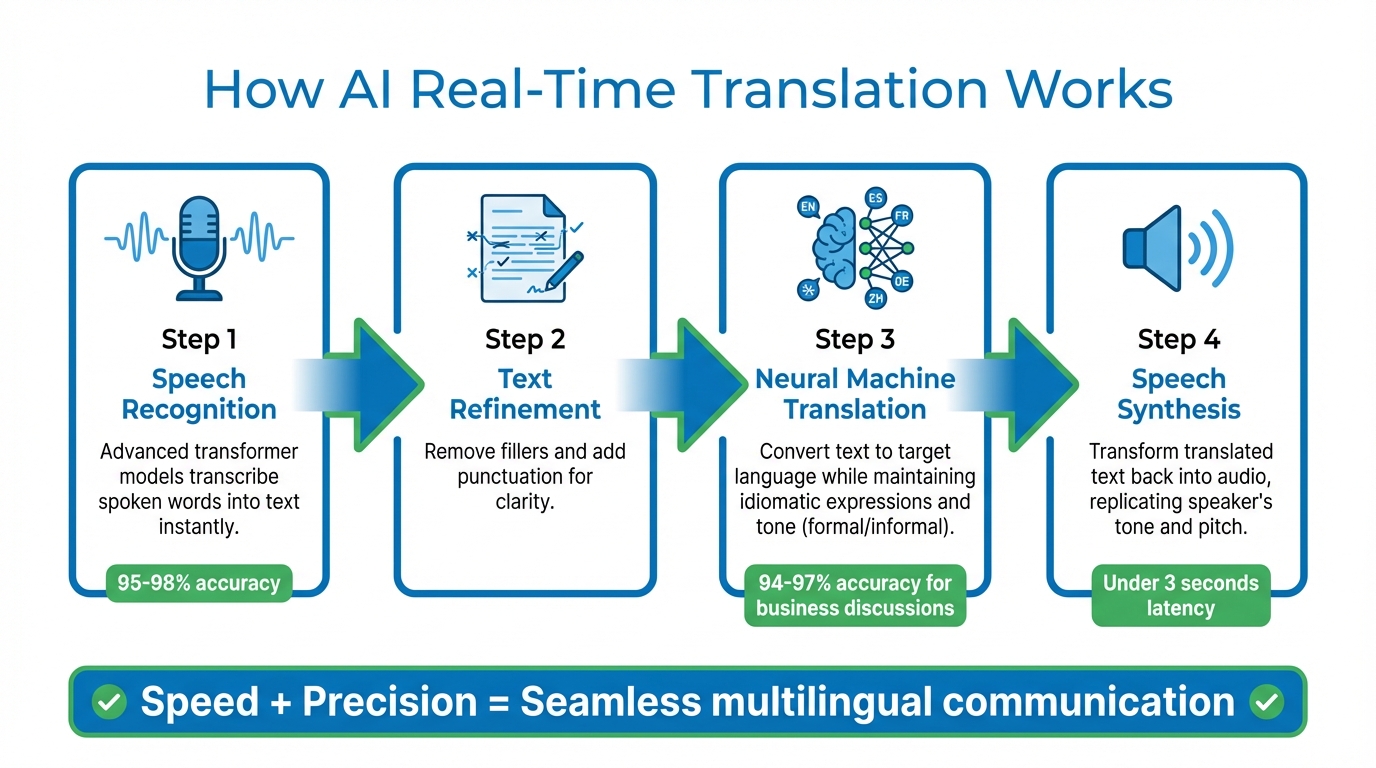
How AI Real-Time Translation Works: 4-Step Process from Speech to Translated Audio
AI translation tools are breaking down language barriers by enabling seamless communication in real time. These systems instantly convert speech from one language to another, allowing team members to speak in their preferred language while others hear the conversation in their own.
How Real-Time AI Translation Works
The process starts with speech recognition, where advanced transformer models transcribe spoken words into text instantly. This text is then refined - removing fillers and adding punctuation for clarity. The next step involves neural machine translation, which converts the cleaned text into the target language while maintaining idiomatic expressions and the speaker's tone, whether formal or informal. Finally, speech synthesis transforms the translated text back into audio. Tools like Microsoft Teams even replicate the speaker's tone and pitch to create a natural conversational flow.
The result? Speed and precision. Current AI systems achieve latencies under 3 seconds, with speech recognition accuracy between 95%-98% and translation accuracy ranging from 94%-97% for business discussions. This streamlined process is revolutionizing how global teams collaborate.
AI Translation Tools for Teams
Real-time translation tools are addressing the challenges of global communication head-on. For example, Microsoft Teams' Interpreter agent supports speech-to-speech translation in nine languages, including English, Spanish, Mandarin Chinese, and French. It also offers multilingual transcription in 31 languages, bundled with Microsoft 365 Copilot licenses, which include 20 hours of interpretation per person each month. Similarly, Zoom's AI Companion provides real-time translated captions in 46 languages.
In April 2025, Microsoft rolled out its AI Interpreter across its global workforce. Masato Esaka, a Business Program Manager at Microsoft, shared his experience using the tool to participate in English-led meetings while speaking in Japanese. He remarked, "I can speak smoothly and articulate my thoughts clearly without worrying about what I sound like in English". This implementation not only improved communication but also reduced reliance on human interpreters, cutting translation costs by up to 80%.
AI Analysis of Cultural Context for Better Understanding
Real-time translation can break down language barriers, but it’s the analysis of cultural context that fine-tunes communication. Without considering cultural nuances, even a flawless translation might misfire. For example, ignoring norms around tone, formality, or directness could unintentionally offend or confuse. AI tools are stepping in to bridge this gap by analyzing these differences and helping avoid potential misunderstandings.
Today’s AI systems go beyond word-for-word translation. They adapt phrases to fit the cultural expectations of the audience. For instance, instead of translating "costs an arm and a leg" literally, AI replaces it with a local equivalent that resonates with the recipient. This level of adaptation ensures communication feels natural and relatable, not robotic or out of place.
How AI Adjusts Communication Styles
AI tools are designed to fine-tune messages by adjusting their tone and style to match cultural expectations. They can:
- Adjust formality levels and add honorifics in languages like Japanese or Korean.
- Detect the tone of a message - whether it’s urgent, humorous, or sarcastic - and preserve that intent.
- Provide cultural notes to flag language that might come across as overly direct or inappropriate.
Matt Sheets, Product Manager at Google, summed it up well:
"Finding the right words just got easier. Today, we're introducing new AI-powered features... designed to help you nail the tone of any conversation - from informal hangouts to professional meetings".
Benefits for International Teams
For international teams, these refinements are game-changing. Cultural context analysis doesn’t just improve communication - it transforms collaboration. A great example comes from March 2025, when Panasonic Connect rolled out Language AI across its global workforce. Shoji Otsubo, Senior Manager and AI Technology Evangelist, described the impact:
"as natural as writing in Japanese".
This implementation allowed multilingual teams to work together seamlessly, combining speed with a sense of natural fluency.
The stakes are high: 55% of employees lose up to two hours daily due to miscommunication, and 24% of global organizations report breakdowns caused by language barriers. AI-driven cultural analysis directly tackles these challenges, ensuring messages are not only understood but also culturally sensitive. By doing so, it strengthens relationships and removes the friction that can slow down global collaboration.
AI-Powered Meeting Tools for Better Collaboration
When teams span the globe, keeping track of key details can be a challenge. Research shows that vital information can be forgotten within just 24 hours. This memory gap can derail progress, especially when coordinating across continents. AI meeting tools tackle this issue head-on by automatically capturing conversations and turning them into well-organized, actionable records.
These tools work in real time, analyzing discussions, identifying speakers, and noting key decisions. Instead of combing through lengthy notes, teams receive clear summaries broken down into topic clusters, decisions, and action items. It’s no wonder that 81% of employees report increased productivity with these tools, and 35% of CEOs acknowledge inefficiencies in decision-making meetings.
Creating Meeting Summaries and Action Items
With AI, an hour-long meeting can be summarized in less than a minute - a stark contrast to the 30 minutes it often takes to do this manually. Using voice recognition and natural language processing, these tools transcribe spoken words into text and then organize the content into digestible sections. The accuracy is impressive: English transcriptions typically hit 98–99%, while Spanish and German range between 95–98%. However, accuracy can drop by 10–20% for non-native speakers. Advanced tools even link summary points to specific transcript timestamps, making it easy to verify details.
Action items are extracted automatically as the AI identifies task-related language and deadlines, assigning responsibilities based on who said what during the meeting. Chanda Jensen, Senior Product Manager at Microsoft Digital, highlighted the impact of such tools:
"Intelligent Recap has been a game changer for our employees, in terms of being able to get the notes, catch up on what they missed, and work asynchronously."
For the best results, use high-quality microphones and give clear instructions like "List all deadlines." It’s also a good idea to review AI-generated summaries to ensure industry-specific terms are captured correctly.
But AI isn’t just about summarizing meetings - it also simplifies scheduling across time zones.
AI Scheduling Across Time Zones
Scheduling meetings across time zones used to mean endless email threads and tedious calculations. AI scheduling assistants, like Gemini in Google Calendar, now make this process seamless by analyzing attendee availability, working hours, and time zones to suggest the best meeting slots. These tools also use predictive scheduling, factoring in historical patterns, preferred times, and buffer preferences.
Some systems even include fairness scoring, which rotates inconvenient meeting times to distribute the burden equitably. As one expert aptly put it:
"Scheduling meetings across global teams shouldn't require a mathematics degree and fifteen email threads."
In early 2026, Beyond Better Foods adopted Slack AI to manage its global operations. Andy Kung, VP of Operations, shared his experience:
"I've only been using Slack AI for about a month, but it's already saved me 30 minutes daily."
To get the most out of these tools, maintain a clean calendar by blocking focus time, personal appointments, and local holidays - AI will automatically respect these blocks. Additionally, set up the system to include 15-minute breaks between back-to-back calls to avoid burnout. Using a 3-hour overlap rule ensures the majority of team members are available during their local working hours.
Using Acedit to Improve Professional Communication
AI tools like translation apps and scheduling software have their place, but personal communication skills are still key in professional settings. Enter Acedit, a Chrome extension powered by AI that helps you sharpen your communication skills in real time. It’s especially handy during high-pressure moments, like video calls with global teams, where clearly explaining complex ideas is critical.
Acedit integrates smoothly with browser-based platforms like Zoom, Microsoft Teams, and Google Meet. It listens during video calls, identifies questions as they come up, and suggests structured responses tailored to your professional background. This discreet guidance helps you turn moments of hesitation into clear, confident communication. By focusing on individual expression, Acedit works alongside tools like AI translation and cultural analysis to ensure everyone on the team feels prepared to communicate effectively.
How Acedit Provides Real-Time Feedback
Acedit takes a personalized approach by analyzing your LinkedIn profile and resume to craft response suggestions that align with your experience. During calls, it uses the STAR method (Situation, Task, Action, Result) to deliver concise prompts. This method helps you break down lengthy explanations into clear, actionable points - an essential skill when working across time zones or with diverse teams.
The numbers back it up: 94% of users report feeling more confident, 88% notice better response quality, and 89% say it reduces stress in high-stakes situations. With over 15,000 questions practiced and an average rating of 4.8/5, users frequently highlight the benefits of Acedit’s live prompts. As James Peterson shared:
"Acedit's real-time coaching boosted my confidence. Great support!"
Applying Acedit to Team Communication
Acedit isn’t just for individuals - it also enhances team dynamics by helping members prepare for challenging conversations. Whether it’s a project update, explaining technical details to non-technical colleagues, or giving feedback to international teammates, Acedit’s practice modules build confidence and clarity.
These modules are especially helpful for non-native speakers, offering guidance on how to use precise, professional language. For teams looking to take it a step further, the Premium Plus plan ($75 one-time) provides unlimited AI-assisted sessions and custom STAR examples. By encouraging individual members to practice structured communication, Acedit helps reduce misunderstandings and improves collaboration across the board.
Step-by-Step Guide: Adding AI Tools to Your Global Team
When introducing AI communication tools, the key is to address your team's specific challenges rather than following trends. Below is a practical approach to integrate AI tools effectively, focusing on real-world issues.
Step 1: Identify Your Team's Communication Problems
Before diving into new tools, take a close look at where communication is breaking down. On average, employees spend 57% of their time on meetings, emails, and chats, leaving just 43% for actual work. Adding more tools without understanding the root cause can worsen inefficiencies.
Start by assessing your current tools. If your team uses more than four, you might be dealing with "tool sprawl", which can lead to context loss. Check how long it takes to retrieve key decisions from past meetings - if your team is scrolling through endless messages, it's time to rethink your system.
Focus on identifying duplication of effort across regions or departments. Are multiple teams unknowingly solving the same problems? This signals information silos. Review how teams hand off tasks to each other; gaps here often highlight misaligned expectations or missing data. A great example comes from Unilever, which reduced meeting times by 30% and boosted campaign effectiveness by 45% in 2022 by implementing AI-driven analytics across 50 countries.
The numbers back this up: 57% of employees in diverse work environments report frequent misunderstandings due to language and cultural differences. Meanwhile, 76% of European companies cite language barriers as a major challenge to international business. If these stats resonate with your team, you've found a starting point.
Step 2: Choose and Set Up AI Translation and Context Tools
Once you've pinpointed the issues, it's time to choose tools that solve them. Look for platforms that integrate seamlessly with your existing systems via APIs. The aim is to simplify workflows, not complicate them.
Before rolling out a tool, conduct a proof of concept. Use real-world data - like past meeting transcripts or product descriptions - to see if the tool meets your needs. Also, ensure compliance with regulations such as GDPR and certifications like ISO 27001.
For translation, avoid basic machine translation tools. Instead, opt for adaptive systems that learn from human edits in real time, ensuring they align with your brand's tone and terminology. When it comes to meetings, look for platforms that can handle transcription, summaries, and action item tracking without requiring your team to learn a whole new interface.
Step 3: Train Your Team on AI Tools
Even the most advanced tools won't succeed without proper training. Start by recruiting "AI champions" from within your team - early adopters who can train others and help ease resistance. Frame AI as a way to enhance, not replace, human work. As Sebastian Enderlein, CTO of DeepL, puts it:
"High-risk scenarios (such as a doctor's prescription or a legally binding contract) benefit from human review and editing. But for lower-risk scenarios, such as internal emails, full human oversight isn't essential".
On launch day, assign a few simple tasks - like summarizing meeting notes - to help your team quickly see the benefits. This task-based approach builds confidence and shows how AI can make their work easier. Training should also emphasize the human-in-the-loop concept, teaching team members when to rely on AI and when to trust their own judgment.
Encourage your team to identify repetitive, high-frequency tasks they can offload to AI. This reduces mental strain and frees up time for more strategic work. Studies show that training materials tailored to a team's language or region improve retention by 40%, so customize your sessions to make them relatable.
Finally, set up a governance framework. Create clear AI policies and ethical guidelines, and assign a team to monitor for issues like "model drift." This ensures responsible use of AI and helps your team feel supported rather than micromanaged.
Conclusion: AI's Role in Global Team Communication
AI has become a powerful partner in the workplace, capable of understanding context, anticipating needs, and boosting productivity on a global scale. For teams spread across different regions, this translates to fewer miscommunications, less time spent on repetitive tasks, and more focus on solving complex problems creatively.
The statistics are clear: companies that rank in the top quartile for ethnic and cultural diversity are 33% more likely to outperform their competitors in profitability. Strong communication is the backbone of this advantage, and integrating AI into workflows can amplify these benefits.
The move toward collaborative intelligence is already transforming industries. AI-driven tools represent a $6 trillion global market - double the size of the $3 trillion IT sector. Organizations that adopt these tools early are seeing tangible results, including 40% higher project success rates, 30% shorter meeting times, and 45% better campaign performance. Companies like IBM and Unilever are living proof of these gains.
For professionals tackling global communication challenges, tools like Acedit provide practical solutions. Though primarily designed for interview preparation, Acedit's real-time feedback and AI-driven suggestions can help users refine their communication styles for various high-pressure scenarios.
"AI is a force to elevate humans. Leaders and workers who don't challenge themselves to use it to stretch their own capabilities will be left behind." - Navin Chaddha, Managing Partner, Mayfield
The future of teamwork isn't about replacing human decision-making - it's about amplifying it. With AI acting as a coach, translator, and knowledge assistant, global teams can overcome barriers that once felt impossible to cross. The speed at which organizations embrace these tools will define their success in an increasingly interconnected world.
FAQs
When should we still use human review instead of AI translation?
Human review plays a crucial role when dealing with content that includes nuanced language, idioms, humor, cultural references, or implicit meanings. These elements often require a deeper understanding and sensitivity to ensure both accuracy and appropriateness - something AI alone may struggle to achieve.
How can AI prevent cultural misunderstandings beyond literal translation?
AI plays a key role in reducing misunderstandings by analyzing cultural context and subtle nuances. This ensures communication is not just accurate but also respects cultural sensitivities. By identifying implicit meanings and encouraging collaboration between humans and AI, it helps bridge gaps that simple word-for-word translations often miss.
What’s the fastest way to roll out AI meeting summaries and action items?
The fastest way to start using AI for meeting summaries and action items is by leveraging built-in AI features in platforms like Microsoft Teams or Google Workspace. These tools can automatically create summaries and pinpoint tasks, cutting down on manual effort. Features like Intelligent Recap and audio summaries make it easier for teams to quickly share key takeaways and next steps after meetings, making follow-ups and collaboration much smoother.