
If your resume doesn’t parse well, a recruiter may never read it. I’d use AI for three jobs: pull the right keywords from the posting, clean up ATS formatting, and check that my resume, cover letter, and LinkedIn all say the same thing.
Here’s the short version:
- I match my resume to the job description with skills, tools, job titles, and certifications that already fit my background.
- I keep the layout single-column, use standard headings like Work Experience and Skills, and write dates in one format like Jan 2022 – Present.
- I use AI to rewrite weak bullets into action + result statements with numbers.
- I rescan the draft, then verify every claim by hand.
- I keep facts the same across my resume, cover letter, LinkedIn, and interview notes.
A few numbers stand out:
- 59% of employers were using AI to screen resumes, based on a 2025 survey cited in the article.
- Job seekers using AI-assisted resume tools got 7.8% more job offers.
- They were also 8% more likely to be hired.
What matters most is simple: AI can help me tailor and fix a resume, but it should not invent facts. I still need to check titles, dates, metrics, and certifications before I apply.
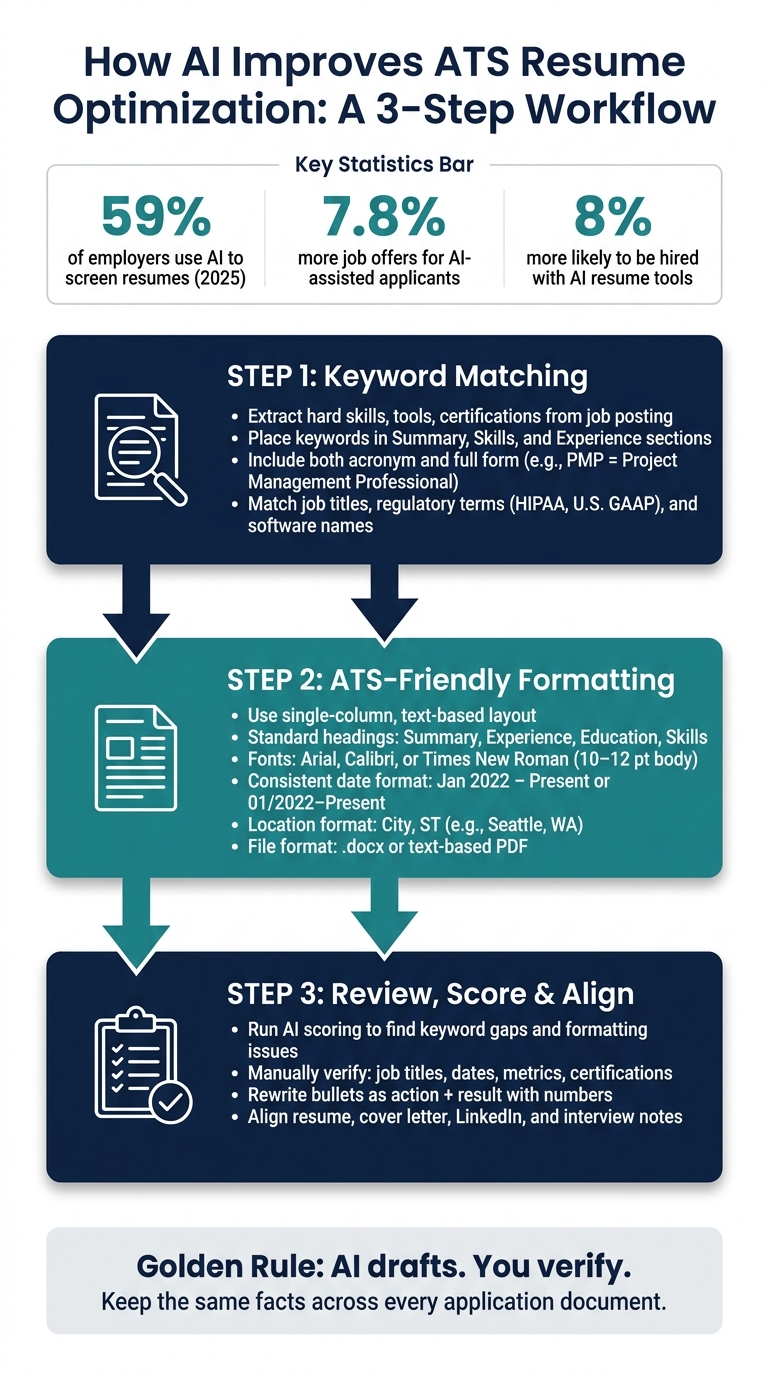
AI-Powered ATS Resume Optimization: 3-Step Workflow
Step 1: Use AI to Match Your Resume to the Job Description
Extract Keywords, Skills, and Certifications from the Job Posting
Paste the full job posting into one of the many AI tools for your job search and ask it to pull out hard skills, tools, certifications, and industry terms. Then ask it to flag repeated terms and required qualifications. Those usually signal higher-priority ATS terms.
For U.S.-based roles, terms like U.S. GAAP, Medicare billing, or FDA regulations often point to familiarity with local standards and workflows.
Stick to terms you can back up. If you’ve used Salesforce for reporting and dashboards, say that. If you haven’t, don’t force it. A simple line like familiar with Salesforce reporting and dashboards works well.
Add Keywords Naturally Across the Summary, Skills, and Experience Sections
Once you have the list, place those keywords where ATS is most likely to scan first. Your Professional Summary should start with your main title and seniority level, then work in your top 3–5 keywords in a natural sentence, not a keyword dump.
For example: Senior Marketing Manager with 8+ years in SEO, SEM, HubSpot, and data-driven campaign optimization.
In the Skills section, AI can sort terms into clean buckets like:
- Technical Skills
- Tools & Platforms
- Certifications
It can also help you include both the acronym and full version at least once, such as Project Management Professional (PMP).
For your Experience bullets, ask AI to turn flat job duties into results-focused statements that include the right terms without sounding forced. For example, instead of Responsible for HIPAA compliance in clinic, write Maintained HIPAA-compliant patient records and workflows in a 10-provider clinic, reducing audit findings.
Keyword Placement Table
| Keyword Type | Example (U.S. context) | Where to Place in the Resume | How AI Identifies It |
|---|---|---|---|
| Job Title | Senior Marketing Manager | Professional Summary; recent Experience job titles | Extracts from the Job Title and role overview sections |
| Hard Skill | Financial modeling, project management | Skills section; Experience bullets | Finds repeated skill phrases in responsibilities and requirements |
| Software/Tool | Salesforce, QuickBooks, Tableau | Skills; Experience bullets where tool was used | Detects proper nouns and software names, ranks by frequency |
| Certification | CPA, PMP, RN, SHRM-CP | Certifications subsection; Summary if it's a key requirement | Identifies required and preferred credentials from qualifications |
| Industry/Regulatory Term | HIPAA, U.S. GAAP, FDA regulations | Skills; Experience bullets tied to compliant work | Flags regulatory language used throughout the posting |
Once the wording lines up with the job post, the next thing to check is whether your resume layout is easy for ATS to read.
sbb-itb-20a3bee
How to write an ATS-optimized Resume with AI (according to research)
Step 2: Use AI to Fix ATS-Friendly Resume Formatting
Once your keywords are set, formatting is the next place your application can fall apart. The goal here isn't design. It's clean text extraction.
Switch to a clean single-column layout
Most ATS tools read resumes from top to bottom, left to right. That means multi-column layouts, tables, sidebars, and text boxes can throw off the reading order or cause parts of your resume to disappear.
Stick with a single-column, text-based layout and use standard section headings like Professional Summary, Experience, Education, and Skills. For fonts, use common options like Arial, Calibri, or Times New Roman. Keep body text at 10–12 pt, headings at 12–16 pt, and margins between 0.5 and 1 inch.
A simple way to test your resume is to paste it into a plain-text editor. If the content shows up out of order, or chunks are missing, there's probably a parsing issue. That's where AI can help clean up the structure and make the file easier for ATS software to read.
Standardize dates, locations, and bullet points for U.S. resumes
AI is also useful for spotting small formatting issues that are easy to miss, especially across older roles.
Dates should follow one U.S. style from top to bottom. For example:
- 01/2023–06/2026
- January 2023–June 2026
Mixing styles like Spring 2023 in one role and 01/2024 in another makes your timeline harder to scan.
Locations should also stay consistent. In the U.S., the standard format is City, ST, such as Seattle, WA or Austin, TX.
For bullet points, use AI to rewrite task-heavy lines into action-led bullets with numbers. Think team size, time saved, revenue supported, retention gained, or process improvements. That gives both the ATS and the recruiter something clear to work with.
Formatting comparison table
| Formatting Element | ATS-Friendly Choice | What to Avoid | Why It Matters |
|---|---|---|---|
| Layout | Single-column, text-based | Multi-column, sidebars, text boxes | Columns can scramble reading order |
| Section headings | Professional Summary, Experience, Education, Skills | Career Story | Non-standard labels can cause ATS to misclassify sections |
| Fonts | Arial, Calibri, Times New Roman (10–12 pt body) | Unusual fonts, text under 9 pt | Can reduce readability and complicate text extraction |
| Date format | 01/2023–06/2026 or January 2023–June 2026 | Spring 2023, mixed formats | Inconsistent dates make work history timelines harder to parse |
| Location format | Seattle, WA / Austin, TX | San Francisco, California, SF, CA | Consistent city/state formatting improves parsing accuracy |
| Bullet points | Plain round/square bullets, action verb + metric | Emoji, arrows, icons, dense paragraphs | Decorative symbols may be skipped; paragraphs hide keywords |
| File format | .docx or text-based PDF | Scanned PDFs, password-protected files | Scanned files can't be reliably parsed as text |
Once your resume is machine-readable, make sure your other application materials line up with it too. This includes preparing for the next stage by using an AI interview answer generator to align your responses with your optimized resume.
Step 3: Review, Refine, and Keep Your Application Materials Consistent
Once your resume parses cleanly, use AI to test the match. Then check every claim yourself.
Run the resume against the job description, fix the weakest spots, rescan, and repeat. After that, carry those checked details into every part of your application.
Combine AI scoring with human review
AI scoring tools are good at spotting gaps. They can show missing certifications, thin keyword coverage, or sections that don’t line up with the role’s main needs. The score itself matters less than the holes it points out.
For example, if a tool says project management shows up only once, don’t panic. Look for related phrasing elsewhere, like led cross-functional timelines or managed project schedules. That kind of natural wording tends to read better for both the ATS and the recruiter.
After each revision, review every fact by hand. Check:
- job titles
- employment dates
- metrics
- certifications
Each one needs to be correct and something you can talk about in an interview. AI might suggest that you increased revenue by 40%, but if that number isn’t yours to claim, it can backfire fast when a hiring manager asks about it.
Also proofread for tense consistency, awkward phrasing, and robotic wording. According to a 2025 employer survey, 59% of employers are using AI to screen resumes. That makes human review even more important.
Keep your resume, cover letter, LinkedIn, and interview prep aligned
Hiring teams often compare your application materials side by side. If your resume lists one job title but your LinkedIn profile shows another, people notice. If your cover letter describes a role one way and your resume frames it another way, that can create doubt.
Keep the facts the same across every document. What can change is the tone and level of detail.
A simple way to do this is to use one checked fact sheet as your source of truth. Include your confirmed job titles, employment dates, key metrics, education, and certifications. Then use that file whenever you draft or revise your resume, cover letter, LinkedIn profile, or interview notes.
The same checked facts that help your resume match a job posting can also stop mix-ups later.
AI workflow comparison table
Use this workflow to see where AI helps and where human review needs to step in.
| Purpose | What AI Does | Ideal Use Case | Risks if Used Alone |
|---|---|---|---|
| AI keyword extraction and rewriting | Identifies missing job-description terms and suggests stronger phrasing | Tailoring a draft resume to a specific posting | Can produce stiff, generic, or exaggerated language |
| ATS simulation and scoring | Estimates parsing issues, keyword gaps, and formatting problems | Checking whether a resume is likely machine-readable | Scores can miss nuance or falsely reassure users |
| Human proofreading after AI generation | Confirms facts, tone, and readability | Final review before submission | Slower, but necessary to catch inaccuracies and robotic phrasing |
Use AI to draft, then verify the final version by hand.
Conclusion: A Simple AI Workflow for Better ATS Resume Results
Use AI to review the job post and draft your resume, then check every detail yourself.
The process is pretty simple. Research supports it: job seekers who used AI-assisted resume tools received 7.8% more job offers and were 8% more likely to be hired than those without assistance.
A clean way to do it is:
- Analyze the job post
- Tailor your resume
- Format it for ATS parsing
- Score it with the tool you use
- Review every line for accuracy
One thing matters a lot here: keep the same facts across every application document. If your resume says one thing and your cover letter or interview answers say another, that can create problems fast.
Tools like Acedit can help keep your interview prep lined up with the same resume facts.
Use AI to move faster on the draft, then edit for accuracy, clarity, and fit.
FAQs
How many keywords should I add to my resume?
Don’t obsess over a fixed number. Focus on quality and natural phrasing, and aim for about 2% to 3% keyword density, or around one keyword for every 50 words.
A good rule of thumb is to match at least 70% of the keywords in your target job description. Work them into your summary, skills, and experience in a natural way instead of stuffing your resume.
Will a PDF resume work with ATS?
Yes, a PDF resume works with most ATS if the file is set up the right way.
The safest option is a standard PDF with selectable text. In plain English, that means the system can highlight and read the words in the file. A scanned image resume won't do that well. The same goes for files packed with graphics, tables, or busy layouts.
For the best match with ATS, keep things simple:
- Use a clean layout
- Stick with standard fonts
- Avoid putting key details in headers or footers
That kind of resume is easier for the software to read and far less likely to trip it up.
Can AI help if I’m changing careers?
Yes. AI tools can be a big help for career changers.
They can scan target job descriptions, spot the keywords that matter, and point out transferable skills you might otherwise overlook. That matters a lot when you're moving into a new field and need to show how your past work still fits.
Features like Acedit’s Smart Job Requirement Matching can also help you reframe your experience so it lines up better with a new industry. The result? A resume that feels more competitive, more ATS-friendly, and more focused on the skills and wins employers care about most.