
Bad reviews can cut sales fast, and AI helps you spot and handle them before they pile up. If I were setting this up, I’d start with four steps: audit where my brand shows up, track reviews and mentions in one place, sort issues by sentiment and risk, and use AI drafts to reply faster.
Here’s the short version:
- Ratings affect sales: shoppers who read reviews are 108.6% more likely to buy
- A move from 4.3 to 4.4 stars can increase conversions by 25%
- Products with only a few reviews can struggle, and products with five reviews can see 270% higher purchase likelihood than products with none
- Common problems are usually easy to spot: shipping delays, damaged items, returns, and slow support
- AI helps by grouping feedback, flagging spikes, and sending urgent cases to people
What I’d pay attention to first:
- Where my brand is mentioned: Amazon, Google, Walmart, Reddit, TikTok, my site
- My starting numbers: star rating, review volume, negative review rate, response time, repeat complaints
- Alert rules: spikes in 1-star reviews, negative sentiment, and risk phrases like “scam” or “unsafe”
- Response flow: let AI draft routine replies, but send legal, safety, and fraud issues to a person
The main idea is simple: AI does the sorting, tagging, and first draft work, while my team handles the final response and the fix behind it.
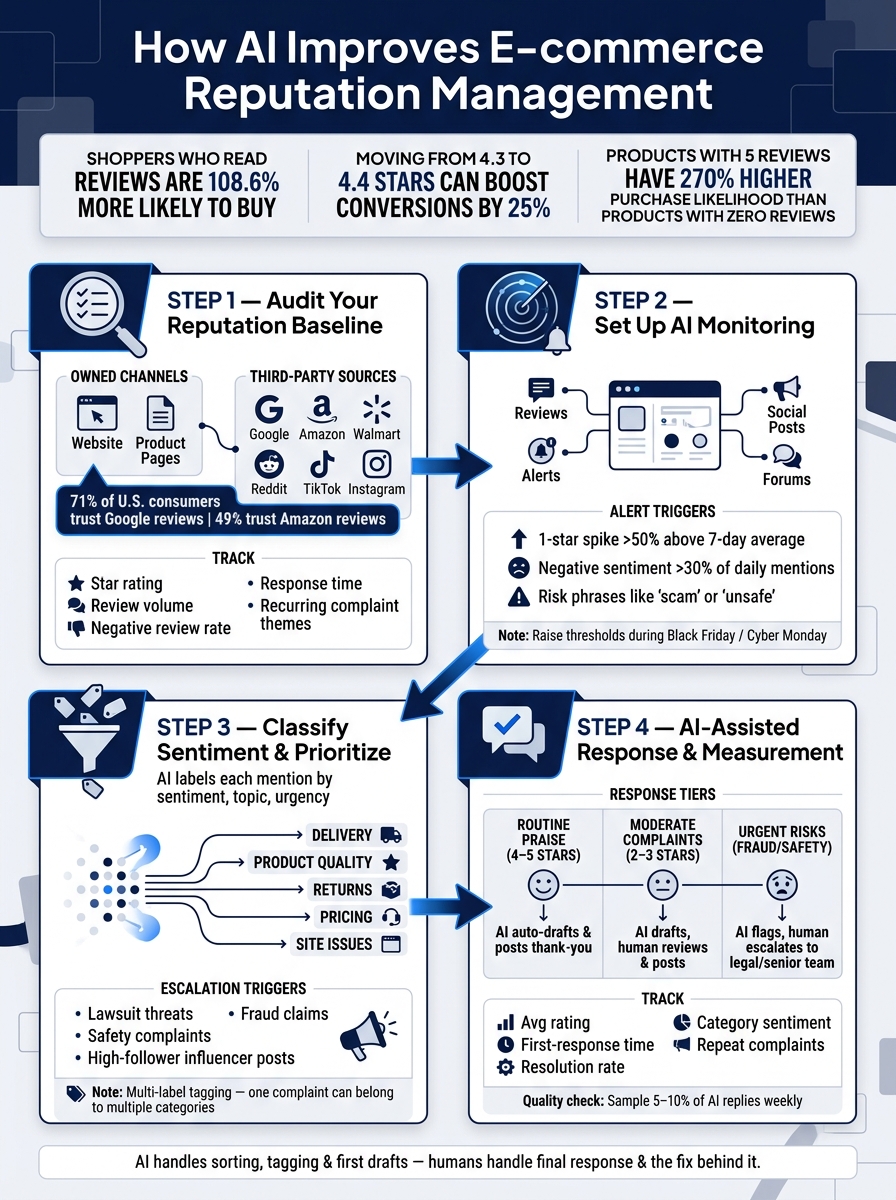
How AI Powers E-commerce Reputation Management: 4-Step Framework
Reputation Management Now Includes What AI Says About Your Brand
sbb-itb-20a3bee
Audit Your Current Reputation Baseline
Before you hand anything off to AI, set a clear baseline. If you don't know where you stand now, it's hard to tell whether anything is getting better later.
List Your Most Visible Reputation Sources
Start with the places shoppers check before they buy. Your reputation doesn't live in one spot. It's spread across your own channels and third-party sites. Search your brand name in an incognito window, then try terms like "reviews" and "scam." Write down what shows up on page one.
A solid audit should cover both owned channels - your website, FAQ pages, and product pages - and third-party sources like Google Business Profile reviews, marketplace ratings on Amazon and Walmart Marketplace, social comments on Instagram and TikTok, Reddit threads, and industry forums. One recent survey found that 71% of U.S. consumers trust Google reviews, while 49% trust Amazon reviews.
The point here is simple: find out which channels bring in the most feedback and which ones shape buying decisions the most. For most e-commerce brands, the biggest ones are Google reviews, marketplace ratings, product reviews, and branded search results. Social platforms and forums usually come after that.
Document Baseline Metrics Before Making Changes
Once you've mapped your channels, record the numbers. For each main channel, note your average star rating, monthly review volume, response time, percentage of negative reviews, and recurring complaint themes.
Say your Amazon listings are sitting at 4.2 stars, and most of the low ratings mention shipping delays. If the same complaint shows up in reviews, social comments, and support tickets, that's usually not a random bad review. It's a pattern. And that's the kind of thing AI tools are good at spotting and tracking over time.
Research from Northwestern's Spiegel Research Center found that products with five reviews have a 270% higher purchase likelihood than those with none.
So yes, review volume is worth tracking from day one.
| Metric | What to Record |
|---|---|
| Average star rating | Per channel (Amazon, Google, your site, etc.) |
| Monthly review volume | How many new reviews per month |
| Percentage of negative reviews | Percentage of 1–3 star reviews |
| Response time | Average time to reply to reviews or tickets |
| Recurring complaint themes | Shipping, quality, returns, support, etc. |
Store these numbers in a spreadsheet and check them every month. This baseline becomes your reference point once AI monitoring begins.
Set Up AI Monitoring for Reviews and Brand Mentions
Once you’ve documented your baseline, the next step is to watch new feedback as it comes in. AI pulls reviews, social mentions, and forum posts into one place, which makes it easier to spot problems before they snowball. Stick with the same channels and complaint themes from your baseline so you can compare changes cleanly.
Monitor Reviews, Social Posts, and Forums in One Place
Start by tracking Amazon and Walmart reviews, Google Business Profile, on-site reviews, major social channels, Reddit, and niche forums tied to your category. Your keyword list should include your brand name, common misspellings, product names, campaign hashtags, and the complaint phrases customers already use.
Create Alerts for Sudden Reputation Risks
Set alerts for spikes in volume, shifts in sentiment, and changes in topic so you can catch problems fast. A simple starting point works well:
- Trigger an alert if one-star reviews jump 50% above the 7-day average within 24 hours, or if negative sentiment goes above 30% of total daily mentions.
- Add topic rules on top of that. For example, send a high-priority alert when shipping-related negative mentions double week over week.
- For misinformation risks, track repeated phrases like BrandX scam or BrandX unsafe across U.S. social platforms.
During Black Friday and Cyber Monday, bump your thresholds higher since big swings in mention volume are normal. These alerts feed into the sentiment and prioritization step next.
Use AI to Classify Sentiment and Prioritize Action
Once alerts catch a spike, the next job is simple: figure out what each mention means and what needs attention first. That’s where AI helps. It can label each mention by sentiment, topic, and urgency, so teams can move faster instead of sorting everything by hand.
Group Feedback into Clear Issue Categories
Start with a shared taxonomy based on how your teams work day to day: delivery, product quality, fit and sizing, pricing, returns, support, and site issues. Each category should connect to the team that can fix it. Then add subcategories that point to root causes, like packaging damage, shipping delay, wrong item shipped, refund delay, or inaccurate product description.
AI topic clustering can group similar feedback on its own. If a large number of reviews mention a crushed box, dented packaging, or leaking on arrival, the system can surface a packaging damage cluster. That points to an operations or carrier problem, not a product defect. The same idea applies to sizing. Phrases like runs small, size chart is wrong, and larger than expected can be grouped into a sizing issue your merchandising team can act on.
Use multi-label tagging. One complaint can belong in more than one bucket. If an item arrived late and damaged, that belongs to both delivery and product quality. Letting AI assign multiple tags helps stop issues from slipping through the cracks.
Flag Urgent Cases for Human Review
Not every negative comment carries the same level of risk. AI should escalate posts that include lawsuit threats, safety complaints, fraud claims, or posts from high-profile influencers.
Route cases based on keywords, phrases, and context. Terms like filing a complaint with the state attorney general, fire hazard, unsafe for children, or credit card fraud should go straight to human review. For high-visibility posts, any negative post from an account above a set follower threshold - or content picking up traction on social feeds - should move into a priority queue that includes PR and senior leadership. If the system detects several high-risk complaints of the same type within 24 hours, that pattern should trigger escalation too, since it may point to a system-level issue.
AI handles the first pass and scoring. People still decide the tone, the fix, and whether the case needs to move up the chain. That triage then feeds the response workflow next.
Build AI-Assisted Response Workflows and Measure Results
Once triage is done, the job shifts from sorting reviews to turning the queue into replies that feel personal and stay on-brand. The same sentiment and urgency labels used during triage should also decide the response path.
Draft Consistent Replies Without Sounding Generic
AI can tailor replies by pulling in the product name, the issue, and the customer’s own wording, then fitting all of that into a brand-approved response.
| Review Type | AI Support | Human Action Required |
|---|---|---|
| Routine praise (4–5 stars, satisfied with product or delivery) | Auto-classify as positive, generate and post a personalized thank-you reply | None by default; optional manual engagement for high-value customers or influencers |
| Moderate complaints (2–3 stars, slow shipping, minor defects, confusing instructions) | Classify as moderate negative, summarize the issue, draft an empathetic reply with a solution within policy | Review and edit the AI draft, confirm the remedy (refund, replacement, or coupon), post the reply |
| Urgent reputation risks (fraud accusations, safety claims, chargeback threats, calls to boycott) | Flag, summarize, and draft a legal-safe acknowledgment | Immediate escalation to senior support, legal, or compliance; craft or approve the final public statement; document the response timeline |
A single rule set keeps things simple:
- Thank customers for praise
- Apologize and state the next step for complaints
- Confirm refund timing
- Escalate unresolved cases
For anything beyond routine praise, AI drafts should be checked for accuracy and tone before they go live. It’s a smart guardrail. On top of that, sample 5–10% of AI-generated replies each week to catch drift in tone or policy fit, then use those findings to tighten your prompts.
Track the Metrics That Show Real Improvement
After replies go out, use the same tags to measure speed and complaint volume.
Track average rating, first-response time, resolution rate, review volume, category sentiment, and repeat complaints.
First-response time shows how fast the workflow moves. In practice, AI should shrink routine replies to a few hours and push urgent cases toward near real time.
Category sentiment shows where the fix starts to appear. The cleanest way to measure it is with a before-and-after comparison tied to a clear go-live date, so you can see whether complaints drop over time.
FAQs
How do I choose the right AI alerts?
Pick AI alerts based on the decisions you need to make and the KPIs tied to your goals. Don't track every data point just because you can.
For example, if brand reputation is the main focus, watch for sentiment drops and spikes in negative mention volume. If you're building a personal brand, pay more attention to visibility and conversion signals like profile views and interview invites.
You can also combine signals to cut down on false alarms. A mix of volume, sentiment, and influencer reach usually tells a clearer story than any single metric on its own.
Which reviews need a human response?
AI can draft responses, FAQs, and holding statements. But every public-facing reply still needs human review and approval.
That human check matters most when the feedback is complex or the situation is sensitive. Empathy, emotional judgment, nuance, and trust are hard to automate. A person can catch tone issues, spot context that a system might miss, and make sure the response is accurate and in line with brand values.
How soon can AI improve my ratings?
AI can help fast once it spots reputation issues. Containment and triage can start within minutes, and it can draft holding responses just as fast. In many cases, an initial public statement can be ready within hours.
Full repair and trust recovery usually take weeks or months, depending on how serious the issue is. And every public response still needs human review and approval before it goes live.