
If interview feedback is not structured, your ATS data gets messy fast. I’d set one shared feedback format first, map every score and note into the right ATS field, lock down access, and then use that data for reports and hiring decisions.
Here’s the short version:
- I use a canonical feedback model so every interview record follows the same format.
- I keep scores, recommendations, and notes separate to avoid reporting issues.
- I map data into the ATS with clear rules for candidate IDs, stages, ratings, summaries, and transcripts.
- I store feedback with role-based access, retention rules, and audit logs.
- I use clean ATS data for completion tracking, interviewer consistency checks, and hiring review.
A few points matter most right away:
- Consent should always be required
- One rating scale should apply across interviewers
- Role-based scorecards should match the job and interview stage
- Structured fields should drive reports, not free-text notes
Modern interview tools can auto-fill scorecards from transcripts, which can cut manual follow-up after interviews and make records more consistent. But if the field mapping is off, the data still becomes hard to use.
So if I wanted this process to work, I’d focus on four things: schema, mapping, access, and reporting. That’s the whole system in plain terms.
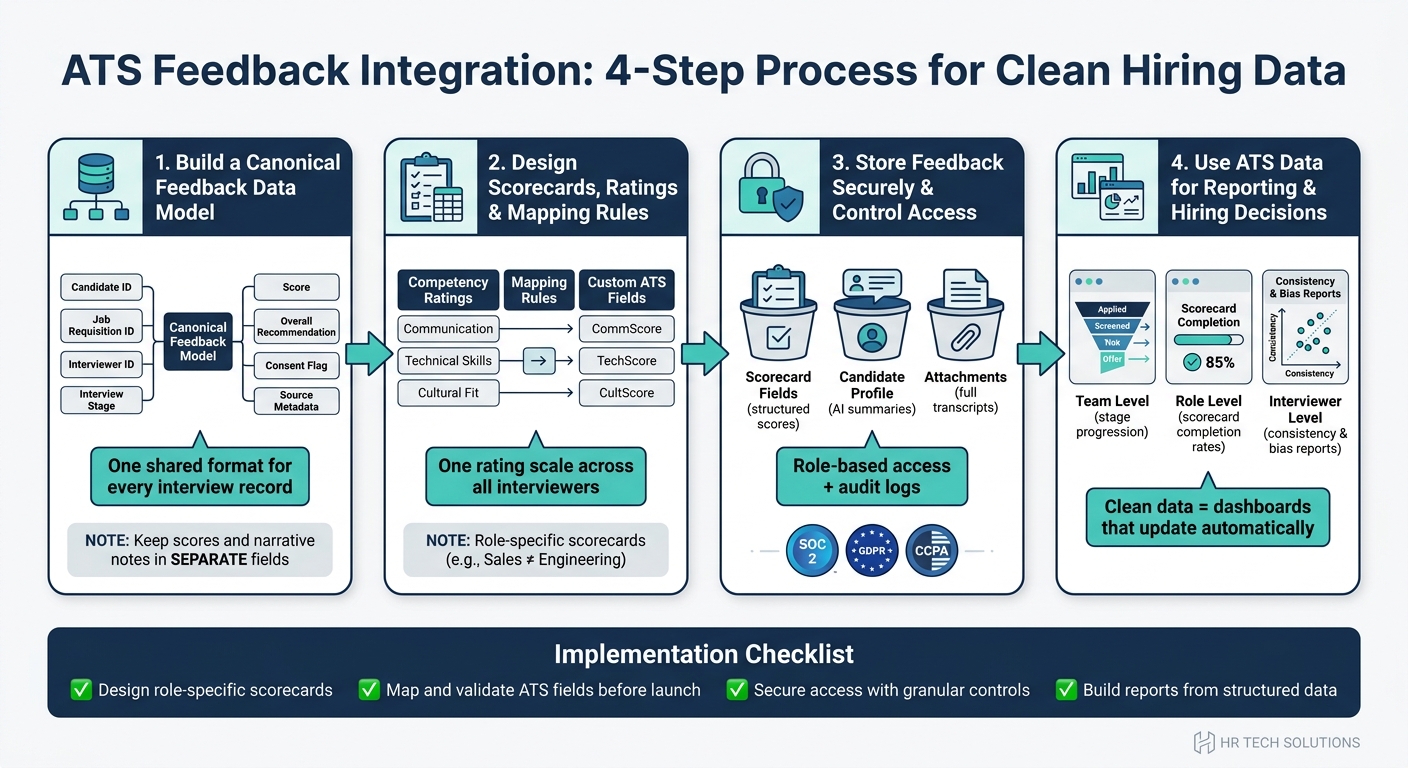
ATS Feedback Integration: 4-Step Process for Clean Hiring Data
Applicant Tracking System (ATS) Explained: How Modern Recruitment Technology Works
sbb-itb-20a3bee
Step 1: Build a Canonical Feedback Data Model
Before you map ATS fields, set up one canonical feedback schema first. Think of it as the shared format for every interview record, no matter who ran the interview or which ATS the team uses.
If you skip this step, teams start pushing mismatched data into structured fields. And once that happens, reporting gets shaky fast. Set the schema now so each interview record flows into the ATS in a clean, consistent way later.
Core fields every feedback record should include
Each feedback record should connect the candidate, the job requisition, the interview stage, the interviewer, the scorecard, and the feedback record itself. A practical model includes:
| Field | Description |
|---|---|
| Candidate ID | Unique identifier tied to the candidate's ATS profile |
| Job Requisition ID | Links feedback to the specific open role |
| Interviewer ID | Interviewer name, ID, and role |
| Interview Stage | Stage label such as phone screen, technical interview, or final round |
| Interview Date/Time | Interview timestamp in U.S. date/time format |
| Competency or Question ID | Maps feedback to a specific scorecard item |
| Score | Numeric or scale rating for each competency |
| Overall Recommendation | Standardized decision: hire, no-hire, or hold |
| Free-Text Notes | Qualitative observations, kept separate from scores |
| Consent Flag | Tracks permission for data processing and recording |
| Source Metadata | Capture source, such as the interview platform or AI tool |
One field should be mandatory: Consent Flag. It tracks permission for processing and recording, and it shouldn't be optional.
Once those core fields are locked in, the next step is deciding how each score and note maps into ATS fields.
Structured fields vs. narrative notes
Don't combine comments and scores in the same field. It sounds harmless, but it causes problems fast. Once comments and scores live together, filtering gets messy and reporting starts to fall apart.
The rule is simple: scores, ratings, and recommendations go into fixed fields. Observations, nuance, and context go into a separate notes field.
That split matters. A hiring manager may need notes to understand a borderline score. But your dashboard should never need to read a paragraph of text just to calculate an average rating.
AI tools can help here. They can structure discussion points and auto-fill scorecards while keeping the full summary in a separate narrative field. You keep the structured data clean, and you still keep the context that people need.
How Acedit can support structured input preparation
Acedit can help candidates practice consistent answers with real-time coaching, personalized Q&A, and STAR-based examples. That can make interview input more consistent before it even reaches the ATS.
Next, map these fields to scorecards and sync rules so the ATS stores them in a consistent way.
Step 2: Design Scorecards, Ratings, and Mapping Rules
Build scorecards and mapping rules for each role so every rating ends up in the right ATS field.
Role-specific scorecards and weighted scoring
One generic scorecard usually falls short across different roles. A sales interview, for example, should not measure the same things in the same way as an engineering interview, highlighting why AI interview preparation vs traditional methods require different evaluation frameworks. Scorecards should match each interview stage so they reflect the right competencies.
Use one shared rating scale across all interviewers. That keeps scoring more consistent from person to person. Then add weights to the competencies that matter most, so the ATS can compare candidates in a more uniform way.
Set the criteria and thresholds before rollout. After that, check the scoring logic with recruiter review. That step helps catch weak spots before the process goes live.
Calibration across interviewers
Even a solid scorecard can drift if interviewers score people in different ways. That’s where calibration sessions come in. Before a hiring cycle starts, the team should align on what each rating means and what counts as enough evidence.
Training and inconsistency dashboards can help spot rating drift early and keep scoring aligned. Once the team agrees on how scoring works, each field can be mapped into the ATS.
Field mapping and sync logic
After the scorecards are set, every data point needs a clear home in the ATS. Here’s how common scorecard data usually maps to ATS objects:
| Data Type | ATS Target | Purpose |
|---|---|---|
| Interviewer Name/ID | Core ATS record | Audit trails and scheduling alignment |
| Candidate ID | Core ATS record | Linking feedback to the correct applicant |
| Interview Round | Core ATS record | Tracking progress through the hiring funnel |
| Competency Ratings | Custom Fields | Structured data for weighted scoring and reporting |
| AI Interview Summary | Custom Field | Quick-read overview for hiring managers |
| Full Transcript | Attachments | Detailed evidence and narrative context |
| Overall Recommendation | Decision Field | Supporting advancement decisions |
Modern AI tools can auto-fill scorecards from interview transcripts. Real-time transcription or summary data can also map straight into candidate records, which cuts down on manual feedback chasing and helps keep evaluations consistent. If your ATS supports two-way sync, candidate status updates should stay aligned across systems.
Next, lock down storage, permissions, retention, and audit trails.
Step 3: Store Feedback Securely and Control Access
Once feedback is mapped and synced, where it lives in the ATS matters just as much as how it got there.
Where feedback should be stored in the ATS
Keep structured scores, summaries, and transcripts in separate places.
Structured scorecard data should sit in scorecard fields or objects inside the ATS. That way, it stays structured and ready for analytics. AI-generated summaries should go in a dedicated candidate field or profile note so they remain tied to the candidate record. Full transcripts should be stored as attachments. This setup keeps the record clean, structured, and ready for audit review.
It also makes the data queryable for reporting, which saves a lot of headaches later.
Permissions, retention, and audit trails
Once storage is in place, access rules and retention controls shape who can use the data and how long it remains available.
Limit access to recruiters, hiring managers, interviewers, and HR. Granular access controls let you restrict who can view, edit, export, or delete feedback data. They also help you separate raw transcripts from summarized notes.
Retention timelines should follow your internal policy and any labor law that applies. The storage system should support SOC 2-compliant security standards and align with GDPR and CCPA requirements, so candidate data can be stored, retained, and deleted under policy. Audit trails should log every view, edit, export, and delete action. That record makes it much easier to review hiring decisions later.
Those controls prepare the reporting views in the next step.
Step 4: Use ATS Feedback Data for Reporting and Hiring Decisions
Once feedback is mapped into the ATS, those same fields can support both reporting and hiring decisions. If the data is stored cleanly, teams can stop chasing messy notes and start using the information.
Reporting views that matter most
The reports that tend to matter most are team, role, and interviewer views.
At the team level, you can track stage progression and hiring outcomes over time. At the role level, scorecard completion rates show whether interviewers are submitting structured feedback on time. At the interviewer level, consistency and bias reports can show rating drift and calibration gaps.
All of this only works if field names stay consistent across competencies, ratings, recommendations, and stage.
What clean mapping improves
Clean field mapping cuts out manual cleanup before reporting. When competency scores, hiring recommendations, and stage labels flow into the right structured fields, dashboards can update on their own and candidate comparisons stay consistent.
It also helps teams spot incomplete scorecards automatically, which means less manual follow-up.
Debriefs become less about gut feel and more about calibrated score summaries.
Conclusion: Implementation checklist
Use this checklist to move from clean data to reporting you can trust.
- Design role-specific scorecards and review them with interviewers before launch.
- Map fields carefully between your feedback tool and ATS, then validate the mapping before launch.
- Secure access with granular controls and set privacy rules that match your internal policy and rules like CCPA.
- Build reports from clean structured data, starting with completion rates and interviewer consistency before moving to outcome-level analysis.
Each step builds on the one before it. Skip field standardization early, and every report downstream ends up needing manual fixes.
FAQs
How do I start standardizing interview feedback across teams?
Start by getting your hiring team on the same page about how candidates will be judged. That means setting clear criteria for skills, experience cutoffs, and the core needs of the role. It also helps to use the same templates across the team, so job titles, feedback, and skill ratings are logged in a consistent way.
You should also add automated validation rules to catch errors or mismatches at the time of entry. And for more detailed feedback, open standards like the Open Talent Protocol (OTP) can help make skill data machine-readable and easier for teams to interpret the same way.
What ATS fields should store scores, notes, and transcripts?
Use standardized fields that match your ATS schema. Store scores in dedicated numeric or rating fields so teams can compare candidates the same way every time.
Map notes and qualitative feedback to long-text fields. Store transcripts through APIs that support structured fields or integrated document repositories, and use consistent field names so automated systems can parse and sync the data with fewer errors.
How can I keep interview feedback data secure and compliant?
Use encryption for data at rest and in transit. Pair that with least-privilege access controls so people and systems can only view the data they need to do their jobs.
To stay compliant, keep audit logs, review permissions on a regular basis, and use automated validation rules. You should also monitor for unauthorized configuration changes within 60 minutes and keep redundant, geographically dispersed backups in place for recovery and data integrity.