
LinkedIn automation saves time by handling repetitive tasks like sending connection requests and follow-ups, letting you focus on meaningful interactions. With over 1 billion members and 65 million decision-makers, LinkedIn is a key platform for networking, but manual outreach can be time-consuming. Tools powered by AI now make it possible to send personalized messages at scale, increasing acceptance rates by up to 74% and boosting reply rates to 30–50%.
Here’s what you’ll learn:
- How automation works: From identifying prospects to sending follow-ups, automation mimics human behavior while staying within LinkedIn’s safety rules.
- Account safety tips: Avoid triggering restrictions by sticking to daily and weekly limits, maintaining high acceptance rates, and using cloud-based tools.
- Personalization strategies: AI tools analyze profiles and activity to craft tailored messages, improving engagement without sounding robotic.
- Workflow setup: Gradual warm-ups, intent-based targeting, and multi-touch sequences ensure smooth and effective outreach.
The key is precision, not volume. By combining automation with a LinkedIn optimization and manual engagement, you can expand your network efficiently while building genuine professional relationships.
Understanding LinkedIn Connection Automation
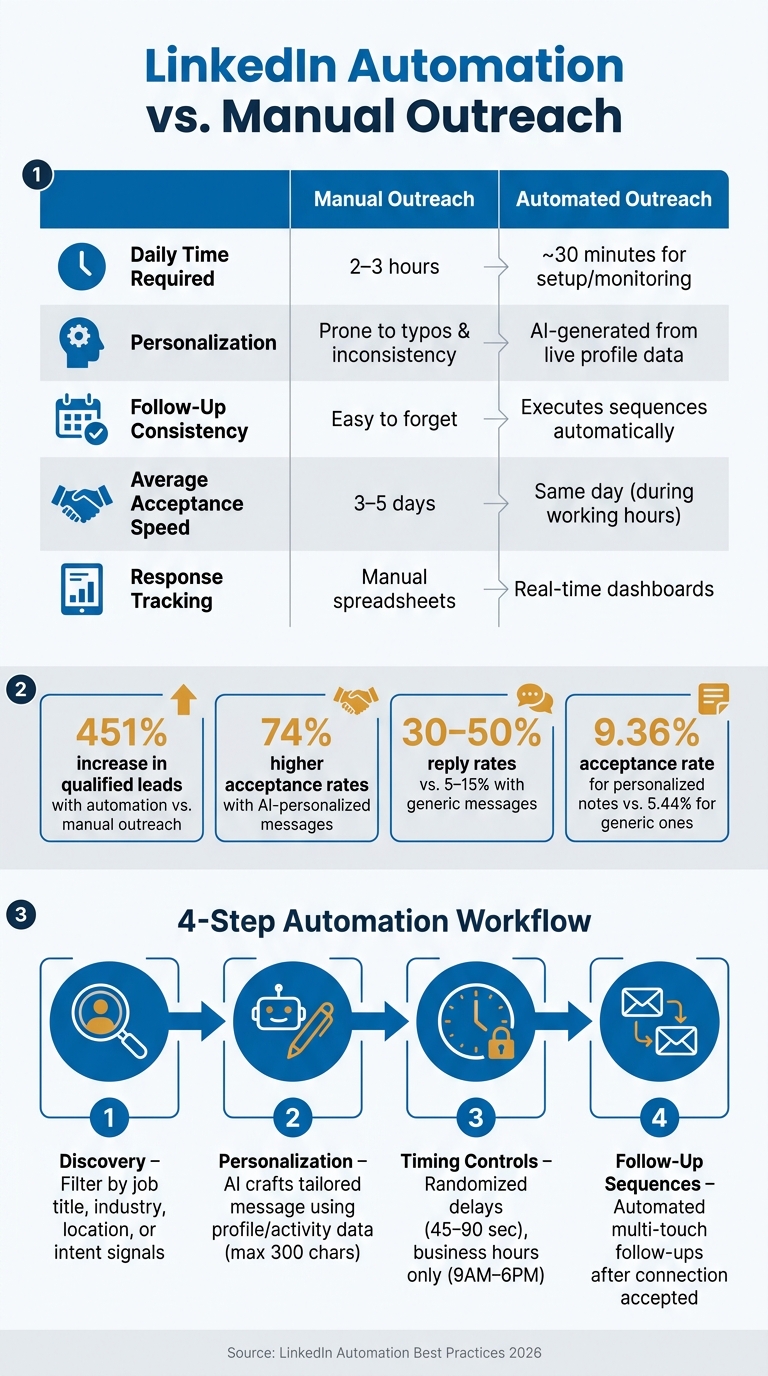
LinkedIn Automation vs Manual Outreach: Key Stats & Workflow
What Is LinkedIn Connection Automation?
LinkedIn connection automation involves using software to handle repetitive tasks like sending connection requests and follow-up messages on your behalf. This software is designed to mimic human interactions, allowing you to focus on meaningful engagement instead.
By automating these requests, you can make a strong first impression without the hours of manual effort. For job seekers, the benefits are clear: professionals using automation report a 451% increase in qualified leads compared to those relying solely on manual outreach. Additionally, automation eliminates the 2–3 hours per day typically spent on manual prospecting, freeing up time for activities like AI-driven interview prep or relationship building.
Let’s break down how this process works.
How LinkedIn Connection Automation Works
Here’s a closer look at the workflow behind LinkedIn connection automation and how it aligns with networking goals.
The process unfolds in four key stages:
- Discovery: This is where you create a target list of potential connections. Filters like job title, industry, or location come into play, or you can focus on people who’ve shown interest in you through actions like viewing your profile or engaging with your posts.
- Personalization: AI tools analyze a prospect’s profile, recent activity, or headline to craft a tailored opening message. With LinkedIn limiting connection notes to 300 characters in 2026, every word matters.
- Timing Controls: To avoid detection by LinkedIn’s algorithms, these tools introduce randomized delays (e.g., 45–90 seconds between actions) and operate only during business hours. This keeps your account safe while maintaining a natural flow.
- Follow-Up Sequences: After a connection request is accepted, the software sends a follow-up message with added value, ensuring timely engagement without redundancy.
"In 2026, automation means using intent signals to identify warm prospects... and letting software handle the repetitive parts while you focus on real conversations." - ReactIn
Manual vs. Automated Outreach: A Comparison
The table below highlights how automation stacks up against manual outreach for job seekers:
| Factor | Manual Outreach | Automated Outreach |
|---|---|---|
| Daily time required | 2–3 hours | ~30 minutes for setup/monitoring |
| Personalization | Prone to typos and inconsistency | AI-generated from live profile data |
| Follow-up consistency | Easy to forget | Executes sequences automatically |
| Average acceptance speed | 3–5 days | Same day (during working hours) |
| Response tracking | Manual spreadsheets | Real-time dashboards |
This comparison underscores how automation saves time and ensures consistency, making it a powerful tool for job seekers.
One important detail to keep in mind: LinkedIn’s 2026 algorithm now applies a "Volume Tax". This penalizes accounts that send high volumes of requests with low response rates. Sending 200 generic requests can hurt your visibility more than sending 25 well-targeted ones. The key to effective automation isn’t quantity; it’s about being strategic and efficient.
sbb-itb-20a3bee
Staying Safe and Following LinkedIn Rules
If you're planning to use automation on LinkedIn for the long haul, keeping your account in good standing is non-negotiable. LinkedIn has stepped up its enforcement game in recent years - account restrictions have surged by 300% since 2023. This makes it crucial to understand and stick to their rules.
LinkedIn Connection Request Limits
LinkedIn no longer has a straightforward cap on connection requests. Instead, it uses a dynamic "Trust Score" system. This score considers factors like your account's age, Social Selling Index (SSI), and how often your connection requests are accepted. Here's a quick look at the typical limits:
| Account Status | Daily Limit | Weekly Limit |
|---|---|---|
| New (under 3 months) | 5–10 | 30–50 |
| Established (3–12 months) | 15–20 | 80–100 |
| Mature / High-Trust (SSI >75) | 20–30 | Up to 200 |
To stay within LinkedIn's good graces, focus on maintaining a high acceptance rate and keeping your pending invitation queue under control. Accounts with an acceptance rate above 40% face 61% fewer restrictions compared to those with rates below 15%. If your acceptance rate dips below 20–25%, it's a good idea to pause your activity and refine your targeting strategy. Additionally, withdraw any pending invitations that have been sitting unanswered for 2–3 weeks to keep your queue clean.
"A user sending 20 targeted, personalized requests with a 40% acceptance rate is in a far safer position than someone blasting generic invites at high volume." - Alex Berman, Founder
Best Practices for Account Safety
Once you're familiar with your connection limits, you can take extra steps to ensure your account remains safe.
Start slow. For the first two weeks, focus on manual activity - like posts, comments, and leveraging LinkedIn data - to establish a natural baseline. After that, gradually increase your activity by no more than 10–20% per week. This keeps your actions looking more authentic to LinkedIn's detection systems.
Here are additional tips to protect your account:
- Stick to business hours (9 AM–6 PM) when running automation. Odd activity during late hours can raise red flags.
- Opt for cloud-based tools instead of browser extensions. Extensions are easier for LinkedIn to detect, while cloud-based platforms significantly reduce this risk.
- Stay below 70% of the maximum daily limit. This buffer helps you avoid triggering warnings.
If you notice repeated CAPTCHAs or forced logouts, it's a clear warning sign. Reduce your activity immediately and reassess your settings to avoid further issues.
How AI Personalizes LinkedIn Connection Requests
Generic messages don't cut it anymore - LinkedIn can identify them with an impressive 94% accuracy. AI steps in to change the game by crafting highly personalized connection requests that stand out.
AI-Driven Personalization Strategies
Today’s AI tools dive deep into a prospect's LinkedIn activity, such as their recent posts, job title, or career changes, to create messages that feel personal and relevant. This approach goes beyond surface-level personalization (like just adding someone's name) to data-driven personalization, which references specific details from profiles or activity.
Why does this matter? Data-driven messages can increase reply rates significantly, from a typical 5–15% to as high as 30–50%. The secret is to focus on one strong signal - whether that’s a recent post, a mutual connection, or a career milestone. Keeping it simple and targeted ensures your message feels genuine. In fact, personalized connection notes have a 9.36% acceptance rate, compared to just 5.44% for generic ones.
"The trigger is often the most powerful personalisation signal available, because it's the actual reason you reached out. Using it makes the outreach feel logical and well-timed rather than random." - SalesTarget.ai
A helpful framework for personalization is the five-layer approach, which includes:
- Profile data (e.g., job title, skills)
- Recent activity (posts or comments)
- Company context (like new hires or funding announcements)
- Mutual connections
- Intent signals (such as profile views)
The trick is to use just one of these signals per message. Overloading your note with too many details can feel intrusive and off-putting.
Since LinkedIn limits connection notes to 300 characters, you need to get to the point quickly. Start with your key observation - this focused approach can boost response rates by 22%.
Next, let’s explore how Acedit uses AI to bring these personalization strategies to life.
Using Acedit for LinkedIn Profile Integration
Personalization doesn’t stop at outreach - it extends to how your LinkedIn profile aligns with the messages you send. That’s where Acedit steps in.
Acedit’s LinkedIn profile integration analyzes your profile data to ensure that your connection requests, cover letters, and other materials reflect your professional story. Instead of creating messages from scratch, Acedit matches your outreach to the skills and experiences already showcased on your profile, helping you make a strong and consistent first impression.
Why does this matter? A poorly aligned message can damage trust before you even start a conversation. With Acedit’s free plan, you can test features like LinkedIn profile integration, AI-generated cover letters, and personalized Q&A tools without any upfront costs. It’s a simple way to ensure your outreach is both accurate and compelling.
How to Set Up a LinkedIn Connection Automation Workflow
Steps to Get Started with Automation
When setting up your LinkedIn connection automation workflow, it's crucial to follow a structured approach to ensure both effectiveness and account safety.
Start by creating a clear plan to avoid triggering LinkedIn's security measures. A good strategy involves targeting profiles that are already engaged with your content - like visitors or commenters - rather than relying on generic CSV uploads. This approach can significantly improve conversion rates, with intent-based targeting achieving 10–25% compared to the 1–3% typical of traditional outreach.
Once you've identified your target audience, implement a 4-week warm-up routine to gradually increase activity:
| Warm-Up Phase | Daily Connection Requests | Method |
|---|---|---|
| Week 1 | 5–10 | Manual only |
| Week 2 | 10–15 | Mix of manual and low automation |
| Week 3 | 15–20 | Full automation |
| Week 4+ | 20–25 | Maintain steady volume |
This phased approach ensures a balance between efficiency and account safety, aligning with LinkedIn's behavioral expectations.
After completing the warm-up, follow a multi-touch sequence to engage prospects effectively. For example, view their profile on Day 1, send a connection request by Day 2 or 3, and follow up 2–3 times over the next several days. Configure your automation tool to stop sending messages as soon as you receive a reply. Continuing automated communication after a response can harm your credibility.
"LinkedIn automation is a precision tool, not a firehose." - Alex Berman
To mimic natural behavior, schedule automation during regular business hours (9 AM–6 PM) and include random delays of 45–90 seconds between actions. Also, keep in mind that LinkedIn's weekly activity limits reset every Monday at 2 AM Pacific Time, so plan your outreach accordingly.
Common Mistakes to Avoid
Avoiding common pitfalls is just as important as setting up your workflow. Here are some mistakes that could jeopardize your account:
- Sudden spikes in activity: LinkedIn monitors your historical behavior. Jumping from 5 daily requests to 50 overnight - even if within the weekly limit - can raise red flags.
- Generic personalization: Simply using placeholders like
{first_name}in your message templates won't cut it. Instead, reference something specific, such as a recent post, career milestone, or mutual connection. - Ignoring pending requests: Letting unanswered connection requests accumulate can hurt your account. Withdraw old requests regularly to keep your pending queue below 500.
- Bot-like behavior: Sending connection requests at odd hours (like 3 AM) or at perfectly consistent intervals is a giveaway to LinkedIn's detection systems.
In 2026, around 23% of LinkedIn automation users faced account restrictions, often due to these operational errors. If LinkedIn flags your activity with a warning or CAPTCHA, pause all automation for 48–72 hours and resume at half your previous volume. As Brian Moran explains, "LinkedIn doesn't behave like a simple counter. It reacts to patterns over time".
Keeping a Professional LinkedIn Presence While Automating
Optimizing Your LinkedIn Profile Before You Start
Automation might get your requests delivered, but it’s your profile that convinces people to respond.
"Even perfectly targeted requests will underperform if the profile doesn't build trust on arrival."
Start by refining your headline and current job title - these make up 60% of LinkedIn search rankings. Stick to clear, search-friendly job titles instead of quirky or nontraditional ones. A strong headline formula is Title + Specialty + Value + Filter, and it should stay under 220 characters.
Beyond the headline, other profile sections play a key role in building trust:
| Profile Element | Why It Matters | Quick Fix |
|---|---|---|
| Profile Photo | Creates visual impact | Use a professional headshot that fills 50–70% of the frame |
| Featured Section | Showcases your work | Pin a case study, article, or major achievement |
| Skills Section | Highlights expertise | List 15–25 skills, emphasizing 3 hard skills at the top |
| Recommendations | Adds social proof | Secure 3–5 recent recommendations from managers or peers |
| About Section | Captures attention | Make the first 200 characters compelling |
A well-optimized profile can lead to double the click-through rate and 50% more messages from visitors. Another small but impactful tweak? Update your public profile URL to remove the default string of numbers. This makes your profile look more polished, whether it’s on your résumé or in your email signature.
Once your profile earns trust, consistent engagement will keep that trust alive.
Engagement Habits That Support Long-Term Networking
Automation can kickstart connections, but manual engagement is what turns them into meaningful relationships. With a polished profile as your base, staying active on LinkedIn strengthens your professional presence.
While automation handles initial outreach, personalized answer suggestions make your connections feel authentic. For example, leaving 1–2 thoughtful comments per week on posts relevant to your industry signals to LinkedIn’s algorithm that you’re an active participant. This activity also helps maintain a healthy Social Selling Index (SSI) score - accounts with scores above 75 tend to see better visibility and higher acceptance rates.
Think of each connection as the start of a conversation. By engaging with posts and responding to replies, you can turn an automated introduction into a lasting professional relationship.
Conclusion
This guide highlights that successful LinkedIn automation is all about blending advanced technology with a personal touch. It's not about sending out as many connection requests as possible but about connecting with the right people at the right time in a way that feels genuine.
"LinkedIn automation is a precision tool, not a firehose. Used correctly, it frees you from manual clicking so you can focus on the conversations that actually matter." - Alex Berman
To get the most out of automation, stick to a few key practices: keep weekly connection requests within safe limits (around 20–25), focus on intent-driven targeting, and leverage AI to craft personalized messages. This approach avoids the pitfalls of generic, high-volume outreach, often referred to as the "Volume Tax". Using signal-based triggers - like responding to job changes or new postings - can significantly improve acceptance rates, boosting them to 40–60% compared to the sub-15% rates for generic messaging.
Once a prospect accepts your connection, tools like Acedit can help you take the next step. Acedit integrates with LinkedIn profiles and uses AI to assist with interview preparation, ensuring you make the most of each new relationship. This tool demonstrates how AI can enhance not just your outreach but your overall networking strategy, providing value far beyond the initial connection.
The key to effective networking lies in combining smart automation to open doors with genuine, manual interaction to build meaningful relationships. By optimizing your profile, personalizing your outreach, and following up thoughtfully, you can turn automation into a powerful ally in your networking efforts.
FAQs
How do I know my LinkedIn account is “safe” to automate?
To keep your LinkedIn account secure while using automation, steer clear of activities that violate LinkedIn's rules, such as sending large volumes of connection requests or scraping data. Aim to send no more than 100 connection requests per week and ensure your acceptance rate stays above 20%. It's also important to mimic natural human behavior in how you interact on the platform.
Be alert for signs that your account might be flagged, such as trouble logging in or receiving warnings. To lower the risk of detection, consider using tools that work directly within your browser session, as they blend more seamlessly with typical user activity.
What’s the best way to personalize a 300-character connection note?
Hi {{firstName}}, I saw your recent post about {{specificTopic}} and found your perspective insightful. I’d love to hear more about your thoughts on this - do you have a moment to connect?
What should I do if LinkedIn shows CAPTCHAs or restricts my account?
If you encounter CAPTCHAs, verification prompts, or account restrictions, halt all automation and manual outreach right away. Ignoring these warnings and continuing could result in stricter penalties. Be sure to check your email and LinkedIn notifications for any verification requests and address them immediately.
Take a break from activity for 24–72 hours to allow your account to recover. When you resume, proceed cautiously - start with a slower pace and gradually increase activity to minimize the risk of additional restrictions.