Virtual behavioral interviews can measure platform friction instead of job fit. When captions lag, screen readers fail, or time limits hit too hard, candidates are judged on access barriers, not on their answers.
Here’s the short version:
- Three problems show up most often: communication barriers, platform barriers, and time pressure.
- The impact is measurable: candidates with disabilities are 30%–40% less likely to get callbacks or offers, and 33% say they are not comfortable disclosing a disability during a job search.
- A few setup changes can remove a lot of friction: captions or CART, screen-reader support, keyboard navigation, written prompts in chat, and extra response time.
- Prep matters too: mock interviews, realistic practice sessions, a saved STAR story bank, and practice with captions or assistive tools can cut down stress before interview day.
- Employers set the tone: sending the format early, using plain language, testing the platform, and inviting accommodation requests can make interviews more accurate.
If I strip this down to one idea, it’s this: behavioral interviews work better when they test skills instead of barriers. The article shows where interviews go wrong, what candidates can do to prepare, and what employers can change before the call starts.
How behavioral interviews create accessibility barriers
Behavioral interviews can shut people out when candidates need captions, interpretation, assistive tech, or more time to process and respond.
Communication barriers in live virtual interviews
Live virtual interviews often fall apart in small but damaging ways. Captions lag. Audio cuts out or sounds muddy. Visual cues are easy to miss. When captions are late or wrong, they can mis-transcribe names, technical terms, and action verbs.
That matters more than it may seem. A candidate may be trying to answer while also checking whether the caption even matches what the interviewer said. If follow-up questions come fast, that pressure stacks up. For candidates reading captions or working through sign-language interpretation, the pace alone can become a barrier.
These problems get worse when the interview platform is hard to use.
Technology barriers that affect participation
Some platforms make basic tasks harder than they should be. Unlabeled controls, weak screen reader support, and poor keyboard navigation can stop blind, low-vision, and mouse-free candidates from unmuting, opening chat, or getting to shared materials.
A few common trouble spots show up again and again:
- Scanned PDFs and images of text don’t work with screen readers.
- Weak platform support can block keyboard-only navigation.
- Unstable internet can interrupt answers and hide nonverbal cues that shape how a response is received.
So even if a candidate is ready, the tool itself can get in the way.
Time pressure and cognitive load
Time limits add another layer of strain. For candidates with ADHD, autism, dyslexia, anxiety, or other processing differences, strict timing can turn a normal interview prompt into a heavy mental load. A question like "Describe a time you led a cross-functional launch under tight deadlines" asks for fast decoding, recall, and structured behavioral interview responses all at once.
Now add captions, notes, and platform controls on top of that. Instead of showing job skill, the interview can end up measuring how much information a person can juggle in real time.
Those barriers point straight to the platform features that can lower them. Practicing with AI-driven interview tools can help candidates navigate these technical hurdles in a low-pressure environment.
sbb-itb-20a3bee
Virtual interview features that reduce barriers
Platform features that support accessibility
Some platform features can cut down the communication, tech, and time-pressure issues described above. The link is pretty direct: when the tool works better, the interview gets easier to access.
Closed captions and CART matter a lot. Built-in captions let candidates read spoken questions in real time. But automated captions can get technical terms, names, and accented speech wrong. In higher-stakes interviews, CART (Communication Access Realtime Translation) is the better pick when accuracy needs to be higher.
Screen reader compatibility is another basic requirement. Platforms need clearly labeled buttons, a logical keyboard focus order, and correct ARIA attributes so candidates using JAWS, NVDA, or VoiceOver can join the call, read prompts, open shared files, and submit responses on their own. If the join button has no label, a blind candidate may not be able to get into the interview at all.
High-contrast display options and adjustable text size can ease eye strain for candidates with low vision, dyslexia, migraine sensitivity, or other visual processing needs. Accessible document sharing also plays a big role. Résumés, job descriptions, and interview prompts should be shared as selectable text, not scanned images, and they should use proper headings so screen readers can move through them with ease.
Flexible response options that improve access
Extra response time can help candidates organize a STAR answer using sample responses and show what their communication skills are actually like. For people managing ADHD, anxiety, processing differences, or speech disabilities, even a few extra minutes can make a big difference compared with a hard cutoff.
Written prompts and follow-up in chat help in much the same way. When behavioral questions appear in chat or on screen, candidates can reread the wording and build a more accurate answer. Letting candidates reply in chat when needed, instead of audio only, can also help people with speech disabilities or those working with sign-language interpreters. For ASL users, pinning or spotlighting the interpreter’s video helps keep the interpreter visible the whole time.
The same tools also make prep before interview day easier. Candidates can also use personalized answer suggestions to refine their responses in advance.
Accessible interview preparation using virtual tools
Practice methods that lower barriers before interview day
Once the interview platform is accessible, prep should take care of the rest. The goal is simple: cut down surprises and ease mental strain. When candidates know the format, the kinds of questions they may get, and which examples match which skills, they can put their energy into speaking clearly instead of scrambling to think on the fly.
Mock interviews are one of the clearest ways to make that happen. Record a practice session with standard behavioral questions, then watch it back. That gives candidates a chance to check both what they said and how they said it. A recording often shows patterns that are easy to miss in the moment, like skipping the Result part of a STAR answer or drifting mid-sentence. It can also surface caption, timing, and navigation issues before the actual interview.
A saved answer bank can ease working-memory strain. Keep a short set of core experiences in a plain document and tag each one by skill area, such as leadership, conflict resolution, or adaptability. Then store each story in STAR format. That way, candidates aren't inventing examples on the spot.
Practice with captions and screen readers turned on so the live setup feels normal. That kind of dry run removes a whole set of day-of problems.
How Acedit can support accessible preparation
For candidates who want more guided practice, AI tools can add structure without taking over their personal stories. Acedit can bring practice, written prompts, and response scaffolding into one place for candidates who need a more structured prep process.
Its personalized Q&A generation builds a library of behavioral questions and STAR-based sample answers from a specific job listing, which cuts down uncertainty about what may come up. For candidates who learn better from written examples, clear models to review and adjust are often more useful than starting with a blank page. The interview simulation feature adds a repeatable practice format with fewer surprises, so candidates can rehearse common behavioral scenarios multiple times without needing another person.
During practice, real-time response suggestions can help ease working-memory strain when a candidate gets stuck in the middle of an answer. These prompts aren't meant to be a script. They give the candidate a structure to follow, which can make it easier to finish clearly and stay on track, especially for people dealing with anxiety or working-memory challenges.
Use AI suggestions as a draft, then swap out generic wording for your own details, job titles, numbers, and outcomes.
How employers can design more accessible virtual behavioral interviews
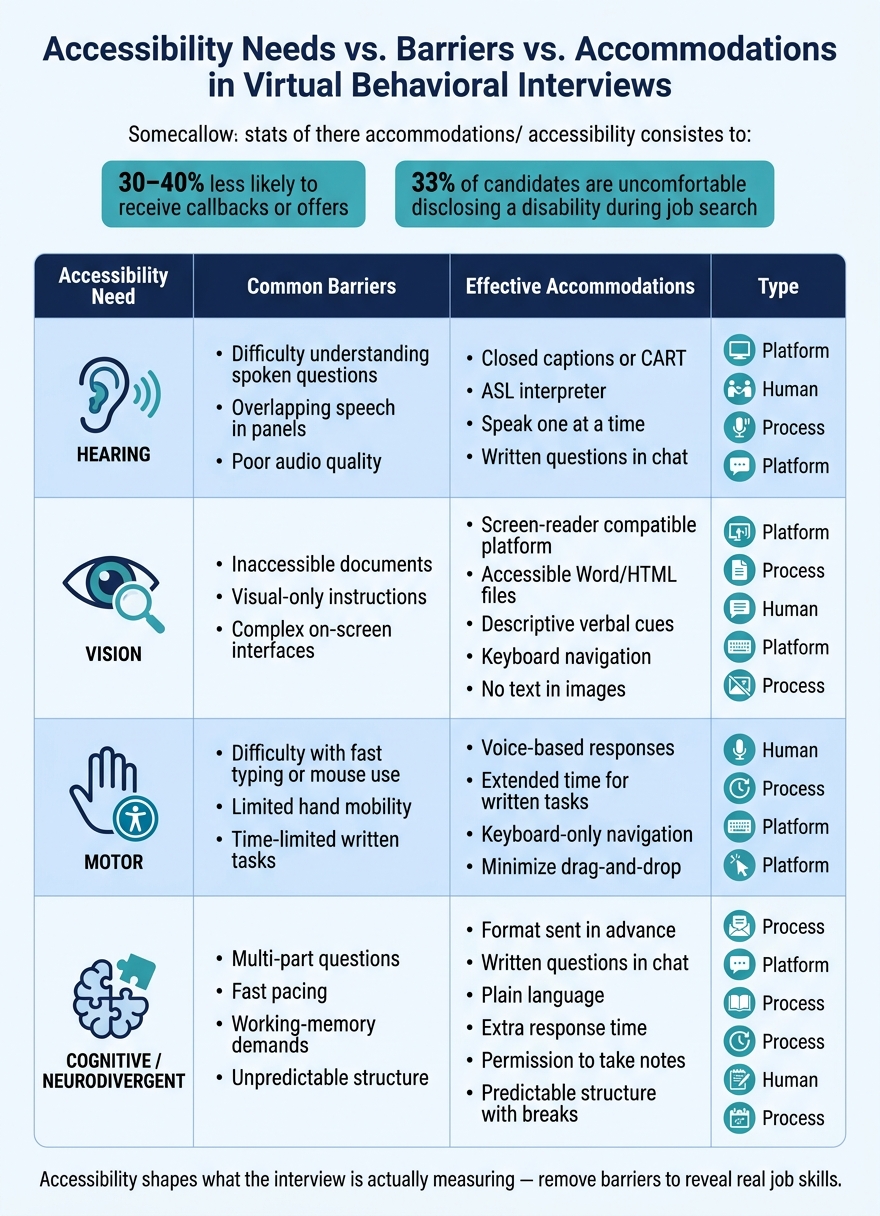
Accessibility Barriers in Virtual Behavioral Interviews: Needs, Barriers & Accommodations
Perfecting your interview preparation matters, but employers still set the conditions for the interview. In most cases, the biggest barriers come from how the interview is built, not from the interview format itself.
Interview design choices that reduce avoidable barriers
Send the interview format several business days in advance. Share the number of questions, the competency areas, the expected length, and the platform details. For candidates who need more time to process information, send question themes or sample questions up to a week ahead.
Use plain language in every touchpoint. This applies to written invitations, how questions are written, and how they are spoken. Stick to one idea per question, avoid multi-part directions, and leave out jargon. Interviewers should be trained to read slowly, pause for 5–10 seconds, and repeat or rephrase a question when asked.
Test the platform before interview day. Check that it works with screen readers, keyboard-only navigation, and magnification tools. It also helps to offer candidates a test connection so they can sort out tech issues ahead of time. Send pre-interview materials, including job descriptions, instructions, and competency overviews, as accessible Word or HTML files instead of image-only PDFs.
Add one clear line in every interview invitation that invites candidates to request a disability-related accommodation. This can include captioning, an interpreter, or extended time. Ask all candidates, not only those who identify as disabled. That helps normalize the process and cut down on stigma.
Matching accessibility needs to the right accommodations
This table links each access need to the barrier it can create and the accommodation that can remove it.
| Accessibility Need | Common Barriers | Effective Accommodations |
|---|---|---|
| Hearing | Difficulty understanding spoken questions; overlapping speech in panels; audio quality issues | Closed captions or CART; ASL interpreter; speaking one at a time; written questions shared in chat |
| Vision | Inaccessible documents; visual-only instructions; complex on-screen interfaces | Screen-reader compatible platform; accessible Word/HTML files; descriptive verbal cues; keyboard navigation; no text embedded in images |
| Motor | Difficulty with fast typing or mouse use; limited hand mobility; time-limited written tasks | Voice-based responses; extended time for written tasks; keyboard-only navigation; minimizing drag-and-drop interactions |
| Cognitive / neurodivergent | Multi-part questions; fast pacing; working-memory demands; unpredictable structure | Interview format sent in advance; written questions in chat; plain language; extra response time; permission to take notes; predictable structure with breaks |
Conclusion: Better access leads to better interview outcomes
Behavioral interviews get harder than they need to be when the format puts extra obstacles in the way. The big takeaway is simple: accessibility shapes what the interview is actually measuring. If a candidate has to deal with fast recall, multi-part questions, or a platform that’s hard to use, the interview can end up testing friction instead of job skill.
Once you spot those barriers, the fixes aren’t complicated. Live captions, chat prompts, and flexible timing can make the interview clearer and less stressful for everyone involved.
Preparation matters just as much as the platform itself. Candidates who connect their past experience to a clear framework, practice with AI and traditional interview questions, and test their tech setup ahead of time are in a much better spot to show what they can do. Tools like Acedit can help with that prep through personalized questions and interview simulations.
Candidate prep helps, but employers still set the conditions of the interview. Accessibility should be part of fair, accurate hiring, not a box to check. When candidates aren’t burning mental energy on avoidable obstacles, their answers do a better job of showing job-related skills. That leads to a clearer signal, better hiring calls, and stronger hires.
Accessibility gets better through feedback, iteration, and a hiring process that measures ability instead of barriers.
FAQs
How do I ask for interview accommodations?
Check the job posting for recruiter or hiring contact details. If that’s not listed, reach out to the recruiter or hiring manager directly. Be clear that you’re asking for an accommodation to support an equitable interview experience, and spell out the accessibility support you need.
It’s usually best to ask well before the interview date. You can also use Acedit to prepare with more confidence and better structure.
Which accessibility features matter most in virtual interviews?
The most important features are clear audio and video, strong eye contact with the camera, steady pacing, vocal variety, and structured answers using STAR.
These basics make a big difference. They help you communicate clearly, build rapport, and keep your answers concise instead of rambling.
Tools like Acedit can also help by offering real-time question detection and personalized response suggestions.
How can I practice behavioral interviews with assistive tools?
You can practice behavioral interviews with Acedit in simulated interview sessions with AI-driven feedback. That means you’re not just reading sample answers off a page. You’re rehearsing STAR-based responses in a setting that feels much closer to an actual interview.
Acedit also reviews how you answer from multiple angles, including your content, tone, pacing, and delivery. On top of that, it creates practice questions tailored to your resume and the job description, so your prep feels specific instead of generic.