
Managing social media is harder than ever, with businesses juggling multiple platforms and high consumer expectations for quick responses. AI tools are stepping up to simplify this, saving teams 5–15 hours weekly and boosting ROI by up to 200%. Here's a breakdown of the top five AI-driven platforms for social media management in 2025:
- SocialBee: Offers AI Copilot for strategy, category-based scheduling, and content recycling. Pricing starts at $24/month.
- Buffer: Known for its AI Assistant that generates captions and repurposes content. Starts at $5 per channel/month.
- Pallyy: Focused on Instagram, with a drag-and-drop grid planner and caption generation. Pro plan starts at $25/month.
- Hootsuite: Ideal for large teams, featuring OwlyWriter AI and bulk scheduling for up to 350 posts. Starts at $99/month.
- Sprout Social: Designed for enterprises with advanced analytics, sentiment analysis, and AI-driven insights. Starts at $199/user/month.
Each tool caters to different needs, from solo creators to large organizations. Below is a quick comparison of their features and costs.
Quick Comparison
| Tool | Best For | Starting Price | Key Features |
|---|---|---|---|
| SocialBee | Strategy + Automation | $24/month | AI-driven strategy, content recycling |
| Buffer | Small Teams/Creators | $5/channel/mo | AI Assistant, platform-specific content |
| Pallyy | Instagram Management | $25/month | Visual grid planner, caption generator |
| Hootsuite | Large Teams | $99/month | Bulk scheduling, AI-powered insights |
| Sprout Social | Enterprises | $199/user/mo | Sentiment analysis, advanced analytics |
These tools make social media management faster and more efficient, helping businesses stay consistent and engage audiences effectively.
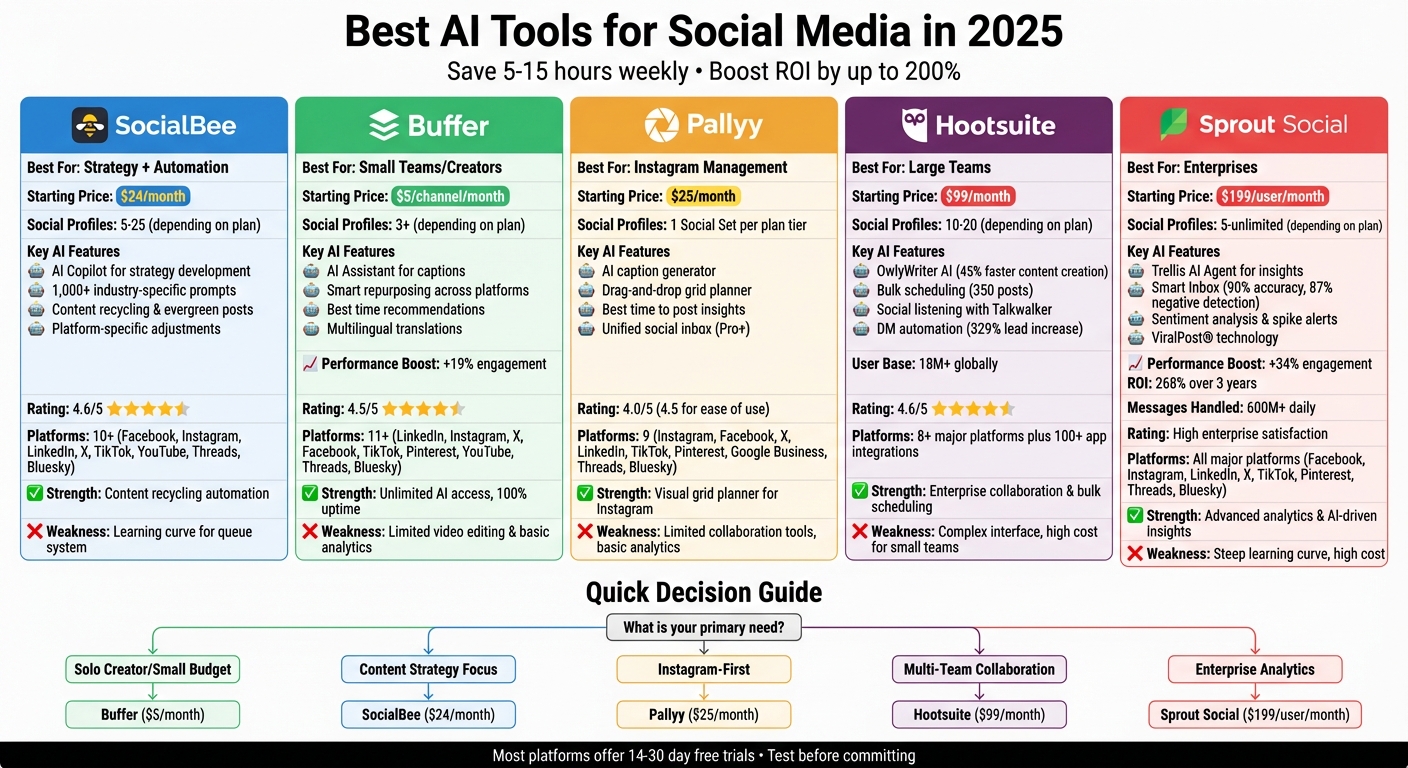
AI Social Media Tools Comparison 2025: Features, Pricing & Best Use Cases
I Automated My Entire Social Media in 5 Minutes
sbb-itb-20a3bee
1. SocialBee with AI Copilot
SocialBee takes a unique approach by integrating AI as a strategic partner. Its AI Copilot analyzes your website or specific business inputs to craft a tailored social media strategy. This includes advising on the best platforms to focus on and ideal posting frequencies - going beyond just content creation to offer actionable planning insights.
AI Features
SocialBee's AI tools are designed to streamline social media management in three major ways:
- AI Copilot: Develops a posting strategy aligned with your brand's identity (similar to how you might use AI in your job search).
- Content Creation: Generates captions and visuals using a library of over 1,000 industry-specific prompts for targeted marketing.
- Platform-Specific Adjustments: Automatically adapts post formats to fit the tone and requirements of various platforms.
Additionally, SocialBee uses a category-based scheduling system to keep your content organized. You can assign posts to specific categories - like promotions, blog updates, or quotes - and schedule them for consistent posting. It also features an evergreen recycling option that reuses popular posts while ensuring time-sensitive content expires as needed.
"Generates on-brand captions, hashtags, and optimal post times - boosted my engagement by 30%".
These features make SocialBee a standout option for brands looking for both strategy and execution.
Pricing
SocialBee provides three paid plans, each with a 14-day free trial:
- Bootstrap Plan: $29/month (or $24.20/month annually, saving about 16.66%) for 5 social profiles, 1 user, and 1 workspace.
- Accelerate Plan: $49/month for 10 social profiles and a 2-year analytics history.
- Pro Plan: $99/month, supporting 25 social profiles, 3 users, and 5 workspaces.
This tiered pricing ensures options for businesses of various sizes and needs.
Platform Support
SocialBee’s integrations expand its utility across multiple platforms. It connects to over 10 social networks, including popular options like Facebook (Pages, Groups, Profiles), Instagram, LinkedIn, X (Twitter), Pinterest, TikTok, and YouTube. It also supports newer platforms like Threads, Bluesky, Mastodon, and Google Business Profile. The "Universal Posting" feature extends functionality to Reddit, Quora, WhatsApp, and Telegram.
Visual content creation is made easier with built-in integrations for Canva, Unsplash, and GIPHY. Plus, it supports over 10 URL shortening services, simplifying link tracking and performance measurement.
Performance
SocialBee consistently earns praise for its AI-driven features. It received a 4.6 out of 5 rating from AllAboutAI, with high marks for speed, caption quality, and scheduling efficiency. Users particularly value the category-based scheduling and content recycling features, which save time and effort. However, some users report a steep learning curve due to the platform's extensive feature set and note the lack of a unified social inbox for managing comments and messages.
Dupple's review summed it up well:
"SocialBee wins for content-heavy teams who want to post consistently with minimal daily effort".
2. Buffer with AI Assistant
Buffer's AI Assistant, integrated directly into the post composer, is designed specifically for social media platforms. Unlike generic AI chatbots, this tool adapts to the nuances of each platform, such as character limits and tone preferences. For instance, it suggests formal language for LinkedIn while keeping updates short and snappy for TikTok.
AI Features
The AI Assistant tackles writer's block by generating ideas, captions, and even full drafts from minimal input. Its standout feature? Smart repurposing. This allows users to transform a single post into formats tailored for different platforms - like turning a LinkedIn article into a thread for X (formerly Twitter). With just a click, users can adjust tone, expand, condense, or rephrase content. It also offers features like hashtag generation, text overlays for TikTok, and multilingual translations. On top of that, Buffer analyzes past engagement data to recommend the best posting times, a tactic shown to improve engagement by 23% over 30 days.
"I've become more focused, spending an hour maximum a week writing and scheduling my posts for the week ahead. If I'm out of ideas, asking the AI tool for ideas is a great place to start too."
- Vicki Lovegrove, Design Consultant
These capabilities make Buffer an efficient tool for creators looking to streamline platform-specific content creation.
Pricing
Buffer has removed credit limits, offering unlimited access to its AI Assistant across all plans. The Free Plan includes up to 3 social channels and allows 10 scheduled posts per channel. For more robust features, the Essentials Plan starts at $5–$6 per month per channel, offering unlimited scheduling and advanced analytics. The Team Plan, priced at around $12 per month per channel, adds collaboration tools. For larger needs, the Agency Plan supports 10 channels at $120 per month.
Platform Support
Buffer supports over 11 platforms, including LinkedIn, Instagram, X (Twitter), Facebook, TikTok, Pinterest, YouTube, Google Business Profile, Mastodon, Threads, and Bluesky. Its AI adapts content suggestions to fit the specific requirements of each platform, eliminating the hassle of manual reformatting. This adaptability ensures a seamless experience for users managing multiple networks.
Performance
Over a four-month test period, Buffer maintained nearly 100% uptime and had zero failed scheduled posts. Its AI recommendations proved accurate 80% of the time for Instagram captions and 85% for X (Twitter) hashtag suggestions. Additionally, Buffer earned a 4.5 out of 5 rating from AllAboutAI for its speed, caption quality, and scheduling efficiency. While users appreciate its intuitive interface, they note that its analytics may not meet the needs of larger enterprises. Even so, its reliability and precision make it a valuable tool for social media scheduling and content creation.
3. Pallyy
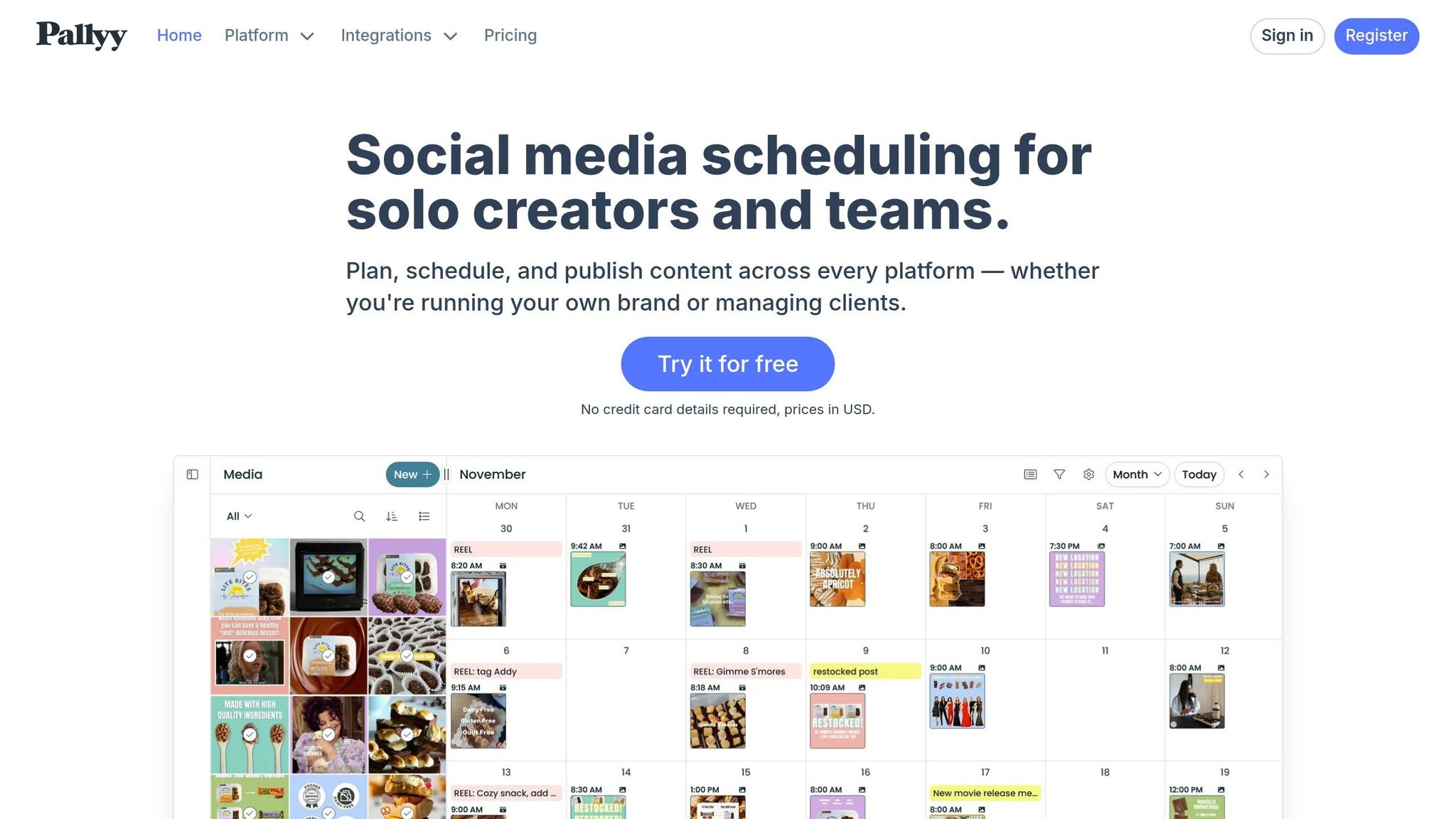
When it comes to Instagram-focused tools, Pallyy offers an Instagram-first scheduling tool with a strong emphasis on visual planning. Its drag-and-drop grid planner lets users preview and tweak their Instagram layout before posting, making it easy to maintain a cohesive aesthetic. This tight focus on Instagram sets the stage for its AI-powered features.
AI Features
Pallyy’s AI caption generator integrates directly into its post builder, creating caption drafts based on your input - like a description, tone, length, and even the number of hashtags. These captions can be saved into lists (e.g., a LinkedIn-specific list) and scheduled well in advance. However, its AI capabilities have some limits; it doesn’t support image generation, video editing, or automated content recycling.
The platform also provides "Best Time to Post" insights for Instagram, using account performance data to help maximize engagement. On Pro plans and above, users can access a unified social inbox that consolidates comments, DMs, and mentions from Instagram, Facebook, LinkedIn, TikTok, and Google Business Profile. While Pallyy lacks the multi-platform versatility of some competitors, it excels in helping users fine-tune Instagram’s visual appeal.
Pricing
Pallyy offers flexible pricing options to suit different needs. It uses a "Social Set" model, where each set covers one account across its supported platforms.
- The Free Plan includes 15 posts per month and 5 AI caption generations.
- The Pro Plan, priced at $25/month, includes unlimited posts and AI caption credits.
- For teams, the jump to the Agency Plan at $99/month adds collaboration tools.
- The Scale Plan, at $199/month, supports up to 30 Social Sets and 10 users.
Platform Support
Pallyy works with key platforms like Instagram, Facebook, X (formerly Twitter), LinkedIn, TikTok, Pinterest, Google Business Profile, Threads, and Bluesky. However, YouTube is limited to Shorts under 60 seconds, with no support for long-form videos or detailed analytics. While Instagram analytics are robust, reporting for other networks is relatively basic. Additionally, publishing Instagram Stories requires a separate reminder app.
Performance
Pallyy has received an overall rating of 4.0 out of 5, with a 4.5 out of 5 for ease of use. Users often highlight its visual grid planner and affordability for solo creators. However, larger teams may find its collaboration tools lacking, and the pricing jump for higher-tier plans can be a drawback. Another limitation is the mobile app, which primarily sends push notifications for manual publishing rather than offering full scheduling functionality.
4. Hootsuite
Hootsuite is a high-level social media management platform designed for businesses and teams handling multiple accounts. With over 18 million users globally, it offers tools for collaboration and AI-powered automation, making it ideal for managing social media at scale. Its features blend scheduling efficiency with advanced capabilities like social listening and automated customer engagement.
AI Features
Hootsuite’s AI tools are centered around OwlyWriter AI, which helps craft social media captions, generate content ideas from keywords or links, and identify successful posts for repurposing. Another standout is OwlyGPT, an AI-powered social media assistant that brainstorms campaign ideas, detects trends from online chatter, and transforms long-form content into social posts.
The Best Time to Publish tool analyzes up to 16 weeks of audience data to suggest optimal posting times based on specific goals like increasing engagement or boosting traffic. For social listening, Hootsuite integrates with Talkwalker, which performs sentiment analysis, predicts trends, and even recognizes brand logos or products in images and videos.
One particularly notable feature is DM Automation, which sends personalized direct messages to users who comment with specific keywords. Social Strategist Trish Riswick noted that this feature led to a 329% increase in Instagram leads for Hootsuite’s own social team. The AI-powered inbox further enhances engagement by automating message routing, providing auto-responses, and enabling chatbot interactions. Additionally, users can schedule up to 350 posts at once through bulk uploads via CSV.
Pricing
Hootsuite’s pricing starts with the Professional Plan at $99/month, which includes one user, 10 social accounts, unlimited scheduling, and access to OwlyWriter AI. For teams, the Team Plan costs around $249/month, supporting up to three users and 20 accounts. Larger organizations can opt for the Enterprise Plan, which offers custom pricing and includes advanced features like social listening and employee advocacy. Most plans come with a 30-day free trial.
Platform Support
Hootsuite supports major platforms such as Facebook, Instagram (including Stories and Reels), X (formerly Twitter), LinkedIn, TikTok, YouTube, Pinterest, and Threads. It also integrates with over 100 apps, including Canva, Notion, Slack, and Bluesky. Canva is embedded directly into the dashboard, allowing users to access design templates seamlessly.
Performance
Hootsuite has received strong feedback, with a 4.6 out of 5 rating from AllAboutAI and an overall score of 8.6 out of 10 from SiteOptz. Users often highlight its analytics and unified inbox as key strengths. Success stories include Stuckey’s, which boosted online sales by 750%, and Apricotton, which saw a 108% sales increase in just two weeks. However, some users criticize its higher pricing and complex interface, and certain advanced AI features are only available in enterprise plans.
Next, we’ll dive into Sprout Social’s features and offerings.
5. Sprout Social
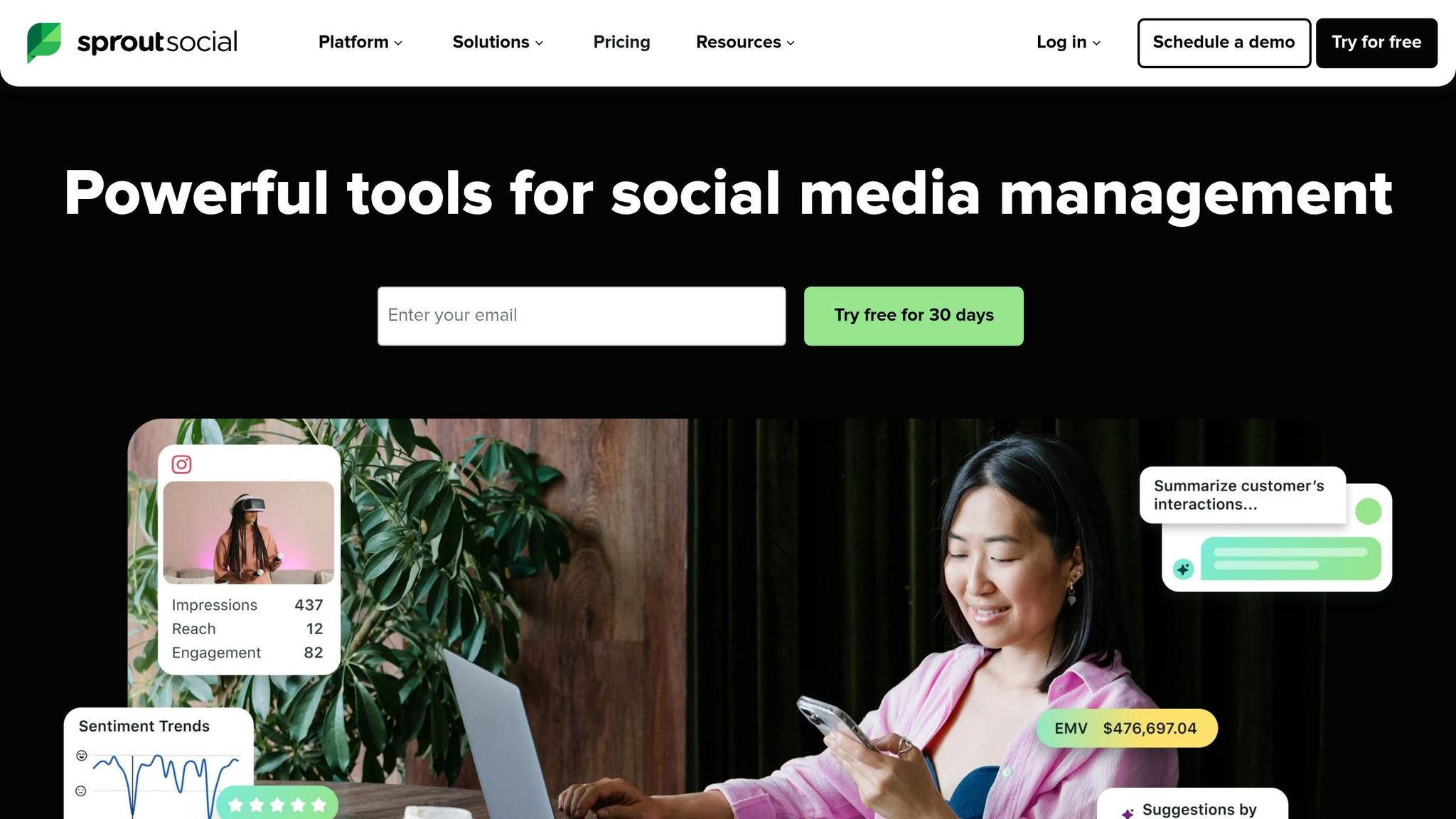
Sprout Social is designed for large teams managing 20 or more accounts, handling over 600 million messages daily while integrating advanced analytics and CRM tools. Unlike tools aimed at smaller teams, Sprout Social focuses on AI-driven insights and automation to meet the demands of high-volume social media management. It supports all major platforms, including Facebook, Instagram, LinkedIn, X (formerly Twitter), TikTok, Pinterest, Threads, and Bluesky. Its enterprise-grade features make it a standout for managing complex social media strategies.
AI Features
Sprout Social’s Trellis AI Agent provides actionable insights tailored to your needs, while AI Assist fine-tunes post copy, captions, and alt text to maintain your brand’s tone and accessibility. ViralPost® technology uses 16 weeks of audience engagement data to determine the best times to post for maximum reach.
The Smart Inbox sorts messages by sentiment, identifying 87% of negative comments and routing urgent issues to the right team. Chatbots handle routine queries, and AI-suggested replies achieve over 90% accuracy. Spike Alerts notify users of sudden changes in sentiment or volume, while Analyze by AI Assist condenses social listening data into quick, actionable summaries. Erica Bufford from Tesco shared her experience:
"Analyze by AI Assist has been a game changer for how I approach content and campaign analysis... What could previously take me hours of manual effort - such as identifying trends, measuring performance, and generating insights - can now be done in minutes."
Pricing
Sprout Social's pricing reflects its advanced capabilities and enterprise focus.
- Standard Plan: $199 per user/month (billed annually) or $249 month-to-month, includes five social profiles and AI-generated alt text.
- Professional Plan: $299 per user/month, offering unlimited social profiles and competitor insights.
- Advanced Plan: $499 per user/month, featuring sentiment analysis and message spike alerts.
- Enterprise Plan: Custom pricing, typically ranging from $2,000 to over $10,000 per month.
A 30-day free trial is available with no credit card required.
Performance
Sprout Social delivers measurable results, with a 268% ROI over three years and total benefits of $1.31 million, according to a 2025 Forrester Consulting study. For example, the Atlanta Hawks used Sprout’s AI insights during the 2024 All-Star Weekend to analyze content themes, resulting in a 170.1% audience growth on Facebook and a 127.1% increase in video views within three months.
That said, the platform’s pricing may be a hurdle for smaller teams or solo creators, as native tools or more affordable alternatives might be better suited for managing fewer than 20 accounts.
Strengths and Weaknesses
Each tool brings its own set of perks and challenges, making them suitable for different team sizes and goals. Here's a closer look at what makes each stand out - and where they might fall short.
SocialBee is a standout for its ability to recycle evergreen content automatically, saving time and effort. Its AI Copilot can craft comprehensive posting strategies aligned with your business objectives. However, the platform's queue system can take some time to master.
Buffer, on the other hand, shines with its easy-to-use interface that simplifies scheduling. It's an affordable choice for smaller teams, with prices starting at just $5 per channel per month. That said, its lower-tier plans lack advanced video editing tools and in-depth analytics. On the plus side, its AI Assistant has been shown to boost engagement by 19%, making it a great option for creators looking for simplicity.
Hootsuite is perfect for large-scale operations, offering bulk scheduling for up to 350 posts and AI-powered heatmaps to identify the best posting times. Its OwlyWriter AI can cut content creation time by 45%. However, its more complex interface and $99/month price point can be a hurdle for smaller teams that don't need enterprise-level features.
Sprout Social excels in advanced analytics and sentiment analysis. Its Smart Inbox uses AI to prioritize and categorize messages with over 90% accuracy. During testing, its AI-optimized posts drove a 34% increase in engagement, and the platform delivered a 268% ROI over three years. But with a starting price of $199 per user per month and a steep learning curve, it may not be the best fit for smaller teams.
Here's a quick comparison of the tools, highlighting their strengths and weaknesses:
| Tool | Best For | AI Performance Boost | Starting Price | Key Weakness |
|---|---|---|---|---|
| Sprout Social | Enterprise Analytics | +34% Engagement | $199/user/month | Steep learning curve, high cost |
| Hootsuite | Multi-team Collaboration | - | $99/month | Complex interface, costly for small teams |
| Buffer | Small Teams/Creators | +19% Engagement | $5/channel/month | Limited video editing, basic analytics |
| SocialBee | Content Recycling | - | $24/month | Learning curve for queue system |
Conclusion
Each AI scheduling tool brings something distinct to the table, catering to varying team sizes, budgets, and strategic goals. Choosing the right platform depends on your workflow needs and the scale of your operations.
For solo entrepreneurs and small businesses, Buffer stands out with its free tier and wallet-friendly paid plans. If you're looking for a tool that combines strategic content guidance with automation, SocialBee is a solid choice at $24 per month. It helps users build content pillars and manage evergreen posts seamlessly. For agencies managing multiple clients, Hootsuite offers bulk scheduling for up to 350 posts and its OwlyWriter AI, which reduces content creation time by 45%. However, the $99 per month fee and complex interface might deter smaller teams.
On the enterprise side, Sprout Social shines with features like advanced sentiment analysis and a Smart Inbox that organizes messages efficiently. The Atlanta Hawks leveraged Sprout Social's AI insights during All-Star Weekend, achieving a 170.1% increase in their Facebook audience and a 127.1% boost in video views within three months. At $199 per user per month, it's an investment best suited for organizations that need detailed analytics.
"Managing your social media presence in 2025 without a smart scheduling tool is like sailing a ship without a compass." - SocialeBuzz
These tools highlight the growing emphasis on personalization and automation in social media management. For those keeping an eye on costs, free options like Buffer's basic tier can handle initial scheduling needs before upgrading. Since most platforms offer 14- to 30-day trials, testing their AI capabilities with your content is a smart move before committing to a paid plan.
FAQs
Which tool fits my team size and budget?
When choosing the right AI social media tool, your team size and budget play a big role. SocialeBuzz is a great option for solo creators or small teams. It offers AI-generated posts and automatic scheduling for just $15 per month. On the other hand, if you're part of a larger team with more resources, Hootsuite might be a better fit. It provides advanced analytics and automation features, but it comes with a higher price tag of $149 per user per month. SocialeBuzz is tailored for startups, while Hootsuite caters to teams with more extensive management needs.
How do I measure ROI from an AI scheduler?
To gauge the ROI of an AI scheduler, focus on a few critical metrics: time saved, engagement rates, and performance improvements. Start by comparing how much time you spent on scheduling and content creation before and after adopting the tool - ideally, you’ll notice a meaningful reduction in time spent.
Next, dive into engagement metrics like likes, shares, and click-through rates to see if the tool is helping boost audience interaction. Finally, assess how well it aligns with broader marketing goals, such as lead generation, conversions, and increasing brand visibility. These factors will give you a clear picture of how effective the AI scheduler truly is.
What should I test during a free trial?
During a free trial of AI-powered social media scheduling tools, focus on testing essential features like content creation (including posts and captions), scheduling with auto-posting across multiple platforms, and analytics to track performance. Evaluate how well the tool supports platform compatibility, its user-friendliness, and whether it offers collaboration features like drafts and approval workflows. Also, see if the AI can tailor content to fit different platforms and formats, helping you streamline your social media process.