
Want your resume to stand out in today’s job market? Here’s the key: optimize it for Applicant Tracking Systems (ATS) and human recruiters. Over 75% of resumes are filtered out by ATS before reaching a recruiter, and 60% of recruiters now review resumes on mobile devices. This means your resume must be both ATS-compatible and easy to read for humans.
Here’s a quick summary of how to optimize your resume:
- Research Keywords: Analyze job descriptions for recurring skills and terms. Match at least 70% of the keywords to double your chances of getting interviews.
- ATS-Friendly Formatting: Stick to a simple, single-column layout. Avoid graphics, tables, or unconventional fonts that confuse ATS software.
- Quantify Achievements: Replace generic descriptions with measurable results (e.g., "Increased revenue by 20%").
- Use AI tools in your job search wisely: Choose tools that refine content, check formatting, and analyze keywords. Ensure your data is protected by reviewing privacy policies.
- Test for Compatibility: Use tools to check ATS readability and aim for a parse score of 90% or higher.
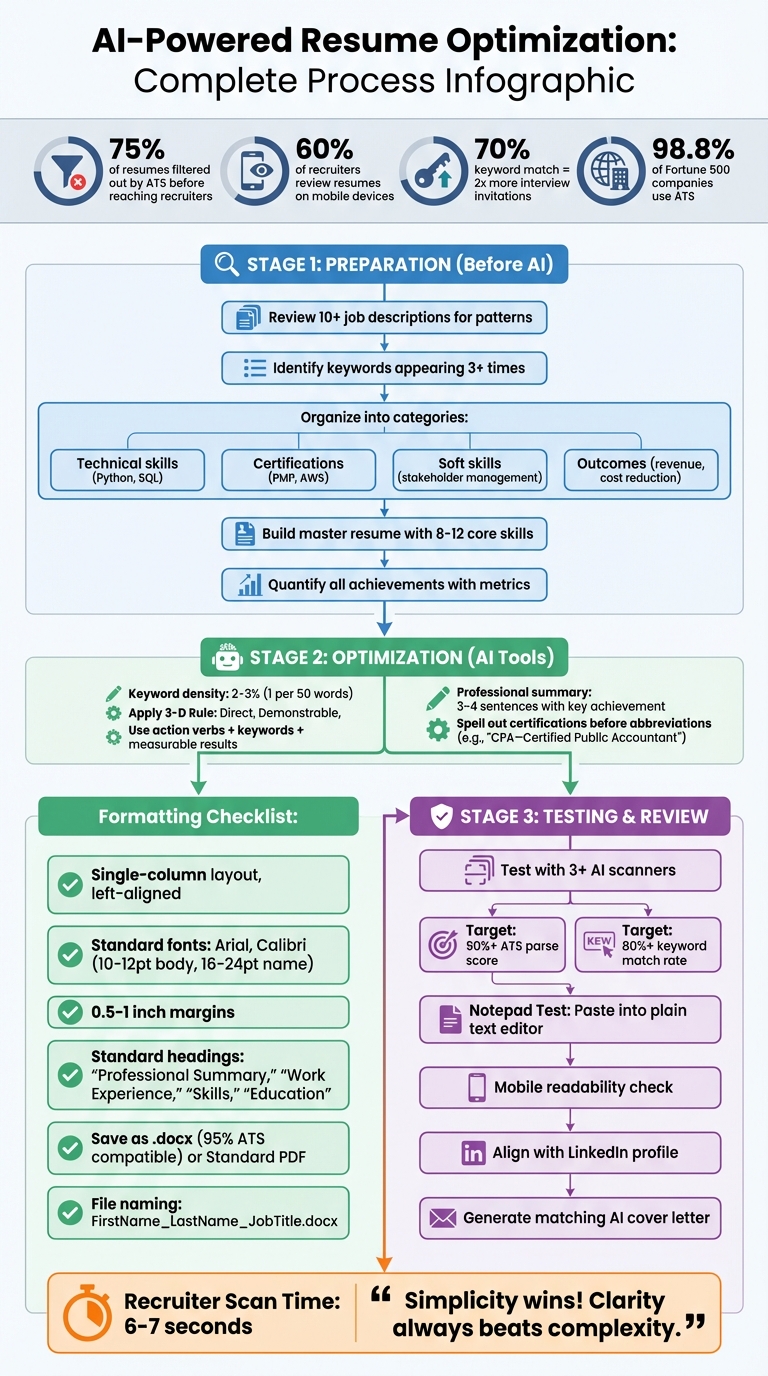
AI Resume Optimization Process: 3-Step Workflow from Preparation to Testing
How to write an ATS-optimized Resume with AI (according to research)
sbb-itb-20a3bee
Steps to Take Before Using AI on Your Resume
Before diving into AI tools to refine your resume, it's crucial to prepare thoroughly. Without proper groundwork, the results may miss the mark. Taking the time to organize and plan ensures AI tools can refine your resume effectively.
Review Job Descriptions for Keywords and Skills
Start by gathering complete job descriptions for roles you're targeting. Copy the text into a plain-text editor to strip away any hidden formatting that might interfere with your analysis.
Next, review at least 10 similar job postings to pinpoint recurring patterns. This helps you identify the skills and keywords employers consistently seek. Pay close attention to terms that show up three or more times in a single job description. For instance, a 2023 Jobscan study found that resumes matching 70% or more of the keywords in job descriptions receive twice as many interview invitations.
Organize your findings into categories like:
- Technical skills (e.g., Python, SQL)
- Certifications (e.g., PMP, AWS Certified Architect)
- Soft skills (e.g., stakeholder management)
- Outcomes (e.g., increased revenue, reduced costs)
Be precise with your language - use the exact terms from the job posting. If the description says "project lifecycle management", avoid rephrasing it as "project management."
Gather and Organize Your Resume Information
Build a master resume that includes your full work history, certifications, measurable achievements, and a list of 8–12 core skills. Think of this as your personal database for creating tailored resumes.
Focus on quantifiable results to replace generic job descriptions. For example, instead of saying "managed social media", try "increased Instagram engagement by 47% in six months." Metrics like percentages, dollar figures, time saved, or team sizes provide concrete details that stand out to both AI tools and recruiters.
Make sure your contact information is up to date, and check your formatting by pasting your resume into a plain-text editor. This ensures it's clean and ready for any system to process.
Select AI Tools for Resume Improvement
With your resume and job-specific keywords organized, choose an AI tool that suits your needs. Look for one that offers keyword analysis, content refinement, and formatting checks to ensure compatibility with applicant tracking systems (ATS). Many modern tools use natural language processing (NLP) to understand context and identify synonyms. For instance, they recognize that "customer success" and "client relationship management" are related.
Consider platforms like Acedit for real-time optimization, tailored suggestions, and seamless formatting checks. Before uploading your resume, review the tool's privacy policy to protect your data. Finally, save your file with a clear naming convention (e.g., "FirstLast_JobTitle_Company.pdf") to keep versions organized.
Formatting and ATS Compatibility Checklist
Your resume's formatting plays a major role in whether it gets through ATS (Applicant Tracking System) screening. With 98.8% of Fortune 500 companies using ATS to process applications, and about 75% of resumes being filtered out before a human even sees them, it’s crucial to get this right. These tips will help ensure your resume is both ATS-friendly and easy for a recruiter to read.
Use a Simple, Standard Layout
Stick to a straightforward, single-column layout with left-aligned text. Fancy designs like multi-columns, tables, or text boxes might look great, but they often confuse ATS software, causing important details to get lost. Also, avoid putting information in headers or footers, as many systems skip over these sections entirely.
"Your resume's greatest enemy? Ambiguity and complexity. Simplicity wins!" - Elias Oconnor, Content Writer, Huru.ai
For fonts, go with reliable options like Arial, Calibri, Helvetica, or Times New Roman. Use 10–12 pt for the body text, 16–24 pt for your name, and 12–16 pt for section headings. Skip graphics, logos, photos, or shaded backgrounds - they might not translate well in ATS and could even disappear entirely. Stick to basic bullet points, like solid circles or dashes, to keep things tidy and readable.
Use Standard Section Headings
ATS software works best with conventional section titles. Stick to clear labels like "Professional Summary", "Work Experience", "Skills", and "Education." Creative or unconventional headings might look unique but could cause your information to be overlooked. Keep margins between 0.5 and 1 inch on all sides for a clean, consistent layout that displays well across different devices. Once your headings are sorted, it’s time to focus on resume-writing file formats.
Save in ATS-Friendly Formats
For maximum compatibility, save your resume as a Microsoft Word (.docx) file, which works with 95% of ATS platforms. If you prefer using PDFs, make sure to save it as a "Standard" PDF with selectable text (in Word: File → Save As → PDF → Standard). Avoid submitting resumes as image-based PDFs, scanned files, or formats like .jpg, .png, Google Docs, or Pages, as these can cause parsing issues.
To double-check your formatting, paste your resume into a plain-text editor. If any sections are missing or look jumbled, the ATS might have trouble reading it. Finally, save your file with a professional title, such as "FirstName_LastName_JobTitle.docx", to keep things organized and leave a good impression. To further stand out, consider using an AI cover letter generator to complement your optimized resume.
Using AI Tools to Improve Resume Content
Once your resume is ATS-friendly, it’s time to focus on improving its content. AI tools can help transform basic job descriptions into engaging, keyword-rich statements that grab the attention of both ATS systems and human recruiters. The key is to use AI as a tool to refine your experience, not invent it.
Add Keywords Naturally
AI tools are excellent at pinpointing the exact terms recruiters prioritize. By analyzing job descriptions, they can quickly identify important nouns, verbs, technical skills, and certifications. For instance, in a 2026 case study, Maya, a mid-level data analyst, used Resumly's Job-Search Keywords tool to uncover 12 critical terms like "Power BI" and "ETL" for a Senior Business Intelligence Engineer role. Incorporating these terms into her summary and bullet points boosted her ATS match score from 58% to 92%. The result? She landed interviews with 4 out of 6 targeted companies, a significant jump from her previous 20% success rate.
To avoid overloading your resume, aim for a keyword density of 2–3% (roughly one keyword per 50 words). Follow the 3-D Rule for keywords: they should be Direct (reflect actual experience), Demonstrable (supported by metrics), and Differentiated (highlight what makes you stand out). Don’t just list keywords - embed them into measurable achievements. Use exact phrasing from job descriptions to increase ATS accuracy, and always spell out terms before abbreviating them, like "Certified Public Accountant - CPA", so both forms are recognized.
"Keywords are the currency that gets your resume past Applicant Tracking Systems (ATS) and into a human recruiter's hands." - Resumly
After adding keywords, focus on improving clarity and impact in your descriptions.
Rewrite for Clarity and Impact
Action verbs and measurable outcomes are your best friends when rewriting resume content. Instead of listing "data analysis" as a skill, write something like, "Analyzed customer behavior data to identify trends, driving a 15% increase in sales". This approach demonstrates your skill in action with tangible results. Replace vague responsibilities with specific achievements; for example, change "managed projects" to "led an 8-member team to deliver a $500,000 product launch three weeks ahead of schedule."
Start each bullet point with a strong action verb, incorporate a relevant keyword, and conclude with a measurable result. You can even use AI tools to analyze job descriptions and identify the top 5–10 required skills, which you can then weave naturally into your experience section.
Improve Professional Summaries and Skills Sections
Your professional summary should be concise - just 3–4 sentences - and include key industry terms along with a measurable achievement. AI can help by analyzing your resume against a specific job description to extract the most relevant details. For example, a marketing manager used AI to identify keywords like "SEO" and "Google Analytics" from a job posting. By crafting a summary that highlighted a "45% increase in organic traffic", the candidate’s ATS score jumped from 68% to 92%.
When it comes to the skills section, modern AI scanners prioritize skills presented in context rather than simple lists. Instead of writing "Leadership", reframe it as "Led a team of 8 during a high-growth product launch." Maintain a master resume that includes all your skills and accomplishments, then use AI to tailor the most relevant details for each job application. Always spell out certification names before abbreviations, and opt for standardized job titles like "Business Development Manager" instead of unconventional ones like "Growth Ninja", which can confuse ATS systems.
These strategies ensure your resume stands out to both ATS algorithms and hiring managers, clearly communicating your qualifications and value. Once your resume is ready, you can further prepare for your interview with AI to ensure you're ready for the next step.
Testing and Reviewing Your Optimized Resume
The final step in perfecting your AI-enhanced resume is making sure it works for both automated systems and human reviewers. This is crucial because over 75% of resumes get filtered out by ATS (Applicant Tracking Systems) before they even reach a recruiter. Testing your resume thoroughly can make all the difference before you hit "submit."
Test with AI Scanners
Start by uploading your resume to AI platforms to check for readability, keyword density, and formatting issues. Use at least three different scanners and aim for a combined ATS parse score of 90% or higher, with a keyword match rate of at least 80%.
To ensure ATS compatibility, try the "Notepad Test." Paste your resume into a plain text editor like Notepad. If the text remains clean and structured, it’s likely ATS-friendly. These AI tools can also perform keyword gap analysis by comparing your resume to specific job descriptions, helping you identify any missing skills or terms.
Once your resume clears these tests, move on to the final step: proofreading for human recruiters.
Proofread for Recruiters
Make sure your resume looks polished and easy to read on all devices, including mobile. Stick to a single-column format with clear fonts (10–12pt) and plenty of white space for better readability. Review each bullet point to confirm your achievements are measurable and that you’re using strong action verbs. Also, check that your resume aligns with your LinkedIn profile, as recruiters often compare the two.
Keep the format simple and text-based. Save your resume as a text-based PDF or .docx file - never as a scanned image, which ATS systems can’t process.
After ensuring your resume meets both ATS and recruiter standards, it’s time to focus on your cover letter.
Create AI-Generated Cover Letters
A well-crafted cover letter complements your resume and reinforces the same targeted keywords and core strengths. This not only strengthens your application for ATS but also makes a strong impression on human reviewers.
Tools like Acedit can help you create AI-generated cover letters that align with your resume. These tools analyze the job description and your background to craft a cover letter that highlights the most relevant details. By doing this, every element of your application - resume, cover letter, and LinkedIn profile - works together to present a consistent, keyword-rich narrative about your qualifications.
Conclusion
Following every step - from analyzing keywords to integrating your cover letter - ensures your application is polished and effective. This checklist takes you from the initial keyword review to formatting and final testing, making sure your resume aligns with both ATS requirements and recruiter expectations. Leveraging AI tools can help highlight your qualifications in the best way possible.
Today’s hiring processes require addressing both ATS software and human reviewers. Aim for an ATS parse score of 90% or higher, while keeping in mind that recruiters typically spend just 6–7 seconds scanning your resume. To meet these demands, stick to standard layouts, naturally incorporate job description keywords, and replace vague tasks with specific, measurable achievements like "improved workflow efficiency by 18%".
"AI software isn't replacing human interaction – it's just filtering the noise. And with the right approach, you can absolutely get through." - Auria Heanley, Co-founder of a London-based recruitment agency
Start with the essentials: carefully review job descriptions, organize your information clearly, and choose the right AI tools to enhance your application. Then, focus on formatting, content refinement, and testing. Keep things simple - clarity always wins. Tools like Acedit can seamlessly integrate AI-driven cover letter creation with resume optimization, ensuring consistent keywords and strengths across your materials.
Use this checklist for every job application. Tailor your resume, test its performance, and align it with your cover letter and LinkedIn profile. Taking the time to optimize today can lead to more interviews tomorrow.
FAQs
How do I know if my resume is truly ATS-readable?
To make sure your resume gets through ATS (Applicant Tracking System) scans, stick to simple formatting. Avoid using graphics, tables, or headers that might confuse the system. Instead, focus on naturally including keywords from the job description throughout your resume.
You can also use AI tools like Acedit to check your resume's compatibility with ATS. These tools can help pinpoint potential issues and offer suggestions to improve your chances.
For the best results, customize your resume for each job. Incorporate the most relevant keywords and keep the layout clear and straightforward. This approach will increase the likelihood that your resume makes it past the ATS and into the hands of a recruiter.
How can I add keywords without keyword stuffing?
To seamlessly incorporate keywords, weave them into sections such as skills, experience, and your summary, ensuring they match the job description. Use a mix of full terms and abbreviations where it makes sense. Avoid stuffing your resume with keywords - AI tools value readability and relevance over sheer volume. Aim for content that feels natural and professional to boost your chances of passing ATS filters without coming across as forced or overly optimized.
What resume details should I never let an AI tool invent?
You should never allow an AI tool to invent details about your work experience, skills, certifications, or education. These elements must always be accurate and truthful. False information can be quickly uncovered and could lead to your application being rejected. AI tools are there to help with formatting and optimizing keywords - not to create facts. Make sure your resume always represents honest and verifiable information.