
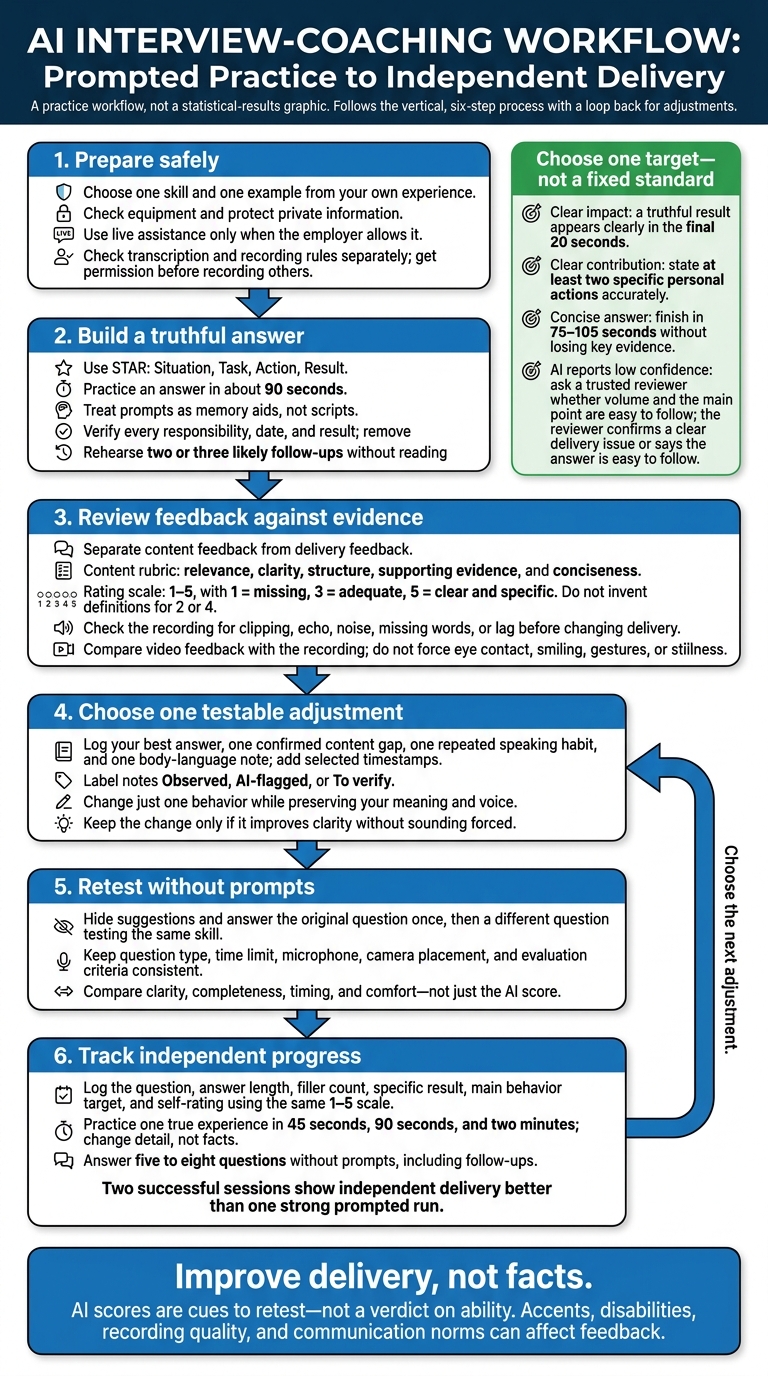
I use AI interview coaching to spot what to change - not to judge my ability. My starting plan: choose one skill, practice a truthful STAR answer in about 90 seconds, review the feedback, and try again without prompts.
Here’s what I focus on:
- Preparation: Check my equipment, protect private information, and choose examples from my own experience.
- Answer structure: Use prompts as memory aids, check every claim, and practice follow-up questions.
- Delivery: Review pacing, fillers, and any video feedback against the recording - not just an AI score.
- Progress: Change one behavior, then answer a comparable question without help.
The goal is clearer answers, not a perfect score. Accents, disabilities, recording quality, and communication norms can affect AI feedback. I use live assistance only when the employer allows it, and <u>get permission before recording others</u>.
AI Interview Coaching: Practice, Verify, Retest
How to Use AI for Job Interview Prep: A 4-Step Framework
sbb-itb-20a3bee
Organize Answers With Live Prompts
Question detection or transcription can help identify intent - such as leadership or prioritization - and suggest a short outline. Wait until the interviewer finishes, then check that the cue fits the question. Speech recognition can mishear names, jargon, accents, or overlapping voices, so treat prompts as memory aids, not scripts. Once the outline fits, shift your attention from what you’ll say to how you’ll say it.
Practice Tailored Answers With Acedit
Acedit is an AI-powered Chrome extension that detects questions and suggests answers in real time. Use your LinkedIn profile to tailor its guidance to your background, but review the imported details before practicing.
During practice, check whether the detected intent matches the question. Use interview questions and answers samples and your STAR notes to assess the suggestions, and verify every responsibility, date, and result before speaking. Don’t accept generated achievements as facts.
Use Prompts to Structure Answers and Plan Follow-Ups
Ask for compact guidance: the question’s intent, one relevant STAR outline, missing evidence, unsupported claims, and one closing point. Keep the answer focused on your actions and the result. Remove any number you can’t support. A verifiable outcome or lesson beats an invented metric.
After each practice answer, ask for two or three likely follow-ups about your contribution, trade-offs, or how you measured success. Rehearse those answers without reading a generated response.
During the conversation, listen to the actual follow-up and pause to gather your thoughts. Ignore suggestions that don’t fit the interviewer’s context. Then practice again without prompts to check what you can answer from memory.
Check Permission Before Using Live Assistance
Use live prompts in an employer interview only when the interview rules allow them. Check transcription and recording rules separately, and get any required consent.
Review whether interview content is stored, how long it’s retained, and the rules for sharing, model use, and deletion. Keep confidential company information out of prompts. If permission is unclear or live assistance is prohibited, use AI only for preparation. Hidden software still needs permission.
Interpret Scores and Delivery Feedback
After you deliver your answer, use the score breakdown to separate content issues from delivery issues as part of your interview preparation.
Review Answer Quality and Speaking Patterns
Start by checking what the tool scores: your words, your voice, or both. Depending on the tool and recording setup, it may analyze text, audio, video, or a mix. Use a role-specific rubric for relevance, clarity, structure, supporting evidence, and conciseness, with a 1–5 scale: 1 = missing, 3 = adequate, 5 = clear and specific.
Ask for evidence behind each rating - not judgments about your personality. Structured, job-related scoring is more reliable than vague impressions. Treat the score as a quick way to spot what to refine in the same answer, not as a verdict on your ability.
If audio analysis is available, use the table below to read the delivery feedback. Check the recording for clipping, echo, noise, missing words, or lag before changing how you speak. Accents, dialects, speech differences, disabilities, microphone quality, and communication norms across communities can affect automated judgments.
| Feedback type | Signal | Meaning and adjustment to test |
|---|---|---|
| Relevance | The answer misses the question | You may have chosen the wrong story; answer directly, then add job-related evidence using proven storytelling strategies. |
| Structure | Situation and Task dominate | The setup is too long; shorten the context and give Action and Result more space. |
| Evidence | Actions are vague | Your contribution is unclear; name your decisions and steps. |
| Conciseness | The answer repeats points or runs long | The main message gets lost; cut repetition and keep the strongest evidence. |
| Pacing | You speed up on key points | You may be rushing; pause before the action and result. |
| Pauses and fillers | Frequent fillers or unfinished starts | You may be planning aloud; take one silent breath and use a short signpost. |
| Vocal variation | Volume, pitch, or emphasis stays flat | Key points may not stand out; emphasize them naturally in your comfortable speaking voice. |
Check Body-Language Feedback Against the Recording
If the review includes video, compare the feedback with the recording itself. Check comments about posture, camera-directed gaze, gestures, expression, and movement. Looking away is a behavior - not proof of dishonesty.
Disability, communication norms, camera angle, lighting, and frame rate can affect what the system detects. Do not force eye contact, smiling, gestures, or stillness.
Change One Behavior and Try Again
Record the answer again under the same conditions. Change just one behavior while keeping your original meaning and voice. Compare clarity, completeness, timing, and comfort - not just the score. Keep the change only if it improves clarity without sounding forced.
When testing a shorter setup, keep it only if it sounds natural and is easier to follow.
Review Your Session and Retest Without Prompts
After changing one behavior, test it in the next run to see whether the improvement holds without help.
Record Feedback and Choose an Exercise
Right after practice, record your best answer, one confirmed content gap, one repeated speaking habit, and one body-language note. Add timestamps for selected moments. Label each note Observed, AI-flagged, or To verify.
Choose one measurable target from the table below. These are practice targets, not fixed standards.
| Feedback signal | Possible issue | Next exercise | Retest measure |
|---|---|---|---|
| Observed: Claim lacks a result | Impact is unclear | Retell the answer with a clear, truthful result; use numbers only when supported | Result appears clearly in the final 20 seconds |
| Observed: “We” obscures personal actions | Individual contribution is unclear | Retell your decisions using accurate “I” statements | At least two specific personal actions are stated |
| Observed: Answer runs long | Background crowds out the main point | Start with the main point; trim context while keeping the action and result | Finish in 75–105 seconds without losing key evidence |
| Needs verification: AI reports low confidence | Delivery may need review | Ask a trusted reviewer whether your volume and main point are easy to follow | Reviewer confirms a clear delivery issue or says the answer is easy to follow |
Use your chosen target in the next no-prompt retest.
Track Progress in Practice Without AI Prompts
AI helps you practice; testing shows what you can deliver on your own. Use Acedit for tailored practice questions, then answer without looking at suggestions. Keep the question type, time limit, microphone, camera placement, and evaluation criteria consistent. Answer the original question once, then try a different question that tests the same skill.
Update your review log with the question, answer length, filler count, specific result, main behavior target, and self-rating. Stick to the same 1–5 scale each time. If recording is permitted, review selected moments for clarity, pacing, and supporting evidence - not just the overall AI score.
Practice one true experience in three forms: 45 seconds, 90 seconds, and two minutes. Change the wording and level of detail, not the facts. Then answer five to eight questions without prompts, including follow-ups about your decisions and results. Two successful sessions show independent delivery better than one strong prompted run.
Then compare your no-prompt result with the prompted run.
Conclusion: Keep Answers Clear and True to Your Experience
Stick to one goal, one truthful example, and one testable adjustment. Use AI interview preparation to organize your answers, not invent achievements. Use live assistance only when the employer allows it. Treat AI scores as cues to retest, not a verdict.
In your next AI interview simulation, test one adjustment without prompts. Hide the suggestions and answer a comparable question on your own. Then check whether the change helped you address the question and explain your contribution. Did your answer stay clear without AI help?
Improve delivery, not facts. Never add unsupported numbers or claim work you didn’t do. If your answer falls short, explain what you learned and what you would change. Aim for an answer that stands up to follow-up questions, and use prompted practice to build toward answering on your own.
FAQs
How can I tell if AI feedback is biased?
AI feedback can reflect bias caused by gaps in training data or differences in accents, gender-related patterns, and communication styles across cultures.
For example, it may misread a regional accent or a phrase tied to a particular culture.
To spot possible bias, consider the context of your responses, including your culture, and focus on steady improvement. Review feedback critically: AI should support human judgment, not serve as the sole authority on your performance.
How do I ask permission to use live AI coaching?
You don’t need to ask permission to use real-time AI coaching during an interview. The browser extension runs quietly in the background, displaying on-screen prompts that the interviewer can’t see.
This private support doesn’t interrupt the conversation. It helps you keep the discussion flowing, maintain eye contact, and stay calm and prepared.
How can I avoid relying too much on AI prompts?
Think of AI as a whisper coach, not a script. Learn your stories’ structure and key points rather than memorizing AI-generated text word for word. During live sessions, limit glances at prompts to 10–15 seconds per response to keep your eye contact natural.
Record yourself practicing both with and without AI support to hear how you sound on your own. During simulations, use prompts to organize your thoughts while keeping your delivery personal and natural.