
Walking into an interview can be stressful, especially when time is tight. Practicing under time constraints is one of the best ways to prepare. Here's why it works and how to do it:
- Why It Works: Simulating real interview conditions helps you organize thoughts quickly, improve clarity, and build confidence. Data shows 89% of people improve their performance after just three practice sessions, and 78% secure job offers.
- How to Start:
- Research common questions, focusing on behavioral ones using the STAR method.
- Set time limits for answers - 60–90 seconds for most questions, 2–4 minutes for detailed ones.
- Practice solo with timers and record your responses for review.
- Use realistic mock interviews with AI tools like Acedit or role-play with a partner for dynamic feedback.
- Key Metrics: Track accuracy, timing, and confidence. Gradually reduce time limits to challenge yourself.
Simulating interviews with a timer is a simple yet effective way to prepare. It ensures you're ready to deliver concise, structured answers under pressure.
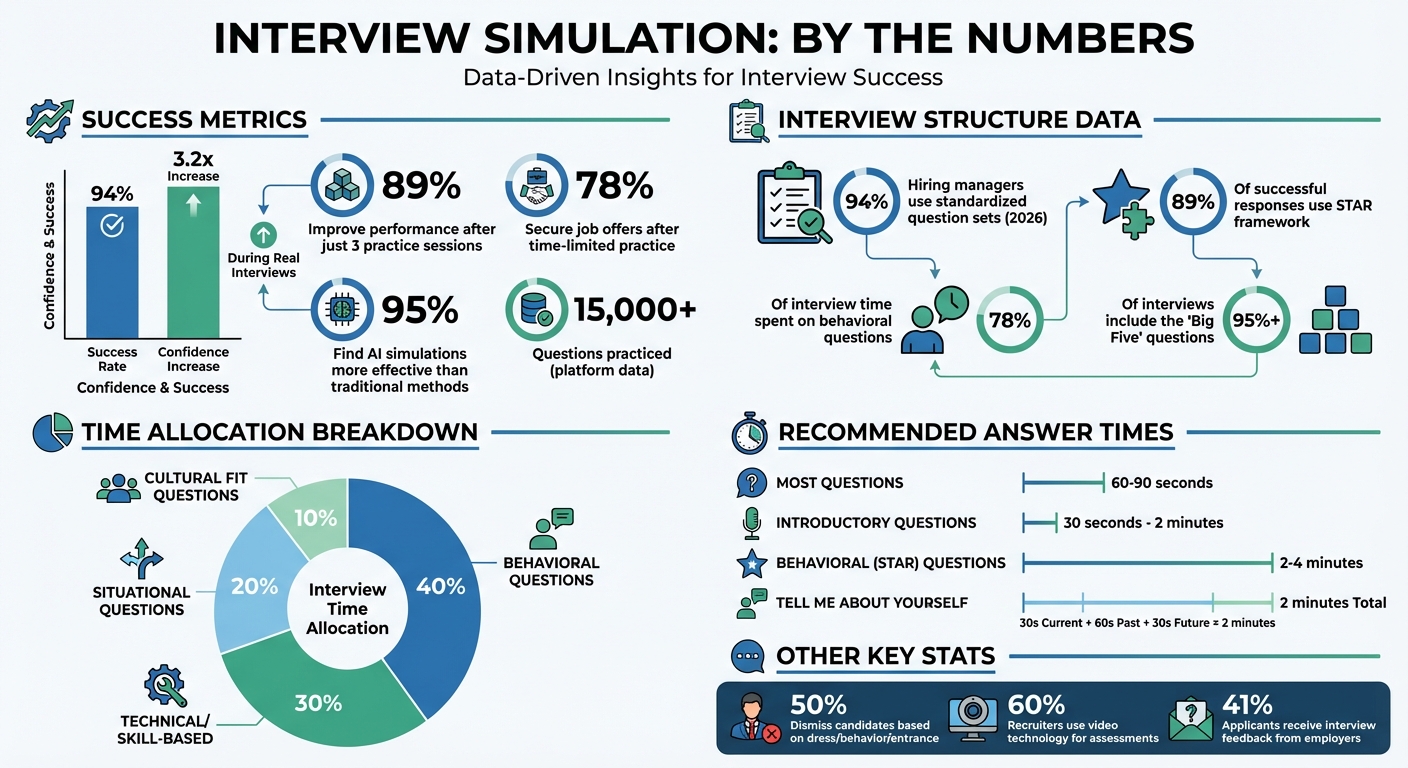
Interview Simulation Success Statistics and Key Metrics
Step 1: Prepare Questions and Set Time Limits
Research Common Interview Questions
Getting ready for an interview simulation starts with crafting the right questions. Begin by analyzing the job description to pinpoint key skills and qualifications. For each, come up with a specific example that demonstrates your experience - this approach mirrors what you'll face in real interviews.
Dive into the company's mission, recent updates, leadership team, and even the interviewers' profiles on LinkedIn. This research gives you insight into their perspective and helps you tailor your responses. Additionally, platforms like Glassdoor can be a goldmine for finding actual questions shared by candidates who’ve been through interviews at the same company.
Interviews today tend to follow a structured format - 94% of hiring managers now use standardized question sets as of 2026. Behavioral questions take center stage, making up 78% of total interview time. To tackle these effectively, build a "STAR story arsenal." Develop 15 to 20 stories using the STAR (Situation-Task-Action-Result) framework, covering topics like challenges, teamwork, and setbacks. This method is highly effective - 89% of successful responses use the STAR framework.
Don’t forget the "Big Five" questions that show up in over 95% of interviews: "Tell me about yourself", "Why this position?", "What are your greatest strengths?", "What’s your biggest weakness?", and "Why are you leaving your current role?". For "Tell me about yourself", practice a 2-minute pitch: spend 30 seconds on your current role, 60 seconds on key past achievements, and finish with 30 seconds on your future goals.
Once your questions are ready, the next step is to set clear time limits for your answers to refine your delivery.
Set Time Limits for Each Question
Most interview answers should fall within 60–90 seconds, though this depends on the type of question. For example, introductory questions like "What are your weaknesses?" should take 30 seconds to 2 minutes. On the other hand, behavioral questions that use the STAR framework need 2–4 minutes to provide enough detail about the situation and results.
"Behavioral questions... require more background and more details, I recommend spending 2-4 minutes on each behavioral question." - Steph Gillies, Career Story Coach
Understanding how interview time is generally divided can help you plan your practice. Behavioral questions often take up 40% of interview time, technical or skill-based questions use 30%, situational questions account for 20%, and cultural fit questions make up the remaining 10%. If you're preparing for a 45-minute interview, that means spending about 18 minutes on behavioral questions, 13.5 minutes on technical ones, and so on.
When practicing, set timers for each question to ensure your responses stay concise and focused. Give yourself a brief pause before starting the timer - this mimics the natural rhythm of a real interview, where you’re allowed a moment to collect your thoughts before answering. This small adjustment makes your practice sessions feel more realistic while still helping you build the speed and clarity needed for the actual interview.
sbb-itb-20a3bee
Step 2: Practice on Your Own
Use Timers to Simulate Real Conditions
Practicing solo is a great way to improve fluency and sharpen your ability to deliver clear, concise answers without the added pressure of a partner. The trick? Use strict time limits. This approach helps you avoid over-explaining and trains you to communicate efficiently under pressure. A typical mock interview session runs about 30 to 45 minutes, so aim to structure your practice sessions within this timeframe.
For behavioral questions, stick to a 15-minute window, focusing on STAR-method responses that are short yet impactful. For technical or more complex questions, try the 2-10-20-5 rule: spend 2 minutes clarifying the problem, 10 minutes outlining your approach, 20 minutes delivering your main response (whether it’s coding, explaining a diagram, or providing a detailed breakdown), and 5 minutes wrapping up. Use a timer to keep yourself on track, and practice delivering most answers within 60–90 seconds to ensure they’re concise and direct.
To make your practice even more effective, set up a professional environment. Sit at a desk, dress in full interview attire, and choose a quiet, distraction-free space that mimics an actual interview setting. This isn’t just for show - 50% of interviewers have dismissed candidates based on their dress, behavior, or even how they entered the room. Treating your solo practice as the real deal can make a noticeable difference in perfecting your interview preparation. Avoid using notes or cheat sheets so you can practice recalling information under pressure. If your interview will be virtual, use the same video platform to get comfortable with being on camera. Once you’ve finished, record your responses for a detailed review.
Record and Review Your Responses
Recording your practice sessions is an excellent way to analyze both your verbal and non-verbal communication. Tools like Zoom, Loom, or even your smartphone can help you capture your responses on video. Watch the recordings to identify filler words, rambling, overly fast speech, or poor body language. Since only 41% of job applicants report receiving interview feedback from employers, self-review becomes a critical way to improve.
When reviewing, focus on areas where you can make real changes. Are you speaking too quickly? Using too much jargon? These are common issues, especially when working against a timer. Pay close attention to your posture, eye contact, and overall presentation - 60% of recruiters now use video technology for candidate assessments, so being comfortable on camera is vital. If you notice recurring problems, like overusing "um" or "like", make a note of them and practice those specific responses until they feel natural and polished. Repetition is key to building confidence and improving your delivery.
30-Minute Mock Interview Practice: Ace Your Next Job Interview!
Step 3: Practice with Peers or AI Tools
Make your interview practice more effective by incorporating interactive sessions that go beyond solo preparation.
Role-Play with a Partner
Working with a friend or mentor can help you simulate the dynamics of a real interview. Set up these sessions with clear guidelines: have your partner ask your prepared interview questions, and aim to keep your responses between 60–90 seconds. Use a timer to help you stay concise.
After each response, ask for quick and focused feedback using the STAR method. While these peer sessions are helpful, they may not provide adaptive questioning or expert-level insights. To take your preparation further, consider using AI tools that can offer dynamic feedback and follow-up questions.
Try Acedit for AI-Powered Simulations
AI tools like Acedit can bring your practice closer to real-world interview conditions. Acedit simulates live interviews by generating follow-up questions based on your answers, giving you a more interactive experience. Simply upload your resume and job description, and the tool will create job-specific questions tailored to your role.
The platform provides immediate feedback, pinpointing areas for improvement. According to user data, 89% of participants notice measurable progress after just three sessions, and 95% find these AI-driven simulations more effective than traditional methods. Acedit offers a free tier to get started, while its premium plan includes advanced features like enhanced AI models, LinkedIn profile analysis, and the ability to upload STAR examples for personalized coaching.
Step 4: Review Feedback and Improve
Tracking your progress is key to turning practice into measurable growth. Without a clear system for analysis, you might feel like you're improving, but you'll lack the evidence to back it up. By focusing on the right metrics, you can identify exactly where to direct your efforts.
Track Your Performance Metrics
After every practice session, log your results. Pay attention to these four key metrics:
- Accuracy: How well did you answer the question?
- Time Management: Did you stay within the time limit?
- Confidence: Rate yourself on a scale of 1 to 10.
- Detailed Feedback: Record notes from peers, mentors, or AI tools for interview prep. For technical questions, include the percentage of test cases passed. For behavioral questions, check if your responses followed the STAR method and aligned with the job's expectations.
Use tools like Google Sheets, Notion, or Airtable to keep track of these metrics. After each session, add a new row with your data and review it weekly. Look for patterns - are you consistently running out of time on system design questions? Do you frequently use filler words in behavioral interviews? Comparing your early sessions to recent ones can help you spot trends and set specific goals for improvement.
To refine your focus, group your mistakes into three categories: lack of knowledge, time pressure, or misunderstanding the question. This categorization makes it easier to decide whether you need to study more, practice quicker responses, or improve your ability to interpret questions.
Once you’ve established a solid baseline, use this data to push yourself further.
Increase Difficulty Over Time
The metrics you’ve been tracking will guide you as you take on more challenging tasks. Start by gradually reducing the time you allow for each question. For example, if you typically spend 30 minutes on a coding problem, try completing it in 25 minutes to build speed and adaptability under pressure. As you progress, begin removing external aids to simulate real interview conditions.
Shift your focus from general practice to company-specific scenarios. If you're aiming for competitive startups or high-profile organizations, prioritize questions that reflect their rigorous evaluation processes. Don’t just aim for a working solution - strive for an optimal one. Write clean, efficient code and provide clear, thoughtful explanations. For system design questions, go beyond surface-level diagrams. Discuss trade-offs, like consistency versus availability, to showcase a deeper understanding.
Conclusion
Structured, time-limited simulations lay the groundwork for interview success. Practicing under these conditions sharpens both your understanding and your ability to think on your feet, helping you stay calm and focused when faced with unexpected questions. This approach turns preparation into confident, efficient performance. In fact, data reveals that after just three sessions, 89% of users see noticeable improvement, and 78% land job offers. AI-powered simulations also boost confidence levels by 3.2 times during real interviews.
Acedit simplifies this process by offering tailored, real-time questions and progress tracking. With over 15,000 questions practiced and a 94% success rate reported by users, it’s a tool designed to deliver results. Whether you’re exploring the free tier or opting for unlimited simulations, consistency is the game-changer.
"Knowing the material is not the same as performing under pressure." - Santosh Rout
Using tools like Acedit ensures that every practice session counts. This focused, time-boxed preparation directly translates into the composure and speed required during actual interviews. Ultimately, success isn’t just about mastering the material - it’s about performing when it matters most.
FAQs
How do I choose the right time limit for each answer?
When deciding how long to answer a question, match the time to the complexity of the question. For most responses, aim to keep it between 60-90 seconds. Behavioral questions, which often require examples or detailed explanations, might take 2-4 minutes. Simpler prompts like "Tell me about yourself" should generally stay within 30 seconds to 2 minutes. If the question is broad, you can extend up to 2 minutes, but always stay concise and engaging unless you're specifically given more time to elaborate.
What should I track after each timed practice session?
Tracking your progress involves paying attention to crucial elements such as response clarity, pacing, body language, and confidence. Evaluate your answers to ensure they are relevant, coherent, and technically accurate. Take note of your tone and gestures - this can reveal habits like speaking too quickly or making nervous movements. By observing improvements over time, you can identify specific areas that need more practice and measure your overall growth effectively.
How can Acedit help me practice follow-up questions under pressure?
Acedit offers a way to sharpen your skills in handling follow-up questions during interviews by creating realistic, high-pressure simulations. Using an AI-driven system, it identifies your responses in real-time and adapts follow-up questions dynamically. Plus, it delivers immediate feedback with tailored suggestions to help you refine your answers. This approach not only boosts your confidence but also enhances the quality of your responses in challenging interview situations.