
High availability and load balancing are essential for building systems that stay online and handle traffic efficiently, even during failures or heavy demand. High availability ensures uptime by eliminating single points of failure and using redundancy, while load balancing distributes traffic to prevent server overload.
Key Takeaways:
- High Availability: Keeps systems running despite failures. Uptime is measured in "nines" (e.g., 99.99% = ~52.6 minutes of downtime/year).
- Load Balancing: Directs traffic across servers to maintain performance and avoid bottlenecks.
- Techniques for High Availability:
- Redundancy: Multiple servers or components ready to take over if one fails.
- Health Checks: Proactively monitor server health to avoid disruptions.
- Failover: Automatic switching to backup systems during issues.
- Load Balancing Algorithms:
- Round Robin: Cycles through servers evenly.
- Least Connections: Sends traffic to the least busy server.
- IP Hash: Routes requests from the same user to the same server.
- Consistent Hashing: Limits traffic redistribution when servers are added/removed.
- Layer 4 vs. Layer 7 Load Balancing:
- Layer 4: Fast, operates at the transport layer (IP/port-based routing).
- Layer 7: Smarter, works at the application layer (routes based on URLs, headers, etc.).
By combining these strategies, systems can scale efficiently, minimize downtime, and provide reliable service under varying conditions.
What Is High Availability in System Design?
Defining High Availability
High availability (HA) ensures that systems stay operational and accessible even when parts of the system fail. It's all about delivering uninterrupted service, no matter what disruptions occur.
"High availability (HA) is a characteristic of a system that aims to ensure an agreed level of operational performance, usually uptime, for a higher than normal period." – Robert Sheldon, Technical Contributor, TechTarget
Availability is often expressed in "nines", which represent uptime percentages. For example:
- 99.9% (three nines): About 8.77 hours of downtime annually
- 99.99% (four nines): Roughly 52.6 minutes of downtime per year
- 99.999% (five nines): Only around 5.26 minutes of downtime annually
These numbers aren't just theoretical - they have real financial consequences. Back in 1996, a 1998 IBM report estimated that downtime cost U.S. businesses $4.54 billion. Clearly, the stakes for uptime are high.
How to Achieve High Availability
Achieving high availability requires careful planning and strategies to keep systems resilient. Here are a few key methods:
- Eliminating Single Points of Failure (SPOF): A single failing component shouldn't bring down the entire system. For example, Stripe achieves 99.99% availability for its payment API by using zone-aware database sharding. Each data shard has a primary node in one availability zone and synchronous replicas in two others. This setup allows for sub-second failover while maintaining low latency - critical for their operations.
- Redundancy: Duplicating critical components ensures backups are ready to take over if something fails. Netflix demonstrated this during the AWS US-East-1 outage in December 2021. Their multi-region active-active architecture automatically redirected traffic to healthy regions. They also use tools like "Chaos Monkey" to simulate failures, ensuring their recovery processes work as intended.
- Deep Health Checks: These go beyond basic checks to ensure full functionality. For instance, instead of just confirming that a database is running, a health check might verify that the database can execute queries. This proactive approach allows automated failovers before users are affected.
Next, we'll explore how load balancing plays a crucial role in supporting high availability.
sbb-itb-20a3bee
How Load Balancing Supports High Availability
How Load Balancers Work
Load balancing plays a critical role in ensuring high availability by efficiently directing traffic and maintaining system uptime. Think of load balancers as skilled traffic controllers, strategically placed between users and servers to guide each request to the best possible destination.
"A load balancer is fundamentally a traffic cop standing at the intersection between clients and servers, directing each request to the most appropriate destination based on a set of rules, policies, and real-time observations about the health and capacity of the server pool." – Matt Klein, Creator of Envoy Proxy
These systems constantly monitor the health of backend servers. If a server stops responding, the load balancer quickly redirects traffic to functional servers, ensuring uninterrupted service.
Load balancers are deployed at various points within a system's architecture: between users and web servers, between web and application servers, and even between application servers and databases. This layered approach ensures a steady flow of traffic across the entire system.
Why Load Balancing Improves High Availability
The standout advantage of load balancing is its ability to prevent bottlenecks and eliminate single points of failure. By spreading requests across multiple servers, no single server is overwhelmed, which helps maintain continuous service.
Load balancing also supports horizontal scalability, making it easy to add more servers as traffic increases without compromising system stability. For example, during the 2010s, a $5,000 server running open-source HAProxy handled traffic loads that previously required a $100,000 hardware solution.
This method also facilitates maintenance and upgrades without causing downtime. It allows for seamless zero-downtime deployments, giving teams the flexibility to make changes without interrupting user access.
However, it’s essential to ensure the load balancer itself doesn’t become a weak point. Using redundant load balancers in active-passive or active-active setups ensures that if one fails, another takes over immediately.
Up next, we’ll dive into the algorithms that make load balancing so effective as part of your technical interview preparation and how to choose the right one for your needs.
Load Balancing Algorithms Explained
Main Load Balancing Algorithms
Choosing the right algorithm is key to distributing traffic effectively. Round Robin is a straightforward method that cycles through servers sequentially, sending requests to each one in turn. It’s a great fit for setups where servers have identical hardware and are running stateless applications. Interestingly, this is the default algorithm for NGINX and is used in over 100,000 deployments.
Least Connections takes things a step further by monitoring active sessions and directing new requests to the server with the fewest current connections. This makes it ideal for scenarios with long-lived connections, like WebSockets, streaming platforms, or databases where session durations vary significantly. HAProxy relies on this as its default for TCP load balancing.
For applications requiring session persistence, such as shopping carts or chat systems, IP Hash ensures requests from the same client IP are always routed to the same server. However, this can create uneven traffic distribution if many clients share a single IP, such as those behind a NAT.
Consistent Hashing is particularly useful when scaling up or down, as it limits the number of remapped requests to about 1/n when a server is added or removed. This feature is especially valuable for distributed caches like Redis or Memcached, which often use virtual nodes to ensure balanced distribution.
Weighted versions of algorithms like Round Robin and Least Connections allow traffic to be distributed based on server capacity. For example, a server with a weight of 10 will handle twice the traffic of one with a weight of 5. Least Response Time combines speed and load by directing traffic to the server with the quickest response time and the fewest connections, while Resource-Based methods allocate traffic dynamically based on real-time CPU and memory usage.
Selecting the Right Algorithm
Your choice of algorithm depends on factors like server capabilities, connection types, and session requirements.
"A good rule of thumb is to start simple and evolve as needs dictate." – Maurice McMullin, Principal Product Marketing Manager, Progress Kemp
If your servers are identical and handle quick, stateless requests, Round Robin is a reliable starting point. However, if your server pool varies in capacity, weighted algorithms can help distribute traffic more evenly without overloading weaker machines.
For mixed workloads, such as applications handling both brief API calls and lengthy uploads, Least Connections is a solid choice. Systems that rely heavily on local caching, on the other hand, benefit from Consistent Hashing, which improves cache hit rates by maintaining consistent routing.
"Choosing the wrong algorithm wastes capacity - requests pile on idle servers while others overflow." – Sanjeev Sharma, Full Stack Engineer, E-mopro
Stateful applications, like those requiring session stickiness, often depend on IP Hash or cookie-based affinity, even though these methods can reduce the efficiency of load distribution. For flexibility, HAProxy offers over 13 different algorithms to accommodate diverse infrastructure setups.
Lastly, robust health checks are critical for identifying and removing failed servers from the pool. Starting with Round Robin for basic connectivity testing is a practical approach, but evolving your strategy based on real-world performance data will yield the best results.
The Ultimate Guide to Load Balancers (System Design Fundamentals)
Building a Highly Available Load Balancer
Let’s dive into strategies for creating a resilient, highly available load balancer, building on the concepts of high availability and load balancing.
Multi-Tier Load Balancer Design
Relying on a single load balancer is a risk no large-scale system can afford. To address this, many architectures implement a multi-tiered approach. At the top level, DNS-based Global Server Load Balancing (GSLB) directs traffic across geographic regions. Beneath that, regional Layer 4 (L4) and Layer 7 (L7) load balancers handle traffic distribution within individual data centers. Meanwhile, service meshes manage communication between microservices internally.
"The choice between L4 and L7 is not either-or. The most resilient architectures layer them, using L4 for raw distribution and fault tolerance at the edge, and L7 for application-aware routing closer to the services." - Matt Klein, Creator of Envoy Proxy
This layered design ensures no single component becomes a bottleneck. For example, AWS Elastic Load Balancing automatically deploys redundant nodes across multiple Availability Zones to bolster reliability. To make DNS failover effective, set your Time-to-Live (TTL) to 60 seconds or less before infrastructure changes. Higher TTL values can cause clients to continue accessing failed servers even after failover.
The next step? Integrating health checks and failover mechanisms to maintain this layered resilience.
Health Checks and Failover
Health monitoring is at the heart of keeping your load balancer running smoothly. There are two main methods:
- Active checks: The load balancer initiates probes, such as TCP handshakes or HTTP requests, expecting a 200 OK response.
- Passive checks: It observes live traffic for warning signs like 5xx errors or timeouts.
To fine-tune this process, set thresholds that mark a server as unhealthy after two failures and require three to five successful checks before bringing it back online.
Additional techniques like connection draining and slow start mechanisms further enhance reliability. Connection draining ensures active requests complete before removing a server, while slow start ramps up traffic to newly recovered instances, avoiding sudden spikes. For stateful applications, synchronize session tables between active and standby load balancers to prevent user disruptions during failovers.
Once health checks are in place, the next focus is on eliminating single points of failure.
Preventing Load Balancer Failures
Redundancy is the key to avoiding load balancer failure. Two common setups are Active-Passive and Active-Active configurations:
- In an Active-Passive setup, one load balancer handles traffic while a standby unit monitors it using heartbeat signals. If the primary fails, the standby takes over the shared Virtual IP (VIP) using VRRP (with tools like keepalived).
- An Active-Active setup takes it further, with all load balancers processing traffic simultaneously. This configuration relies on BGP and Equal Cost Multi-Path (ECMP) routing to distribute traffic evenly, scaling capacity as more load balancers are added.
| Feature | Active-Passive | Active-Active |
|---|---|---|
| Traffic Handling | One load balancer handles traffic | All load balancers handle traffic |
| Complexity | Lower; standard for most setups | Higher; requires advanced networking |
| Capacity | Limited to one unit's capacity | Scales with the number of active units |
| Failover Speed | Near-instant via VRRP/heartbeat | Continuous; traffic shifts automatically |
To calculate the maximum failover downtime, use this formula:
Duration = DNS TTL + (Health Check Interval × Unhealthy Threshold).
For example, a regional Application Load Balancer proxy typically handles up to 600 HTTP or 150 HTTPS new connections per second. Regular fault injection testing ensures standby units and VIP transitions work as expected, keeping your system prepared for real-world failures.
Layer 4 vs Layer 7 Load Balancing
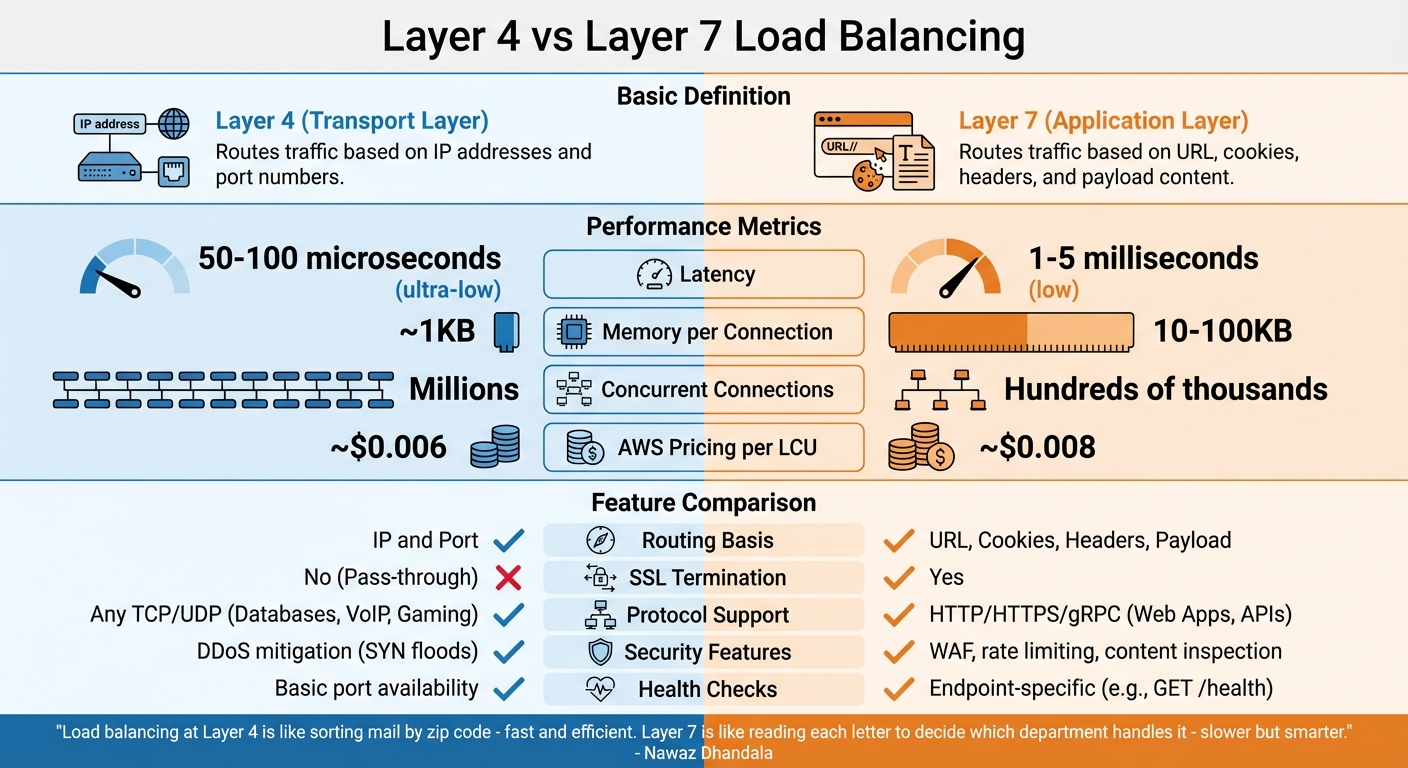
Layer 4 vs Layer 7 Load Balancing: Performance and Features Comparison
The distinction between Layer 4 and Layer 7 load balancing lies in how they operate within the network stack. Each offers a unique balance between speed and functionality, depending on your needs.
Layer 4 and Layer 7 Explained
Layer 4 (Transport Layer) load balancers function at the TCP/UDP level, routing traffic based solely on IP addresses and port numbers. They don’t inspect or decrypt packet contents, instead forwarding traffic using methods like NAT (Network Address Translation) or Direct Server Return (DSR). This simplicity allows for quick packet handling without maintaining application-level state.
Layer 7 (Application Layer) load balancers, on the other hand, operate at the HTTP/HTTPS level. They terminate client connections, inspect the application data, and then route traffic based on factors like headers, cookies, URLs, or request payloads. This deeper inspection enables more advanced decision-making but requires establishing separate connections with both the client and backend server.
"Load balancing at Layer 4 is like sorting mail by zip code - fast and efficient. Layer 7 is like reading each letter to decide which department handles it - slower but smarter." - Nawaz Dhandala, Author, OneUptime
In terms of performance, Layer 4 boasts ultra-low latency, typically around 50–100 microseconds, and uses minimal memory. Meanwhile, Layer 7 introduces slightly higher latency in the range of 1–5 milliseconds due to request buffering and parsing. Layer 4 can manage millions of concurrent connections, while Layer 7 is generally suited for handling hundreds of thousands of requests per second.
Comparing Layer 4 and Layer 7
The right choice between Layer 4 and Layer 7 depends on your workload and goals. Layer 4 is ideal for maximizing throughput, supporting non-HTTP protocols (like PostgreSQL or Redis), or maintaining encrypted traffic without decryption at the load balancer. In contrast, Layer 7 is better suited for web applications requiring features like path-based routing (e.g., /api vs /static), SSL termination, or advanced security tools such as Web Application Firewalls (WAF).
| Feature | Layer 4 (Transport) | Layer 7 (Application) |
|---|---|---|
| Routing Basis | IP and Port | URL, Cookies, Headers, Payload |
| Latency | Ultra-low (50–100 µs) | Low (1–5 ms) |
| Memory per Connection | ~1KB | 10–100KB |
| SSL Termination | No (Pass-through) | Yes |
| Protocol Support | Any TCP/UDP (e.g., Databases, VoIP, Gaming) | HTTP/HTTPS/gRPC (e.g., Web Apps, APIs) |
| Security Features | DDoS mitigation (e.g., SYN floods) | WAF, rate limiting, content inspection |
| AWS Pricing (per LCU) | ~$0.006 | ~$0.008 |
When it comes to health checks, Layer 4 relies on basic port availability tests, ensuring the server is reachable. Layer 7, however, can perform more detailed checks by targeting specific endpoints (e.g., GET /health) to verify that application logic is functioning as expected.
Conclusion
High availability and load balancing aren't just technical considerations - they're the backbone of modern system design. These concepts are essential for maintaining user trust, driving revenue, and ensuring operational continuity. By removing single points of failure and distributing traffic effectively, they keep systems running smoothly even during server outages or unexpected traffic spikes.
The evolution from costly hardware to software-based solutions has made enterprise-level reliability more accessible. Services like AWS ELB and Google Cloud Load Balancing now deliver impressive uptime guarantees (99.99%), translating to just 52 minutes of downtime annually.
Load balancers act as more than traffic distributors - they're the brains behind seamless deployments, DDoS protection, SSL termination, and horizontal scaling. They enable systems to adapt to demand, whether it's an e-commerce platform handling a holiday rush or a social network managing viral content.
To achieve true reliability, redundancy is key. Incorporate fail-safes at every layer, design systems to be stateless by using tools like Redis for session management, and conduct health checks that assess application performance, not just server availability. Willy Tarreau's insight highlights the importance of tailoring your approach:
"The ideal load balancing algorithm doesn't exist in the abstract -- it exists relative to your workload".
Whether you're gearing up for a system design interview or building production infrastructure, mastering these principles is a game-changer. High availability and load balancing work hand-in-hand to create systems that scale efficiently and recover gracefully - because even a few minutes of downtime can have a serious impact on your bottom line.
FAQs
How do I choose the right uptime target (99.9 vs 99.99 vs 99.999) for my system?
When setting an uptime target, consider how critical your system is. For less critical systems, 99.9% uptime (around 8.76 hours of downtime annually) is typically sufficient. However, for mission-critical services - like those in healthcare or finance - you'll want a higher target, such as 99.99% (approximately 52.6 minutes of downtime per year) or even 99.999% (just 5.26 minutes annually). Keep in mind, achieving higher uptime levels demands a much larger investment, so it's essential to weigh your reliability needs against the associated costs.
What should a 'deep' health check include beyond a simple ping?
When performing a health check, it's important to go beyond a simple ping. A thorough health check should evaluate all critical dependencies, like databases and message queues. This approach provides a clearer picture of the system's overall health and helps minimize the risk of cascading failures.
When should I use Layer 4 vs Layer 7 load balancing in production?
For Layer 4 load balancing, routing decisions are made based on IP addresses and ports. This approach is perfect for high-performance applications because it minimizes overhead and delivers fast, protocol-based routing.
On the other hand, Layer 7 load balancing focuses on application-aware routing. It uses content like URLs, headers, or cookies to make decisions, making it ideal for more complex scenarios. However, be aware that this method involves higher latency and uses more resources compared to Layer 4.