
I use AI to prepare for LinkedIn events - not to handle the relationships. My approach has four steps: update my profile with LinkedIn optimization best practices, check public attendee details, plan a few questions, and write personal follow-ups.
Here’s my checklist:
- Before: Check my headline, About section, and work samples. Prepare a 15- to 30-second introduction and questions for a small group of contacts.
- During: Join the conversation myself, listen, and note one detail I can mention later.
- After: Review each connection request, send a thank-you within 24–48 hours or soon after acceptance, and deliver any promised resources.
- Over time: Track conversations and completed commitments, share lessons with permission, and use verified career examples for interview practice.
My rule: <u>check every fact and keep private information out of AI tools</u>. AI can help with drafts, but I choose the words, send the messages, and follow through.
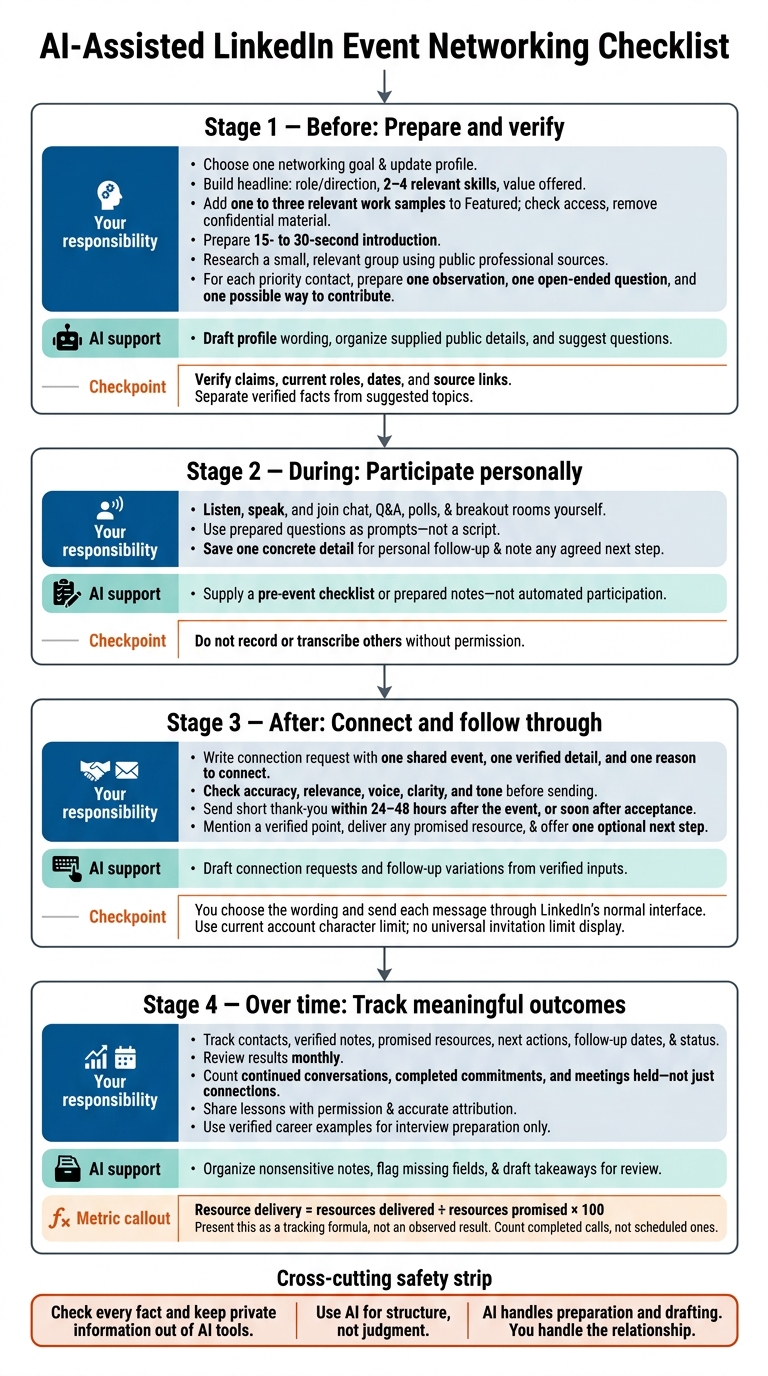
AI-Assisted LinkedIn Event Networking Checklist
Prepare Your LinkedIn Profile for the Event
Improve Your Headline and About Section
Choose one networking goal: connecting with hiring managers, finding collaborators, conducting field research, or searching for a role. Your headline should show your role or direction, 2–4 relevant skills, and the value you offer. Keep your About section brief and factual, with verified accomplishments that relate to the people and topics you want to meet at the event.
Use event-related keywords sparingly. You’re preparing for a conversation - not rewriting your career story around one event.
Use this reusable prompt with your existing profile and verified career details. Replace vague claims with specific skills and accomplishments, and check the facts before publishing.
Revise my LinkedIn headline and About section for this event.

Event topic:
Networking goal:
Target audience:
Verified skills and relevant industry keywords:
Source facts:

Use only the supplied facts. Do not invent employers, titles,
degrees, certifications, years of experience, skills, clients,
responsibilities, metrics, or outcomes.
Do not describe an interest as professional expertise.
Flag missing information as [NEEDS VERIFICATION].

Return:
- Three headline options, each no longer than 220 characters.
- An About section of about 150–250 words in one or two concise paragraphs.
- A table showing each factual claim and the exact source fact supporting it.
- Any wording that needs my review.

Write in clear, conversational language. Remove vague claims and
superlatives. If facts are limited, keep it short.
Check the output against your résumé and portfolio before publishing. Carry the same message through the rest of your profile.
Review Your Profile and Write an Introduction
With your headline and About section set, check the rest of your profile for consistency. Review your photo, banner, Experience, Skills, Projects, Featured content, recent activity, and contact preferences. Fix mismatched dates and titles, and move event-relevant work to the top of each Experience entry.
Add one to three relevant work samples to Featured, such as projects, articles, presentations, or portfolio links. Open each link to confirm that others can access it, and remove anything confidential. Use a current, recognizable photo; profiles with photos get more views.
Prepare a 15- to 30-second introduction connecting your background, current focus, and conversation goal. Focus on what you want from this event rather than your entire career history. Mention one relevant skill or project, then explain what you hope to learn or contribute.
Keep a shorter written version ready for chat, and rehearse your spoken introduction aloud. Skip the full résumé and an immediate job request. Give the other person one clear topic to respond to, so you have a short answer ready when a conversation starts.
Connect Your Profile to Interview Preparation
If networking leads to a career conversation, use your profile’s projects and accomplishments as evidence for interview practice. Acedit can turn those details into STAR examples, practice questions, and simulations for interview prep only.
Review its drafts using STAR approach (Situation, Task, Action, Result). Check that each action reflects your own contribution and that every result is accurate. Keep its use limited to interview preparation.
sbb-itb-20a3bee
Research Attendees and Plan Event Conversations
Check Event Details and Attendee Backgrounds
Once your profile is ready, research the people most likely to see it. Start with the official event page, agenda, speaker bios, and organizer posts. LinkedIn may show some attendees after you accept the invitation, but privacy settings can leave that list incomplete. Focus on a small, relevant group rather than researching everyone.
For example, prioritize two speakers, two peers, one organizer, and one recruiter.
Stick to public professional details: roles, employers, session topics, and relevant posts. Do not scrape profiles or upload private attendee lists, registration exports, direct messages, or sensitive data. LinkedIn’s Event Terms prohibit automated collection of member data. Share only the public excerpts or links AI needs, and check how it stores submitted content.
Help me [prepare for a virtual LinkedIn networking event](https://www.acedit.ai/blog/30-ways-to-use-ai-in-your-job-search-and-interview-prep).
For each person, provide:
- Name, current role, organization, and source link
- Publicly documented expertise or event-relevant work, with a source link
- A recent professional post or published topic, with its date and source link
- One shared professional link, only if supported by a source
- Two suggested conversation topics, clearly labeled as suggestions
- One role-specific question
- Any uncertainty, conflicting information, or missing evidence

Separate “Verified facts” from “Suggested conversation topics.”
Do not invent details.
Confirm current roles and post dates, then remove unsupported claims. Use those checked details to plan a few targeted conversation starters. That gives you something relevant to say instead of relying on generic small talk.
Prepare Questions and Participate
For each priority contact, prepare one observation, one open-ended question, and one possible way to contribute. Ask speakers about examples or tradeoffs, peers about implementation, recruiters about hiring needs, and organizers about future sessions. You can also use AI to practice these interview-style questions before the event begins. Have a backup question ready, but let the discussion guide what you ask.
Join chat, Q&A, polls, and breakout rooms yourself. Take brief, factual notes on the topic and any agreed next step. Do not record or transcribe others without permission.
Save one concrete detail for your follow-up. When setting a time, use a full date and time zone, and confirm it directly.
Example: October 8, 2026, at 2:00 p.m. ET.
Separate AI Support From Your Responsibilities
Use AI for structure, not judgment.
| Task | AI support | Your responsibility | Guardrail |
|---|---|---|---|
| Research | Organize public details, group contacts by role, and pull themes from supplied sources | Choose relevant contacts and check that details are current and accurate | Use official event information and public professional sources; do not upload private lists or sensitive data |
| Conversation preparation | Suggest role-specific questions and discussion topics | Choose respectful, relevant, useful questions | Keep suggestions separate from facts; avoid sensitive or speculative inferences |
| Live participation | Provide a pre-event checklist or brief notes | Listen, speak, ask questions, join chats and breakout rooms, and make your own judgments | Do not impersonate others, automate participation, or record or transcribe without permission |
| Fact verification | Flag missing sources, contradictions, or uncertainty | Open sources and correct or remove unsupported claims | Prefer official event pages and original professional posts; never rely on AI output alone |
Write Personal LinkedIn Connection Requests
A connection request shows relevance - it doesn’t commit either person to a meeting. Use your attendee research notes and any actual event interaction to make each request specific and brief. Include one shared event, one verified detail, and one reason to connect.
Draft Requests From Verified Details
Select LinkedIn’s Add a note or Personalize Invite option and check the character limit in your account. Limits can change, so use the one shown in your current interface.
Write one LinkedIn connection request to [recipient name], who is [role] at [company]. We both attended [event name] on [date]. Verified event detail: [fact]. My reason for connecting is [specific professional reason]. Use a concise, warm, or professional tone. Keep the request within the character limit shown in my current LinkedIn interface. Do not invent details or ask for a job, referral, or favor. Return only the draft and its character count.
Tailor and Check Each Request
Match the note to the recipient. For speakers, mention the session or idea and how it relates to your work. For peers, name the shared event and a confirmed professional overlap. For recruiters, state your professional area without asking for a job or referral. For organizers, acknowledge a specific part of the event and explain why you’d like to stay connected. Keep the wording concise, warm, or professional - whichever fits your voice.
Before sending, check accuracy, relevance, voice, clarity, and tone. Read the note aloud, confirm the recipient’s profile, and check its length inside LinkedIn. Review each request on its own rather than sending a batch with swapped names. Approve the wording yourself and send it through LinkedIn’s normal interface. Its User Agreement prohibits unauthorized automated methods for adding contacts or sending messages.
Save accepted contacts and any response details for follow-up.
Compare AI-Assisted and Manual Drafting
| Factor | AI-assisted drafting | Manual drafting |
|---|---|---|
| Speed | Produces several variations quickly from structured inputs. | Takes longer, especially when researching multiple attendees. |
| Consistency | Can follow the same format, tone, and length rules across drafts. | Style may vary between requests. |
| Personal voice | May sound polished but generic without editing. | More likely to reflect the sender’s natural wording. |
| Accuracy | Can repeat incorrect inputs or invent unsupported details. | The sender controls the facts but can still make errors. |
| Privacy | Requires care with profile notes and personal information. | Keeps research and drafting under the sender’s direct control. |
| Review | Required before sending; AI should not approve or send requests on its own. | Still needed to check spelling, grammar, relevance, and tone. |
After sending the request, use the same facts to prepare a short follow-up message or resource share for when the recipient accepts.
Follow Up and Share Event Takeaways
Send Messages After Acceptance or Conversation
When someone accepts your connection request or a conversation ends, send a brief, useful follow-up. Send a short thank-you within 24–48 hours after the event, or soon after acceptance. Mention one verified point, include any promised resource, and offer one optional next step. If they don’t respond, wait until you have a real reason to reach out again.
Reusable AI drafting prompt:
Draft a concise LinkedIn follow-up using only these verified details: [event name], [session title], [person’s name and role], [specific topic discussed], and [resource promised]. Thank the person, explain why the exchange was useful, and offer one optional next step. Do not invent quotes, achievements, shared interests, or personal details. Do not imply urgency. Keep the message under 75 words and provide two versions: one that simply continues the conversation and one that invites a 20-minute conversation.
Make sure any examples match your actual interaction.
Track Contacts and Next Steps
After sending your messages, record the outcomes in a simple tracker. Include each contact’s name, LinkedIn profile data, event, session, verified notes, promised resource, next action, follow-up date, and status.
AI can organize nonsensitive notes and flag missing fields. Before entering details into an AI tool, check its access controls, retention periods, and whether it may use your inputs for model training. Remove identifiers you don’t need.
Review results monthly to see which contacts, resources, and conversations led somewhere. Count continued conversations, completed commitments, and meetings held - not just connections. Calculate resource delivery as resources delivered ÷ resources promised × 100. Count completed calls, not scheduled ones.
Use your tracker to spot conversations that could become useful content.
Turn Event Lessons Into LinkedIn Posts
Turn a useful event insight into a post rather than retelling the conversation. Focus on one practical lesson from your verified notes, and add your own interpretation instead of recreating the session.
Check names, titles, companies, dates, links, and attribution. Get permission before sharing private exchanges or restricted materials. Tag contributors only with their consent and when relevant.
Reusable post-writing prompt:
Based only on the verified notes below, draft a LinkedIn post of 120–180 words about one practical lesson from the event. Separate your take from the speaker’s words. Do not invent quotes, statistics, examples, names, titles, or event details. Do not reproduce slides or restricted materials. Remove private or identifying details unless permission is documented. End with one thoughtful question for professionals in this field.
Verified notes: [paste notes]
Public event details: [insert]
Approved names and attributions: [insert]
Permission limits: [insert]
Conclusion: Your LinkedIn Event Networking Checklist
Use this checklist before, during, and after the event to put the guide into practice.
Before the event: Make sure your LinkedIn headline, photo, About section, experience, location, skills, and contact details are up to date and consistent. Check the event’s purpose, date, time, time zone, registration details, and format. Verify priority contacts’ names, roles, organizations, and recent work. Prepare a short introduction that explains your role, expertise, and why you’re attending.
During the event: Listen and use AI-generated questions as prompts - not a script. Keep only the notes you need for a personal follow-up. Separate confirmed facts from impressions, and don’t record sensitive or private details.
After the event: Send a personal connection request explaining why you want to connect. Share any resource or introduction you promised, and record the date for your next step. If someone accepts but doesn’t respond, send one polite reminder after 5–7 days. Check accuracy and privacy before publishing event takeaways.
Use the checklist to check that you’ve participated sincerely, verified the details, and completed your follow-up - with AI handling preparation and drafting, and you handling the relationship.
FAQs
How can I make AI-written messages sound like me?
Treat AI as a collaborator, not a replacement. Give it examples of past emails or messages that worked well so it can learn your voice and style. Build a “voice bank” with your signature phrases and perspectives.
Review every draft. Cut generic wording, corporate jargon, and tired phrases. Then add one specific, verifiable detail about the recipient, like a recent post or career milestone, to make the message personal and sincere.
What if attendee information isn’t available?
If attendee information isn’t available, use AI to analyze industry trends, event themes, and public agendas. Research the speakers, host organization, and related trending topics. Use what you learn to prepare discussion points and icebreakers that show your expertise - even without individual profiles.
Acedit can also help you maintain a professional presence and generate effective responses in real time during event conversations.
How should I handle conflicting follow-up advice?
Balance automation with human judgment. Use AI to schedule follow-ups and draft initial outreach based on behavioral triggers, but take over once a prospect responds.
If they’ve seen your message but haven’t replied, stop the automated sequence. Send a personal follow-up that offers something useful, like a brief voice note or a relevant insight. Let your professional intuition and shared history guide the conversation, keeping it personal and focused on the relationship.