
AI-generated cover letters are fast but often fall short. The main issues? Generic language, inaccuracies, robotic tone, and poor formatting. These mistakes make applications feel impersonal and unconvincing, leading to rejection.
Here’s what you need to know:
- 74% of hiring managers can identify AI-written content.
- 57% of recruiters are less likely to move forward with AI-heavy applications.
- Common pitfalls include vague buzzwords, fabricated achievements, and lack of personalization.
To stand out, treat AI as a tool to enhance your voice - not replace it. Personalize your letter, verify every claim, and rewrite key sections like the opening and closing to reflect your unique experience. Use AI in your job search to structure and refine, but always add your personal touch for a genuine, tailored result.
5 AI Cover Letter Red Flags Recruiters Spot Fast
Once you've polished your cover letter, you can also use AI for interview answers to prepare for the next stage of the hiring process.
sbb-itb-20a3bee
The Problem with Generic, Untailored Language
AI-generated cover letters often fall into the trap of sounding polished but impersonal. Unlike a personalized letter, they rely on generic wording that fails to showcase your unique strengths. When you ask an AI to "write a cover letter for this job", it churns out something that looks professional but lacks depth. This approach waters down your message and misses the opportunity to highlight what makes you stand out.
Why Generic Language Does Not Work
Buzzwords like "results-oriented professional," "dynamic team player," and "proven track record" might sound impressive, but they’ve become meaningless without context. They fail to provide evidence of your skills and often leave recruiters unimpressed. In fact, 89% of hiring managers prefer an authentic-sounding letter - even if it’s slightly less polished - over a generic, overly polished one. Overusing vague superlatives like "extensive experience" without backing them up with specifics? That’s a fast track to rejection, with 81% of such letters being dismissed.
"Generic cover letters die in eight seconds." - Alex, Founder & Head of Recruitment Insights, JobLabs
Why Customization Matters
Recruiters want to see that you’ve done your research. A line like "I admire your commitment to innovation" is a red flag - it’s generic enough to apply to any company. On the other hand, referencing a recent product launch, a company initiative, or a specific challenge they’re tackling shows you’ve put in the effort to understand their business. This level of detail is what makes a cover letter memorable and sets you apart from the competition. Personalization is the key to turning a generic draft into a standout application.
How to Fix This Problem
Think of AI as your writing assistant, not your ghostwriter. Start by gathering specific details about the company and outlining your own measurable achievements. Then, use AI to help structure your ideas, but make sure to edit the output so it reflects your personality and voice. Replace robotic phrases with conversational language, use contractions, and back up every claim with concrete examples from your experience. This method not only avoids the pitfalls of generic language but also ensures your cover letter feels genuine and tailored to the role. The goal isn’t to make ChatGPT sound more human - it’s to make your input sound more like you.
Inaccurate or Exaggerated Information
Even though an AI-generated cover letter might sound smooth and professional, the content itself can often pose a serious risk. The issue isn't just awkward phrasing - it’s the potential for false information to be presented with complete confidence.
The Risk of AI Hallucinations
AI tools don’t know your personal career history. If given vague prompts, they tend to fill in the blanks with made-up details, a phenomenon often referred to as "hallucinations." For instance, the AI might falsely claim you boosted revenue by 47%, earned a certification you never pursued, or managed a team of 20 when, in reality, you only supervised three. These inaccuracies can seriously harm your credibility.
"AI will confidently invent a metric if you do not give it one. Treat the model as a first-draft engine and a polish tool; the strategic choice of which story stays yours." - AI Tools Guidebook
Rob Porter, Editor at Vault, warns: "If an interviewer asks you to elaborate on something in your resume and you can't explain it clearly, the conversation can unravel quickly." This is why many candidates now compare AI interview preparation vs traditional methods to ensure they are truly ready for live questioning. Fabricated details not only reduce your chances of landing the job but can also damage your professional reputation.
To avoid this, accuracy and personalization are essential. Your cover letter must align seamlessly with other application materials to ensure consistency and credibility.
Misalignment with Other Application Documents
Recruiters don’t evaluate your cover letter in isolation. They compare it to your resume and LinkedIn profile. Any inconsistencies - like mismatched job titles or conflicting achievements - can immediately raise suspicion. In fact, 53% of hiring managers cite AI-generated content as a major red flag in applications, and a third of them can identify such letters in under 20 seconds.
To steer clear of these issues, ensure every detail in your cover letter is factual and aligns with the rest of your application.
How to Keep Your Cover Letter Accurate
Don’t rely on AI to create your achievements. Start by compiling a verified list of metrics - 10 to 15 specific numbers, percentages, and outcomes directly from your resume and LinkedIn profile. Use these real data points when prompting the AI, so it has no reason to fabricate details.
Once the draft is generated, apply the 30-second rule: verify each claim against your resume or LinkedIn profile immediately. If a claim can’t be confirmed quickly, either cut it or rephrase it. The purpose of AI is to refine how you present your genuine experience - not to invent accomplishments.
"If you didn't do it, don't include it. Use AI to improve how you describe your experience, not to change what that experience actually was." - Rob Porter, Editor, Vault
Robotic Tone and Poor Formatting
Just like a personalized cover letter sets you apart from generic AI output, using the right tone and formatting boosts your professional credibility.
Why Tone Matters to Recruiters
Recruiters spend less than 10 seconds scanning a cover letter, so your opening needs to sound human and specific right away.
The issue? AI-generated text often leans on overly formal language that feels polished but empty. Beyond the opening, it tends to churn out medium-length sentences with little variation in rhythm. This uniformity is a dead giveaway. In fact, 57% of hiring managers are less likely to consider candidates whose cover letters seem fully AI-generated.
"Unedited AI output has a recognizable rhythm. Parallel sentence structures, formal register, the same 6 openers, overuse of Latinate verbs... Trained recruiter eyes spot this in seconds." - Alex, Founder & Head of Recruitment Insights, JobLabs.ai
U.S. Formatting Standards for Cover Letters
Formatting errors can be just as damaging as tone issues - and AI often stumbles on both. A properly formatted U.S. cover letter includes a header with your name, email, phone number, LinkedIn URL, and the date in standard U.S. format (e.g., May 30, 2026). The body should be 250–400 words divided into 3–4 short paragraphs. Stick to simple fonts like Arial, Calibri, or Times New Roman, with left-aligned text. Avoid tables or graphics that could confuse Applicant Tracking Systems (ATS).
AI often misses these basics. It may exceed 500 words or leave placeholders like "[Company Name]" or "[Job Title]" in the draft. Recruiters see these as red flags for low effort.
| Formatting Element | U.S. Standard | Common AI Failure |
|---|---|---|
| Length | 250–400 words | Often exceeds 500 words |
| Opening | Specific hook or achievement | Generic "I am writing to express my strong interest..." |
| Tone | Professional but conversational | Stiff, formal, robotic |
| Contact Info | Full header with LinkedIn and date | May omit header or use wrong date format |
| Personalization | Mentions specific company detail | Vague praise like "your innovative company" |
Once you’ve nailed the formatting, the next step is refining tone and structure. This preparation is as vital as practicing with realistic AI interview simulations to ensure your delivery matches your written persona.
How to Improve Tone and Structure
A quick way to fix a robotic tone is the "read aloud" test: read your cover letter out loud. If it sounds awkward or unnatural, revise it.
Here are some simple tweaks to make a big difference:
- Use contractions like "I'm" instead of "I am" and "I've" instead of "I have" to sound more conversational.
- Replace generic phrases like "I am thrilled to apply" or "I am passionate about your mission" with specific reasons why the role fits your background.
- Mix up your sentence lengths. Break up long, AI-generated sentences with shorter, punchier ones to create a more natural rhythm.
For structure, always write the opening and closing paragraphs yourself. Include details like a measurable achievement, a specific connection to the company, or a recent accomplishment by the organization. These personal touches do far more to engage recruiters than polished but generic AI text.
"We can tell when a cover letter was entirely AI-generated. It is not necessarily a dealbreaker, but it does not help you stand out either. What catches my attention is when I can hear the candidate's actual voice come through." - Senior Recruiter, Fortune 500 Tech Company
Common Mistakes When Using AI in the Application Process
How to Use AI for Cover Letters Without Getting Rejected
Even if you've nailed avoiding clichés and perfected your formatting, there’s still room for error when it comes to using AI for your job search and crafting cover letters.
Why Copy-Pasting AI Output Hurts Your Application
One of the biggest mistakes? Submitting an AI-generated draft without making any edits. A staggering 74% of hiring managers can spot AI-written content, and by 2026, 91% have flagged AI misrepresentation in applications. The problem lies in skipping the editing process. Recruiters are now looking for what sets you apart, not just polished language. If your letter reads like every other one, it's likely to be ignored. This happens even more when vague instructions are given to the AI, resulting in generic and uninspired output.
"The tell is not the use of AI; it is the lack of editing afterward." - Resume Optimizer Pro
The Problem with Vague Prompts
Another major issue is weak prompts. If you ask AI to "write me a cover letter for a marketing manager role", it will often fill in the blanks with made-up details. As Rob Porter, Editor at Vault, explains:
"AI can and will fill in gaps if you let it. If you provide vague input, it may generate accomplishments, metrics, or responsibilities that sound impressive but aren't accurate."
Here’s a surprising stat: since ChatGPT launched, 90% of cover letters start with the same opening line. That’s because default prompts lead to default results. Worse, vague inputs often trigger AI "hallucinations" - fabricated achievements, inflated numbers, or tools you’ve never used. If a recruiter checks your LinkedIn or resume and finds inconsistencies, it’s game over.
A Step-by-Step Workflow for Better Results
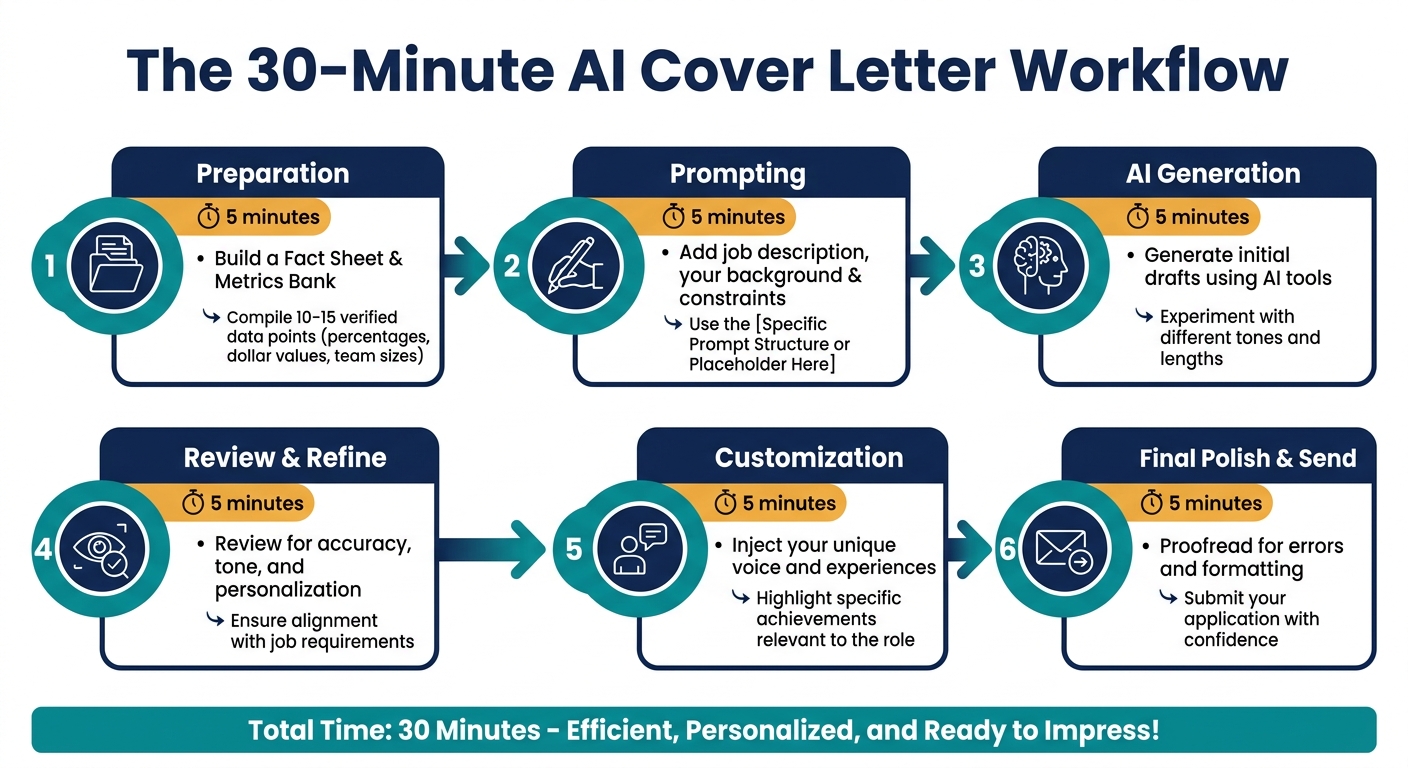
You can avoid these pitfalls with a simple, structured workflow that takes just 30 minutes. The key is to feed the AI accurate, specific information - starting with a "Metrics Bank" of 10–15 verified data points from your career, like percentages, dollar values, or team sizes. This ensures the AI has real facts to work with instead of making things up.
| Workflow Phase | Key Action | Time Estimate |
|---|---|---|
| Preparation | Build a Fact Sheet & Metrics Bank | 5 minutes |
| Prompting | Add the job description, your background, and constraints | 5 minutes |
| Verification | Check every claim for accuracy | 5 minutes |
| Personalization | Rewrite the opening to reference the company directly | 5 minutes |
| Refinement | Adjust tone, vary sentence length, and remove buzzwords | 5 minutes |
| Final Polish | Run an ATS check and trim to under 300 words | 5 minutes |
For better results, use the "Role + Constraints + Specifics + Ban List" formula. This means telling the AI to act as a recruiter, setting a word limit, pasting the job description and your metrics, and listing phrases to avoid - like "thrilled to apply," "dynamic team," or "perfect fit." Follow up with prompts like "Rewrite the opening to mention a recent company initiative" or "Replace buzzwords with concrete evidence." This approach keeps your letter tailored and authentic.
Tools like Acedit can simplify this process. By using your LinkedIn profile and job-specific details, it generates drafts rooted in your actual experience - helping reduce the risk of inaccuracies that come from vague inputs.
Key Takeaways for U.S. Job Seekers
Practical Rules for Better Cover Letters
AI can be a helpful tool, but it should never replace your personal touch.
"The difference between a rejected AI cover letter and one that lands interviews isn't the technology - it's whether the candidate used AI as a writing partner or a replacement for their own voice."
In today's job market, 89% of hiring managers favor cover letters that feel genuine over ones that are flawlessly written but lack personality. This means your revisions and personal input are more important than the AI's initial draft. To stand out in a sea of AI-generated applications, focus on making your letter specific and tailored.
Mention something unique about the company - like a recent product launch, a major market move, or a newsworthy development from the past 90 days. Stick to a word count between 220 and 280 words, and read your letter out loud to catch any awkward or robotic phrasing. Always double-check any numbers or achievements included by the AI, as inaccuracies can quickly disqualify your application.
One more tip: 60% of applicants use "Dear Hiring Manager" even when the hiring manager's name is easily available on LinkedIn. Taking the time to find and use a real name demonstrates the attention to detail that recruiters value.
Keep these strategies in mind as you use tools like Acedit to create a cover letter that feels personal and effective.
How Acedit Can Help
Acedit bridges the gap between basic AI drafts and cover letters that get results. By pulling details from your LinkedIn profile and the job description, it crafts drafts that reflect your actual experience - avoiding the vague language and made-up details that often plague AI-generated applications.
But Acedit goes beyond just cover letters. It also offers AI-powered interview preparation including real-time coaching, simulated practice, and customized Q&A prep. According to users, these features lead to a 3.1x higher response rate from employers, with 94% reporting better outcomes in their job applications overall. You can try it for free as a Chrome extension, or opt for premium access with a one-time payment of $45 for lifetime use.
FAQs
How can I use AI without sounding generic?
To make your application stand out, treat AI as a starting point, not the final author. Start by incorporating specific details from your resume and tailoring them to the job description. Add a personal touch by including a compelling hook about the company - why you admire them or how their mission aligns with your goals. Highlight measurable achievements to showcase your impact, and let your genuine voice shine through.
Avoid relying on buzzwords or filler phrases - they dilute your message. Double-check every detail for accuracy, and read your content aloud to ensure it sounds natural and conversational. Finally, take the time to edit and refine your draft, making it unmistakably your own.
How do I stop AI from inventing details?
To make sure AI-generated content stays accurate, begin with clear, detailed inputs rather than broad or vague prompts. Double-check facts, such as statistics or project names, by comparing them with your resume or other reliable records. If you can’t confirm a detail quickly, either adjust it or leave it out entirely. Consider keeping a metrics bank - a collection of verified achievements - to streamline this process. Lastly, read your drafts out loud. This helps ensure the tone feels genuine and aligns with your real-life experiences.
What’s the best prompt to get a tailored cover letter?
To craft a personalized cover letter, steer clear of vague prompts like "write a cover letter for this job." Instead, focus on giving detailed and specific information about yourself, the position, and the company. Here's an example of a more effective prompt:
- Role: [Job Title] at [Company Name]
- Your achievements: Include [3–5 specific, measurable accomplishments]
- Job requirements: Highlight [key skills or qualifications required for the role]
- Constraints: Keep a professional tone, stay under 300 words, and avoid overused buzzwords.
This approach ensures the cover letter is tailored and relevant, showcasing your fit for the role.