
I’d use a free AI headline generator for a draft - not a promise of recruiter views. Start with your target role, 3–5 skills, and one verified result. Then edit the output to fit your voice and LinkedIn’s 220-character limit. Once your profile is ready, you can also generate professional cover letters to match your new headline.
I compare Supergrow, NavioHQ, Jobzuma, Lemonpost, and SocialCal by inputs, draft options, free limits, account requirements, and length checks.
Quick Comparison
| Tool | Main focus | Drafts per request | Free access |
|---|---|---|---|
| Supergrow | Role, audience, and skill keywords | 5 advertised | No account or usage limit advertised |
| NavioHQ | Headline formulas and tone choices | Up to 4 | No sign-up or usage limit advertised |
| Jobzuma | Current role, target role, and skills | 5 | 3 requests per day; no account advertised |
| Lemonpost | Tone choices and visible character counts | 5 | Daily visitor cap; exact quota not stated |
| SocialCal | Role keywords and tone choices | 3 | No sign-up; advertised cap of 3 requests daily and 15 monthly per IP address |
The article gives conflicting details for some tools, so I’d check their current rules before relying on these advertised limits.
My final check: <u>keep every claim accurate</u>, put your strongest role keywords first, and leave out private employer or client details. There are many ways to use AI in your job search to help with wording. You still make the final call.
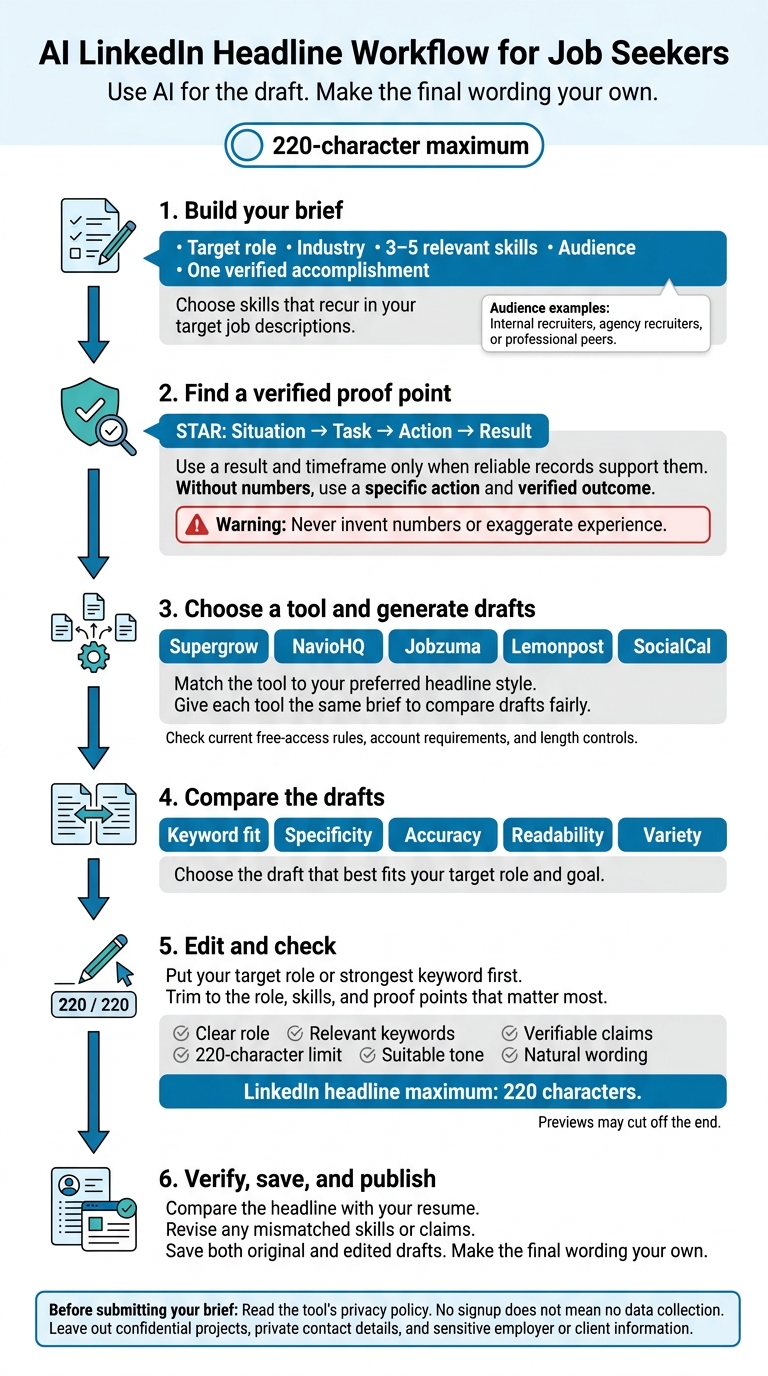
AI LinkedIn Headline Workflow for Job Seekers
The LinkedIn Headline Formula That Gets You Found
sbb-itb-20a3bee
Compare the 5 Free Headline Generators
Use this chart to choose a generator based on your headline goal, target role, skills, and search keywords.
| Tool | Best use case | Inputs | Outputs per generation | Advertised free access and limits | Account requirement | LinkedIn character-limit support |
|---|---|---|---|---|---|---|
| Supergrow | Getting several keyword-focused options fast | Role, audience or people helped, and key skills | 5 | Advertised as free with no stated usage limit | No account advertised | Optimized for LinkedIn’s 220-character limit. |
| NavioHQ | Comparing headline formulas and tones | Current or target title, industry, career goal, formula, and tone | Up to 4 | Free, no sign-up advertised, no limits advertised | No sign-up advertised | Outputs under 220 characters advertised. |
| Jobzuma | Comparing different positioning angles | Current role, target role, 3–5 skills, and industry | 5 | 3 generations per day advertised | No account advertised for free access | 60–220 characters advertised. |
| Lemonpost | Adjusting tone and checking headline length | What you do, who you help, tone, and one proof point | 5 | Daily visitor cap advertised; quota not disclosed | No login advertised | Outputs under 220 characters with visible counts advertised. |
| SocialCal | Testing keywords and styles quickly | Role, what you do, 1–2 recruiter-search keywords, and preferred tone | 3 | 3 generations per day and 15 per month per IP address advertised | No sign-up advertised | 220-character support advertised. |
Policies reflect public information as of October 6, 2026, and may change.
Match the tool to your preferred headline style, then compare the drafts. NavioHQ’s formula choices let you compare set structures. Lemonpost shows character counts, making length checks easier. Jobzuma helps you test different ways to present the same experience.
Give each tool the same inputs. Then compare the drafts for keyword fit, specificity, accuracy, readability, and variety, or integrate your LinkedIn profile to tailor responses based on your actual experience.
After choosing a tool, check that your strongest keywords come first. LinkedIn allows up to 220 characters, but previews may cut off the end.
Gather Your Target Role, Skills, and Results
Start with a short brief that includes your target role, industry, 3–5 relevant skills, audience, and one verified accomplishment. This gives the generator clear details to use when choosing headline keywords.
Pick skills that appear repeatedly in your target job descriptions. Perfect your interview preparation by specifying who will read your headline: internal recruiters, agency recruiters, or professional peers. Then use the same brief with each generator to keep the drafts consistent.
Give the AI verified facts - not made-up claims about your value. Use STAR - Situation, Task, Action, Result to describe one verified accomplishment and pull out a proof point for your headline. Include a result and timeframe when reliable records support them.
Changing careers? Lead with transferable skills and a verified outcome. If you don’t have numbers, use a specific action and a verified outcome instead. Don’t invent numbers, exaggerate experience, or include sensitive company data. Check every generated claim against your actual work.
Once your brief is ready, compare the first generator’s draft with the others. Keep the brief detailed, but trim the final headline to the strongest role, skill, and result signals within 220 characters.
1. Supergrow AI LinkedIn Headline Generator
Supergrow offers LinkedIn optimization and headline generation for quick drafts. For this comparison, the sources don’t confirm its input options, sample outputs, free-access limits, account requirements, or built-in length controls.
Before using it, check the current access rules. Then review each draft for accuracy, keyword fit, readability, and length.
2. NavioHQ Free AI LinkedIn Headline Generator
NavioHQ works best when you want several headline angles from the same brief.
Inputs and customization
Enter your target job title, industry, professional goal, and preferred tone. NavioHQ supports five headline structures: role-plus-value, “I help,” achievement-led, keyword-focused, and niche-authority.
Output count and quality
You can get up to four variations per request, making it easy to compare tone and structure. Use these drafts to see which angle best presents your role, skills, and proof point.
Usage limits and headline length
No other usage limit or built-in character counter is disclosed. Check your headline’s length in LinkedIn before saving it.
Use the same target role, skills, and tone in the next generator to compare drafts on equal terms.
3. Jobzuma Free LinkedIn Headline Generator
Inputs and customization
Jobzuma uses your current role, target role, three to five specific skills, and industry to draft LinkedIn headlines. It’s a good fit for career changers who want to connect their past experience to the role they’re pursuing.
Compare the five options to test different ways of presenting yourself. Then keep the version that’s clear and rich in relevant keywords.
Output count and free access
Jobzuma generates 3 sets of 5 headlines per day - that’s 15 total - with no account required. Use the same brief in the next tool to see whether a different headline structure makes your message clearer.
4. Lemonpost LinkedIn Headline Generator
Inputs and customization
Lemonpost works best for fast, structured headline drafts with visible character counts. It asks for what you do, who you help, and one proof point - a measurable result, years of experience, or a specialized skill.
Choose a casual, professional, playful, or minimal tone. Professional is the default, while minimal uses a simpler role-and-company format. Stick to one proof point you can verify rather than vague adjectives.
Output count and quality
Each run produces five headlines, each with a different structure: a plain role statement, who you help and how, results-focused, keyword-first, and personality-led. Review each draft to make sure it accurately reflects your role, audience, and proof point. Once your profile is ready, you can also use AI for interview preparation to practice for upcoming meetings.
Free limits and account requirements
Lemonpost sets a daily limit per visitor that resets the next day, but the available description doesn’t state the exact quota. Save drafts you want to keep before requesting more.
Leave out confidential employer or client details, and read the current privacy note before submitting your information.
Character-limit support
Drafts stay under 220 characters, and each result includes a character count. Put your target role and strongest keywords first: Lemonpost’s guidance says some LinkedIn views may show only about 60–80 characters. Check the length again before pasting a draft into LinkedIn’s Headline field.
For a more keyword-led option, compare the next tool.
5. SocialCal LinkedIn Headline Generator
SocialCal works best for quick drafts built around keywords.
Inputs and customization
Enter your target job role, a short description of what you do, and keywords recruiters search for. You can also choose a tone that fits your voice.
Output count and quality
Each generation gives you three headline options. Specific role titles and keywords help keep the drafts relevant.
Free limits and account requirements
You don’t need an account. No daily or monthly usage cap is stated.
Character-limit support
SocialCal supports LinkedIn’s 220-character limit.
Compare its drafts with those from the other four tools before editing your final headline.
Choose and Edit Your LinkedIn Headline
Pick the draft that best fits your goal, then check it for accuracy. If you’re targeting a specific role, use skills from the job description that you actually have. For a career change, link your target role to relevant experience without suggesting you already hold that position. For a niche focus, put your strongest relevant skill first.
Lead with your target role or strongest keyword. Then trim the headline to the role, skills, and proof points that matter most. Check that the draft hasn’t added credentials, inflated results, or overstated your responsibilities.
Use this short checklist to review each draft: clear role, relevant keywords, verifiable claims, a 220-character limit, suitable tone, and natural wording. Once you've polished your profile, you can use AI for interview answer generation to prepare for the next stage of your job search.
Save your best drafts in a personal file, keeping both the original and edited versions so you can compare them across roles.
Before you paste your information into a tool, check what you’re sharing. No signup does not mean no data collection. Read the tool’s privacy policy before entering details. Leave out confidential projects, private contact details, and sensitive information. Share only what you’re comfortable publishing, then make the final wording your own.
Conclusion: Check Your Final Headline
After comparing the five tools, choose the draft that best fits your goal: your target role, strongest keyword, and one relevant result.
Check that it fits LinkedIn’s 220-character limit. Review the tool’s free access rules, too: what the free tier includes, whether you need to sign up, and which features stay free.
Before publishing, compare the headline with your resume. Your skills and claims should match. If they don’t, revise the headline first.
FAQs
Should I mention being unemployed in my headline?
Your LinkedIn headline should focus on what you offer, not your employment status. Recruiters mainly search for specific skills and job titles. Use your 220-character limit to highlight your skills, industry expertise, the problems you solve, and the results you deliver. This helps you appear in LinkedIn searches and stand out as a strong candidate.
How can I tell if my headline is working?
Check your LinkedIn profile analytics, especially weekly profile views and viewer demographics, to see whether your headline attracts the audience you want. Track search appearances to learn which keywords bring recruiters and professionals to your profile. More profile views and better visibility in relevant searches suggest your headline connects with recruiters and works well with LinkedIn’s search algorithms.
How often should I update my LinkedIn headline?
Update your LinkedIn headline whenever your career goals or target roles change. Update your skills and experience sections monthly to help maintain visibility.
Review your full profile quarterly - including your photo and recommendations - to keep your professional brand in line with your current goals. Regularly add measurable results and relevant keywords to keep your profile appealing in recruiter searches.