
Networking in 2025 is all about efficiency and personalization, thanks to AI tools that streamline the process. Forget outdated practices like generic messages or endless manual research. AI helps you:
- Optimize your LinkedIn profile: Use AI to add industry-relevant keywords, write better headlines, and highlight achievements to increase recruiter views by 40%.
- Write personalized outreach messages: AI analyzes profiles to craft tailored messages, boosting response rates by 2.5×.
- Prioritize high-value contacts: AI ranks connections based on their relevance and impact, saving time by focusing on the right people.
- Prepare for events: AI generates talking points by analyzing attendee profiles and trends, ensuring meaningful conversations.
- Automate follow-ups: AI tracks engagement and sends timely, relevant follow-ups, increasing closure rates by up to 30%.
AI transforms networking from a time-consuming task into a data-driven process, much like other ways to use AI in your job search, allowing you to focus on building connections while AI handles the details.
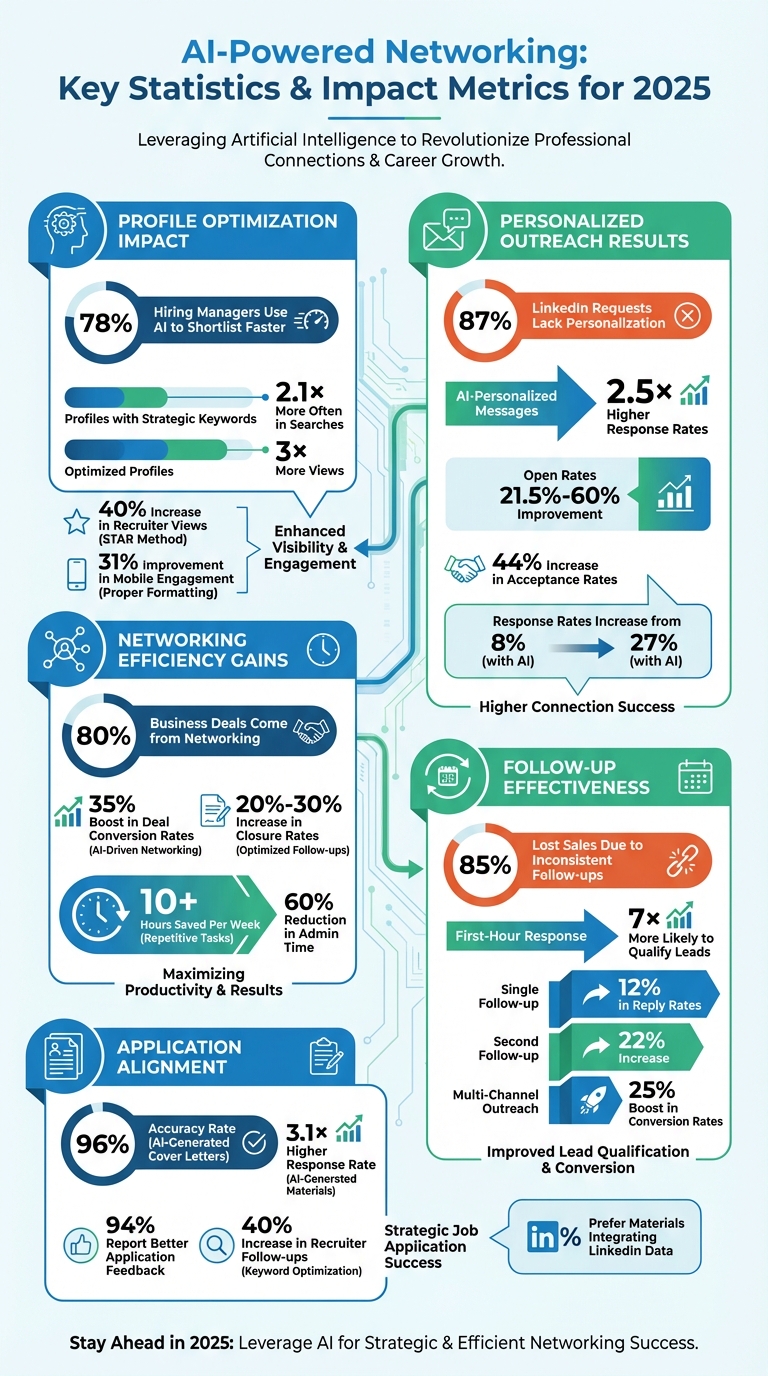
AI-Powered Networking Statistics and Impact Metrics for 2025
2025 AI Productivity Stack: Top 10 AI Tools I Use Weekly to Get More Done
sbb-itb-20a3bee
Improve Your LinkedIn Profile with AI Tools
Your LinkedIn profile is like your digital business card. If recruiters can’t find you in searches, it’s as if you don’t exist. AI tools can help turn your profile into a recruiter magnet by optimizing it with the right keywords, content, and structure that hiring algorithms love. Here’s a striking stat: 78% of hiring managers say AI tools help them shortlist candidates faster. Profiles that strategically use keywords show up 2.1× more often in searches and get 3× more views. The difference between being contacted or ignored often comes down to how well your profile matches the criteria AI-powered recruiter filters are scanning for. Using AI to fine-tune your LinkedIn profile is a smart way to take control of your networking game in 2025.
Find SEO Keywords with AI
Think of keywords as the search terms recruiters use when filtering candidates on LinkedIn. AI tools can analyze job descriptions in your field to find the most frequently mentioned terms - things like "SQL", "project management", or "data storytelling". For a hands-on approach, try this: paste 3–5 job descriptions into an AI tool, and it will pull out the top 10 technical skills and 5 soft skills recruiters are looking for. Tools like Resumly’s Skills Gap Analyzer can even compare your profile to target roles and highlight missing keywords that are crucial for matching.
Not all keywords are created equal. AI can help you organize them into categories:
- Primary keywords: Your core job title, like "Digital Marketing Manager."
- Secondary keywords: Specific tools such as "Google Analytics."
- Long-tail keywords: Niche phrases like "B2B SaaS Growth Specialist."
- Trending keywords: Emerging terms like "Generative AI Strategy".
Your headline should include 8–12 of these keywords, prioritizing the most important ones in the first 50 characters for visibility on mobile devices. For example, if a job posting mentions "Figma", don’t replace it with a general term like "UI design tools." Exact matches matter. And don’t forget to refresh your keywords every quarter to stay current with industry trends.
Once you’ve nailed your keywords, the next step is to polish your profile content with AI.
Generate Better Profile Content with AI
With the right keywords in hand, AI writing tools can help you weave them seamlessly into your profile. Forget overused phrases like "results-driven" or "team player" - instead, focus on quantifiable achievements that catch both human and algorithmic eyes.
Start with your headline. AI can help you craft one using this formula: Current Role + Key Skill + Measurable Result. For instance, instead of just "Data Engineer", try something like "Data Engineer | Cloud-Native Pipelines | 40% Cost Reduction". Test 10–20 headline variations and rotate them every 60–90 days to see which ones boost your profile views.
For your About section, aim for a structure that grabs attention:
- A hook to draw readers in.
- A brief career story.
- 3–5 skills paired with achievements.
- A call-to-action.
Keep it concise - 200–350 words - and break it into short paragraphs (under three lines each) for better readability on mobile. This small tweak can improve mobile engagement by 31%. If you’re a LinkedIn Premium user, you can even use the platform’s "Write with AI" feature for tailored suggestions.
When updating your Experience section, apply the STAR method (Situation, Task, Action, Result) to turn vague responsibilities into clear, results-driven bullet points. For example, AI tools can transform "managed projects" into something like "Led a cross-functional team to deliver a $1M project 10% under budget, improving delivery timelines by 15%." This approach has been linked to a 40% increase in recruiter views.
Before hitting save, run your profile through an AI buzzword detector to cut unnecessary jargon. Keep sentences under 20 words to improve readability and make it easier for algorithms to scan. Tools like Acedit’s LinkedIn Profile Integration can help ensure your profile aligns perfectly with your job search strategy.
Write Personalized Networking Messages with AI
Once your LinkedIn profile is polished, it’s time to focus on crafting personalized messages - and AI can make this process much easier. Generic outreach doesn’t work; in fact, 87% of LinkedIn requests lack personalization. By analyzing a contact’s profile, AI can help create tailored messages that generate 2.5× higher response rates. Instead of spending hours researching each contact, AI does the groundwork, leaving you free to add the personal touches that foster genuine connections.
Create Custom Introduction Messages
AI tools can pull key details from a recipient’s profile - like recent promotions, mutual connections, or posts they’ve engaged with - to craft messages that resonate. For instance, in March 2025, Sarah Chen, a B2B SaaS Sales Executive, used AI to scale her LinkedIn outreach to 500 prospects weekly, increasing her response rate from 8% to 27% and cutting admin time by 60%.
A great framework to follow is the SPARK Method:
- Specific reference: Mention something like a recent post they shared.
- Personal connection: Highlight mutual interests or connections.
- Added value: Share a resource or insight that benefits them.
- Relevant social proof: Establish your credibility.
- Keep it conversational: Make the tone approachable.
AI can structure your message to include a quick hook, context, added value, and a soft call-to-action - all within 150 words. It can also optimize the timing of your messages, suggesting the best days (Tuesday–Thursday) and times (9 a.m.–4 p.m. local) to reach out. Additionally, AI tracks key signals, like job changes, to help you strike at the right moment.
These hooks, combined with a professional tone, form the backbone of a well-crafted outreach message.
Keep Messages Professional with AI
AI tools not only help with personalization but also ensure your messages stay professional. They flag spammy language, typos, and unnecessary filler, while toning down overly aggressive pitches that could trigger platform filters. AI can even adjust the tone of your message - making it more conversational for creatives or direct for executives - by mirroring the recipient's communication style.
"AI tools scrape data from websites, social media and CRM systems to provide comprehensive lead profiles, reducing the time required to perform manual research."
- Molly Hayes, Content Writer, IBM Consulting
It’s also important to stay within LinkedIn’s limits: 20–30 InMails per day and 100 connection requests per week. AI can monitor these caps to protect your account from being flagged. Always review AI-generated drafts before hitting send - the goal is to start with a 70% draft and refine it with your own voice to keep it authentic.
This mix of AI efficiency and personal input ensures your outreach messages are polished, professional, and effective.
Find and Prioritize Networking Contacts with AI
Not all networking contacts hold the same value. With 80% of business deals coming from networking, AI has stepped in to revolutionize how we approach this process. By analyzing data, AI can pinpoint which contacts are most likely to help you reach your career goals - before you even hit "send" on a message. These tools evaluate factors like shared connections, industry relevance, and past communication to help you prioritize your efforts.
Gone are the days of blindly reaching out to everyone in your contact list. AI shifts the focus to a smarter, data-driven strategy. It can assess a contact’s seniority, decision-making authority, and even how accessible they are, giving you a clear picture of who’s most likely to respond. This targeted approach can boost deal conversion rates by up to 35%, saving you both time and energy. Let’s dive into how AI sharpens contact evaluation to get the most out of your networking efforts.
Analyze Contact Relevance with AI
AI uses Natural Language Processing (NLP) to dig into LinkedIn profiles, past interactions, and shared interests. By applying machine learning algorithms, it ranks contacts based on their potential impact on your career goals and their likelihood of engaging with you.
Take job hunting as an example. AI can help you identify 15–20 target companies and zero in on 3–5 key individuals at each - like hiring managers, recruiters, or peers in your desired role. It can also highlight "influential connectors", those who often facilitate introductions within a specific industry, giving you access to broader networks through just one connection.
AI doesn’t stop there. Automated data enrichment pulls together publicly available information about a contact’s role, company, and recent activity, creating detailed profiles from basic contact details. This means less time spent researching and more time building genuine connections. AI even tracks the frequency and tone of your interactions, flagging relationships that might need a follow-up to keep them warm.
Once AI identifies your most relevant contacts, the next step is organizing them into actionable categories.
Organize Contacts into Categories
AI doesn’t just find the right people - it helps you manage them effectively. After identifying key contacts, it segments them based on factors like seniority, strategic alignment, and intent. Common categories might include mentors, peers, recruiters, decision-makers, and long-term leads.
AI-assisted tags like "High Fit" or "Decision Maker" make prioritization easier. For instance, it can filter contacts by seniority and industry relevance, ensuring your outreach focuses on people who can actually move the needle - rather than just anyone at your target company.
Additionally, AI tracks engagement metrics, such as response rates and email opens, to fine-tune the timing and frequency of your follow-ups. This prevents you from overwhelming some contacts while neglecting others who might be more open to connecting. By automating these processes, you can spend your time crafting meaningful messages and fostering relationships - building on the personalized AI messaging strategies mentioned earlier.
Prepare for Networking Events with AI-Generated Talking Points
Walking into a networking event without preparation can feel like a missed opportunity. AI changes the game by analyzing event details, attendee profiles, and industry trends to create personalized talking points. Considering that 76% of event attendees prioritize networking, while 67% of organizers struggle to facilitate meaningful connections, preparation is key.
Instead of relying on chance encounters, AI helps you take a targeted approach. By analyzing LinkedIn activity, professional publications, and company websites, AI identifies shared interests or recent achievements of attendees. This means you can walk in with specific conversation starters instead of generic small talk. The results of this strategy can be impressive - AI-driven networking has been shown to increase deal conversion rates by up to 35%.
Research Events with AI
AI tools can dive into event agendas, speaker profiles, and attendee lists to craft customized icebreakers and discussion points based on your goals. For example, these tools can identify shared research interests or collaboration opportunities by analyzing public data. They can also curate relevant industry news and trending topics tied to the event’s theme, helping you appear well-informed and engaged.
Some advanced AI systems even go a step further by predicting communication styles. They might suggest whether a direct, no-nonsense approach or a more conversational tone would work best for particular contacts. The more detailed your registration information, the better these tools can tailor their insights.
Armed with these talking points, you can focus on refining your delivery to make an even stronger impression.
Practice Conversations with AI Simulations
AI-powered simulations allow you to rehearse and fine-tune your communication style. These tools provide strategies to keep conversations engaging and aligned with your objectives. By testing different approaches, you can identify the one that makes you feel most confident and resonates best with high-value contacts.
Sentiment analysis features can evaluate the tone and effectiveness of your messages, helping you strike the perfect balance between professionalism and approachability. AI can even generate specific questions for event speakers or panelists, making your interactions stand out. For example, you could ask AI to "Find 10 upcoming networking events for [job title] and suggest talking points for each based on my resume".
Automate Follow-Up Messages with AI
Automating follow-ups takes personalized messaging to the next level, making your networking efforts more efficient and impactful. Consistent follow-ups are key to turning good interactions into lasting professional relationships. Did you know that 85% of lost sales are due to inconsistent follow-ups?. Yet, many professionals find it challenging to keep the momentum going after initial meetings. AI automation solves this problem by ensuring that every contact receives timely, relevant messages - without hours of manual effort.
Here’s a powerful stat: businesses that respond within the first hour are 7 times more likely to qualify leads compared to those that delay even an hour longer. AI tools can track behavioral triggers - like when someone opens your email, views your profile, or downloads content - and send follow-ups instantly when interest is high. This ensures you're reaching out when your prospect is most engaged, instead of days later when the opportunity might have cooled.
The time savings are huge. Business owners using AI for lead management report saving over 10 hours per week on repetitive tasks. That’s time you can reinvest in building meaningful connections while AI handles the nitty-gritty of follow-ups.
Generate Personalized Follow-Ups with AI
AI doesn’t just save time - it makes your follow-ups smarter. By analyzing a prospect’s career history, LinkedIn activity, and past interactions (like attending a webinar or downloading a resource), AI creates messages that feel personal and relevant. Instead of sending generic "just checking in" notes, AI can reference specific details - like a recent promotion, a shared article, or a mutual connection - which can boost response rates by 2.5 times.
The system also adapts to recipient behavior. For example, if someone opens your message but doesn’t reply, AI might suggest a different angle or include added value, like a relevant case study. Even a single follow-up message can increase reply rates by 12%, and sending a second follow-up can boost that number to 22%. AI also coordinates outreach across multiple channels - email, LinkedIn, and messaging apps - so you stay connected without overloading any single platform.
"AI tools scrape data from websites, social media and CRM systems to provide comprehensive lead profiles, reducing the time required to perform manual research."
– Molly Hayes, Content Writer, IBM Consulting
Once these personalized messages are ready, AI ensures they’re sent at the right time and tracks their performance, so no opportunity slips through the cracks.
Schedule and Track Follow-Ups with AI
AI platforms take the guesswork out of scheduling follow-ups. Instead of manually tracking when to send a message, these systems automate the process, spacing follow-ups 2–7 days apart to maintain engagement without being overbearing. They also analyze recipient behavior to determine the best times to send messages - typically between 10:00 AM and 11:00 AM or 1:00 PM and 3:00 PM on Tuesdays through Thursdays, which tend to yield the best results.
By integrating multiple channels - email, LinkedIn, and text - AI ensures your outreach stays balanced and effective, with multi-channel efforts boosting conversion rates by 25%. Every interaction is logged and tagged by interest level, helping you prioritize leads and decide on next steps if a deal stalls for 7 to 14 days.
When a prospect responds, AI pauses automated sequences immediately, allowing you to take over with a personalized, human approach to interview preparation. This hybrid strategy - AI for initial outreach and humans for relationship building - creates a seamless, effective networking process. With AI managing the details, you can focus on what really matters: building strong professional connections.
Align Cover Letters and LinkedIn Profiles with AI
Recruiters often compare your cover letter against your LinkedIn profile to verify details like job titles, dates, and accomplishments. Any inconsistencies can raise concerns. AI tools are designed to bridge this gap by analyzing your LinkedIn profile to extract key skills, achievements, and career milestones. These tools can then generate cover letters aligned with your professional history, achieving an impressive 96% accuracy rate.
Using AI-generated cover letters can make a big difference. Candidates report a 3.1× higher response rate, with 94% saying they received better application feedback. When your LinkedIn profile, resume, and cover letter all present a unified story - complete with matching metrics and achievements - it builds trust and strengthens your professional brand.
Some advanced AI models even analyze your writing style from your LinkedIn profile and resume. This allows them to create cover letters that match your tone, ensuring consistency across platforms. By relying on a single AI tool to manage both LinkedIn data and cover letter creation, you can maintain a cohesive and reliable professional image.
Customize Job Applications with AI
Tools like Acedit take customization to the next level by connecting directly to your LinkedIn profile. They ensure consistency in job titles, dates, and key metrics across your LinkedIn profile, resume, and cover letter.
AI doesn’t stop at aligning your documents - it also tailors them to specific roles. For example, AI tools can extract keywords and company values from job descriptions to craft targeted content. One software engineer saw a 40% increase in recruiter follow-ups after AI seamlessly incorporated keywords like "API design" and "microservices" into his application materials. These tools can even summarize recent product launches or earnings calls, helping you create a compelling connection between your achievements and the company’s goals.
Acedit’s integration with LinkedIn ensures that your cover letters and interview responses reflect your documented career progression and interview preparation. It analyzes your resume, the job description, and company background to tailor responses effectively. No wonder 91% of users prefer application materials that integrate LinkedIn profile data.
"Ensure your interview responses align perfectly with your documented professional brand and achievements."
– Acedit
This kind of seamless integration makes it easier to craft applications that resonate with recruiters.
Add STAR Examples with AI Help
AI tools can also help you showcase your achievements through STAR (Situation, Task, Action, Result) examples. By transforming basic resume bullet points into STAR stories, these tools create a Personal Story Bank that ensures your narratives remain consistent across your LinkedIn "About" section, cover letters, and interview responses. The AI matches your professional history to specific job requirements, suggesting the most relevant STAR examples for each application.
If you already have STAR examples prepared, advanced AI models can integrate them into your application materials for a more personalized touch. Acedit’s premium features even allow you to include custom STAR examples in your cover letters and profiles.
The results speak for themselves: 88% of users report a better representation of their professional achievements when using AI to align their background with job requirements. By including precise metrics in the "Result" section of each STAR example, the AI reinforces your credibility and impact.
Scale Your Networking Impact Using AI Dashboards and Simulations
Track Networking Metrics with AI Dashboards
AI dashboards transform your networking efforts into measurable insights, helping you refine and improve your strategies. For example, you can track metrics like connection request acceptance rates (typically ranging from 20% to 30% for successful LinkedIn outreach), message response rates (often between 15% and 25%), and meeting booking rates to gauge how well your outreach is performing.
These tools also help you monitor conversion rates and optimize your follow-ups. Research shows that AI-driven networking tools can improve deal conversion rates by up to 35%, while well-timed follow-ups can increase deal closure rates by 20% to 30%. Beyond conversions, dashboards provide insights into operational efficiencies, such as time saved through automation and the cost per new connection, giving you a clear view of your networking ROI.
Modern dashboards go a step further by analyzing behavioral data - like profile views, session clicks, and interaction history - to help you identify high-quality connections. This is important because while networking accounts for 80% of business deals, professionals often waste 70% of their time on unqualified leads. With these insights, you can focus on building relationships with contacts that truly matter.
"AI-powered networking isn't a nice-to-have - it's the competitive edge that defines high-growth businesses." - REALIZER
Once you've optimized your metrics, take things further by using AI simulations to perfect your networking conversations.
Practice Networking Scenarios with AI
AI simulations offer a safe space to rehearse conversations and refine your approach, ensuring you're prepared for every networking opportunity. These tools analyze a contact's background and recent activity to suggest tailored conversational strategies. For instance, Acedit's AI interview preparation vs traditional methods comparison shows how simulation features help users build confidence through practice, which translates seamlessly to real-world networking scenarios where first impressions are critical.
Think of this technology as your "virtual wingman", providing conversation starters and icebreakers based on shared interests or a contact's recent work. Some personality-driven AI tools even analyze public data to determine whether a contact prefers formal or casual communication styles, helping you tailor your outreach effectively. This kind of preparation can make a big difference - AI-assisted cold emails, for example, have been shown to increase response rates by 3x to 5x compared to manual efforts.
The secret lies in combining AI's efficiency with your own authenticity. Use simulations to prepare talking points and practice your delivery, but let your genuine personality shine in actual interactions. By handling the research and preparation, AI allows you to focus on building meaningful relationships. When you combine these rehearsed strategies with insights from your dashboards, every networking opportunity becomes a chance to stand out.
Conclusion
AI transforms networking from a tedious manual task into a streamlined, automated process. By taking over responsibilities like drafting outreach messages, scheduling follow-ups, and organizing contacts, AI allows you to focus on building genuine connections. For instance, AI-personalized outreach can improve open rates by 21.5%–60%, while follow-up optimization can boost closure rates by 20%–30%.
Each AI-powered tip works together to refine your networking strategy. Whether it's fine-tuning your LinkedIn profile, automating follow-ups, or preparing for events, AI strengthens your ability to build professional relationships with greater efficiency and impact.
AI also makes outreach more personal, turning generic messages into tailored, meaningful communication. This shift can lead to a 44% increase in acceptance rates for personalized InMails. On top of that, AI helps you identify high-value contacts who align with your goals. Tools like Acedit even integrate LinkedIn data with AI features, equipping you with insights to approach networking conversations with confidence.
As AIToolsNetwork aptly states:
"AI isn't here to replace human connections. It's here to enhance them. Think of it like this - AI is the ultimate wingman."
By 2025, successful professionals won't have to choose between efficiency and authenticity - they'll have both. AI can handle research, drafting, and scheduling, while you focus on adding your personal touch to every interaction. Whether you're optimizing your LinkedIn profile with strategic keywords, practicing conversation scenarios, or tracking your progress with dashboards, AI becomes your trusted partner in building meaningful connections.
To make the most of these advancements, start small. Introduce one or two AI tools into your routine, monitor the results, and watch as your response rates improve and your time is freed up for more impactful networking. With AI as your co-pilot, you’ll be well on your way to forming lasting professional relationships that propel your career forward.
FAQs
What’s the safest way to use AI without sounding fake?
To make the most of AI, think of it as a partner in the creative process rather than a substitute for your unique voice. Let it help you brainstorm ideas or draft content, but always ensure the final tone and message feel like you. A good test? Ask yourself if the content sounds like something you'd naturally say in a conversation. By combining AI's support with your personal style, you can keep your work authentic while working more efficiently. Whether or not you disclose AI's role is up to you - just aim for content that feels relatable and genuinely expressive.
Which networking metrics should I track to improve results?
To get better results from networking, keep an eye on some important metrics. These include your response rates to outreach - aim for over 30% here - along with reciprocal engagement, which should fall between 15-20%. Another critical metric is your conversation-to-meeting conversion rate, where you should target 40% or higher.
You’ll also want to measure network diversity, the speed of building relationships (or relationship velocity, which tracks the time from first contact to reaching your goal), and referral generation. Using AI tools can make this process easier by automating the tracking. These tools can give you insights to prioritize your most valuable contacts and make your follow-ups more effective.
How do I keep LinkedIn, my resume, and cover letter consistent with AI?
To maintain consistency between your LinkedIn profile, resume, and cover letter, make sure they highlight the same skills, accomplishments, and key terms. AI tools can help fine-tune each document, ensuring they work seamlessly together and meet applicant tracking system (ATS) requirements. Regular updates are essential - refresh these materials regularly to showcase your most recent experience while keeping a unified and compelling story.