
If I had to sum it up in one line: AI helps me tailor a PM resume faster, but manual writing gives me more control over story, facts, and tone.
For most project managers, the best choice is not AI-only or manual-only. It’s a mix of both. I’d use AI to match job keywords, format for ATS, and draft bullets fast. Then I’d edit by hand to make sure the resume shows the right scope, leadership, metrics, and project context.
A few facts make this choice pretty clear:
- 97% of Fortune 500 companies use ATS to screen resumes
- 82% of hiring managers want measurable results
- Purpose-built AI tools showed a 71% ATS pass rate vs. 29% for plain ChatGPT resumes
- Manual tailoring for one senior PM role can take 1.5 to 2 hours or more
- 49% of hiring managers reject AI-generated resumes
So if you’re applying to a standard PM role and need to move fast, AI is often the better starting point. Beyond resumes, there are many ways to use AI in your job search to gain a competitive edge. If you’re going after a senior role, a PMO leadership job, or a role with a mixed background, manual edits matter more.
What this comparison looks at:
- Tailoring speed
- ATS keyword coverage
- Narrative quality
- Accuracy and believability
Quick Comparison
| Method | Tailoring speed | ATS keyword coverage | Career story | Fact control |
|---|---|---|---|---|
| AI tools | High | High | Medium | Medium |
| Manual writing | Low | Medium | High | High |
| Hybrid approach | Medium-High | High | High | High |
If I were advising most PMs, I’d keep it simple: use AI for the first draft, then rewrite the parts that need judgment.
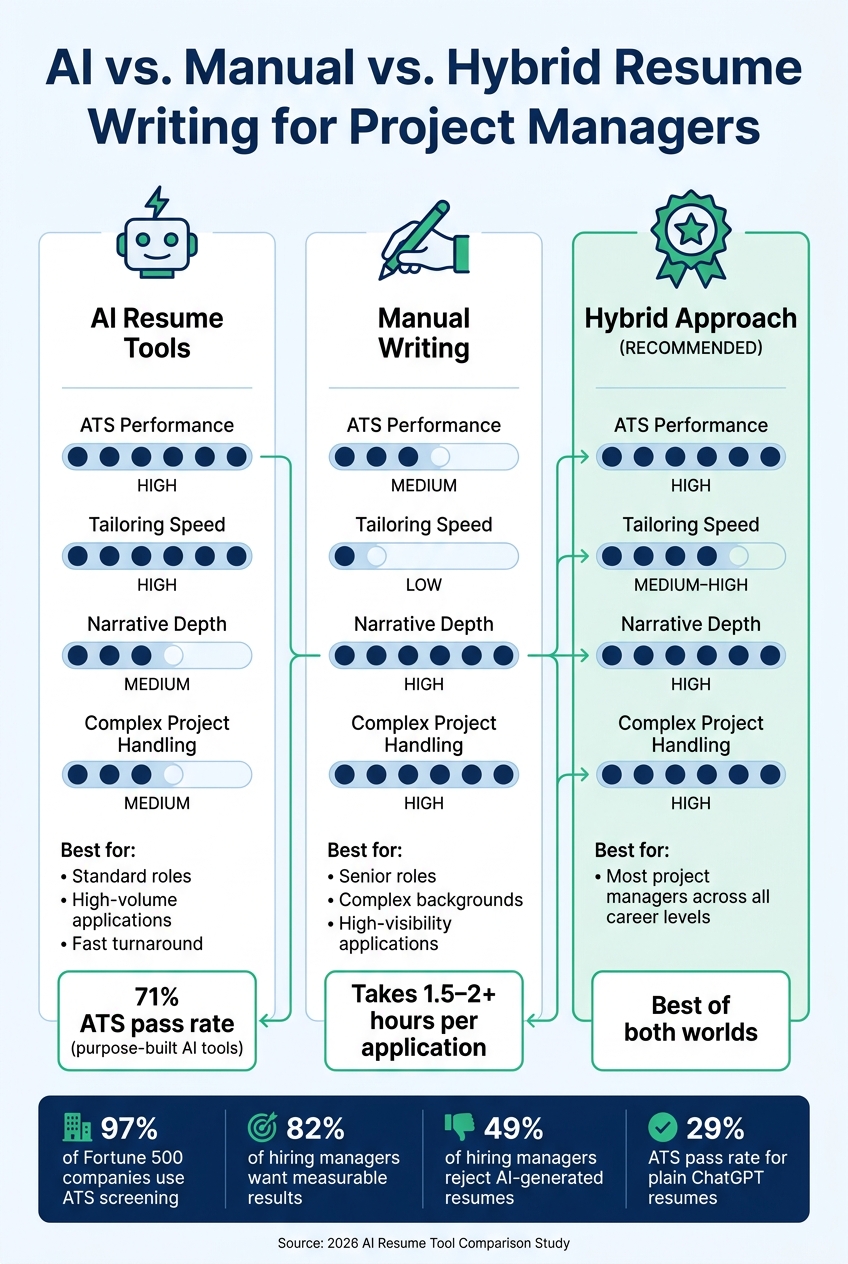
AI vs. Manual vs. Hybrid Resume Writing for Project Managers
How AI Resume Tools Help Project Managers
Faster Tailoring for ATS and Job Description Keywords
For most project managers, the biggest time sink in a job search is rewriting the same resume for each new posting. AI tools scan the job description, spot missing PM keywords, and shrink tailoring time from hours to minutes.
That matters for a simple reason: ATS parsing tends to work better when your keywords and formatting match what the system expects. If you're applying for IT, program, or portfolio management roles, AI can also pull in role-specific terms that are easy to miss when you're doing everything by hand.
| Aspect | AI Resume Tools | Manual Writing |
|---|---|---|
| Drafting Speed | Generate a structured, role-specific draft quickly | Often takes hours to build and refine from scratch |
| Keyword Alignment | Scans job postings for PM terms like Agile, PMO, roadmap ownership, budget management, and cross-functional leadership | Requires manual reading and hand-insertion of relevant terms |
| ATS Readiness | Uses standard sections and clean formatting to improve parsing in systems like Workday and Taleo | More vulnerable to formatting issues or missing keywords |
Once those keywords are covered, the next win is sharper writing.
Cleaner Bullet Points and Stronger Structure
Keywords alone won't carry a resume. It also needs to read well. AI tools help tighten weak bullets and turn them into results-focused lines with scope, tools, and metrics. That keeps the emphasis on delivery and shows the kind of leadership hiring teams want to see from project managers.
They also tend to use ATS-safe layouts by default, with standard headers, left-aligned text, and no graphics or columns. That's a big deal when recruiters usually spend less than a minute on an first resume scan. A clean layout makes your best work easy to spot right away.
After the resume is in good shape, the next step is the rest of the application.
Where Acedit Fits After the Resume Draft
That's where Acedit comes in. Once the resume draft is ready, Acedit helps carry that same message into tailored cover letters, interview Q&A, mock interviews, and LinkedIn alignment.
For project managers, that means one clear story across each part of the application process instead of a resume that says one thing, a cover letter that says another, and interview answers that drift off course.
sbb-itb-20a3bee
Where Manual Resume Writing Still Works Better
Better for Complex Project History and Leadership Nuance
AI is fast, but project management resumes often need more context than a template can give. Senior PM careers rarely follow a neat pattern. You may have led a multi-year transformation, balanced clashing executive priorities, or held a blended role that doesn’t fit one clean title. That’s where AI often falls short. It tends to flatten messy, high-stakes work into generic lines.
Take a PM who led a multi-year enterprise ERP modernization across U.S. operations while handling union constraints and regional VP demands. That story needs room. The right sentence should show changing scope, shifting KPIs, and stakeholder priorities that moved over time. A short, compressed bullet often can’t do that job.
This matters even more for career pivots and hybrid roles. If you moved from engineering into project management, or worked as both a Project Manager and a Product Owner, a recruiter needs to see where one set of duties stopped and the other began. That kind of positioning takes judgment. A template usually can’t make that call well.
More Control Over Voice, Accuracy, and Credibility
One of the biggest risks with AI-generated resumes is overstatement. These tools don’t know your actual project data, so they often fill gaps with polished, generic language that sounds strong but may not be accurate. Phrases like "drove significant improvements across cross-functional teams" show up a lot, and they often read like boilerplate.
Manual writing pushes you to be specific. Instead of a fuzzy impact statement, you might write: "Reduced average project cycle time by standardizing intake and gating reviews." That works better because it’s a claim you can stand behind in an interview. You can even use AI interview answer generation to practice articulating these specific achievements. You know what changed, how it changed, and where the number came from.
Before you send out any resume, do a quick truth check:
- Match each metric to a dashboard, budget report, or status log
- Revise any line that feels stretched
- Cut any bullet you can’t defend clearly
Manual writing also gives you more control over tone and emphasis. The resume can sound like you and reflect your leadership style, instead of reading like a one-size-fits-all template.
The Time Cost and ATS Tradeoff
Manual writing is slower. Tailoring a resume for one senior PM role can take 1.5 to 2 hours or more, especially if you’re digging through old project records. That’s a real cost, and it helps to be honest about when that time is worth it.
For high-priority applications, that extra effort often makes sense. Think director-level roles, target employers, or jobs where your background is unusual enough that it needs a bit more explanation. In those cases, the added time can pay off.
For high-volume applications or early-career PM roles, AI tools are often the more practical option. They help you move faster, even if they don’t give you the same level of control.
That tradeoff sits at the center of the direct comparison below.
How to Transform an Operations Resume into a Project Manager Resume (AI + ATS-Ready)
AI Resume Tools vs. Manual Writing: A Direct Comparison for Project Managers
Using the same four criteria - speed, ATS coverage, narrative depth, and accuracy - this is the shortest way to make the call.
When AI Is the Better Choice
If the role is similar to ones you’ve already held and the deadline is tight, go with AI.
Purpose-built AI resume tools take care of the repetitive stuff: matching bullet points to the job description, adding role-specific keywords like "risk mitigation", "Agile delivery," or "cross-functional stakeholder management," and keeping the format clean from top to bottom. They also do better than general AI in ATS tests. One 2026 comparison found 71% pass rates for purpose-built tools versus 29% for ChatGPT-generated resumes.
For early-career PMs and people applying to standard roles, AI is often the faster starting point.
Use this path for:
- Standard roles
- Many similar applications
- Fast turnaround
When Manual Writing Is the Better Choice
Manual writing makes more sense for senior roles, complex work histories, and high-visibility applications.
It’s also the better move when your project background has a lot of layers - cross-border programs, regulatory-sensitive federal work, or hybrid PM/product roles that need careful framing so a recruiter can follow the story. And there’s a trust factor here too. Surveys show 49% of hiring managers reject AI-generated resumes. For senior PM roles, where your writing style and interview preparation are part of what’s being judged, a resume that sounds like a template can work against you.
Use this path when the role is senior, unusual, or highly visible.
The Best Option for Most Applicants: A Hybrid Process
For most project managers, the best route is a hybrid one: use AI for structure and keywords, then edit by hand for accuracy, voice, and fit.
That combo tends to work best for most applicants. You get the speed of AI without giving up the human judgment that keeps a resume sharp and believable.
| Dimension | AI Tools | Manual Writing | Hybrid Approach |
|---|---|---|---|
| ATS performance | High | Medium | High |
| Speed of tailoring | High | Low | Medium–High |
| Narrative depth | Medium | High | High |
| Handles complex project backgrounds | Medium | High | High |
Conclusion: Choose the Method That Fits Your Job Search
Your choice comes down to what your job search needs most: speed, nuance, or a mix of both. For most project managers, the best fit depends on the role’s complexity, your timeline, and your seniority level. If you map that choice back to the four criteria in this article - speed, ATS coverage, narrative depth, and credibility - the right path usually gets easier to spot.
AI-only resumes can sound generic. Manual-only resumes can miss ATS keywords.
Once your resume is done, the next move is keeping that same story consistent in your interview answers. After your resume is finalized, Acedit can help you practice interview answers that match your resume bullets. Pick the method that fits your timeline, role complexity, and seniority. Keep your resume, cover letter, and interview answers aligned.
FAQs
When should I use AI instead of writing my PM resume myself?
Use AI when you need speed and ATS optimization.
It can put together ATS-friendly formatting fast, scan job descriptions for the right keywords, and point out gaps in formatting or keyword use.
AI also helps when your resume bullets sound a little fuzzy. It can turn vague job duties into clear, results-focused bullet points and spot skill areas you may have missed.
That said, don’t use its output as-is. Review every suggestion and tailor it so your resume sounds like you and reflects your actual experience.
How can I tell if an AI-written resume sounds too generic?
Watch for lines that sound repetitive, canned, or like they came from a resume template. If the writing doesn’t sound like you or reflect your own point of view at work, there’s a good chance it leans too hard on generic AI filler.
It also helps to scan bullet points for tired buzzwords instead of clear, measurable results. Go back through any AI-written suggestions and tailor them so your resume matches your actual experience, not a stock version of it.
What should I edit before sending an AI-drafted resume?
Before you submit an AI-drafted resume, give it a careful review. The goal is simple: make sure it’s accurate, sounds like you, and works well with applicant tracking systems.
Check the formatting first. Stick with a single-column layout, use standard fonts, and make sure section headings are clear. Remove tables, graphics, and other design elements that can trip up resume scanners. Keep your contact details in the main body of the resume so they’re easy to find.
Then look at the wording. Add keywords from the job description in a natural way, not by stuffing them in. Review your achievements and make sure they show measurable results where you can. Numbers help. They give hiring teams a clearer picture of what you’ve done.
Finish with a typo check. One simple trick is to paste the resume into a plain-text editor. If anything is missing, out of order, or jumbled, it usually shows up right away.