
Miss the time zone, and the interview can fail before it starts. In virtual hiring, a small scheduling mistake can lead to no-shows, weak candidate experience, and slower hiring. One stat in the article stands out: a 72-hour delay in scheduling can cut candidate pass-through by up to 30%.
Here’s the short version of what I’d want to know right away:
- Always show the time zone clearly in every message and invite
- Use both local times plus UTC to avoid mix-ups
- Do not rely on short labels like CST or IST
- Watch for daylight saving time changes, especially for interviews booked far ahead
- Send a 24-hour confirmation with the meeting link and both sides’ local times
- Avoid overnight or very early slots when possible
- Use scheduling tools that convert time automatically
- Candidates should perfect their interview preparation by double-checking times, saving them correctly, and setting reminders
- Recruiters should store the candidate’s time zone early and use one repeatable process
A few facts make this more than a small admin task:
- 80% of missed interviews are tied to unconfirmed times
- Arizona can shift against other Mountain Time locations because most of the state does not use DST
- Tools like Google Calendar, Outlook, Calendly, Doodle, and timeanddate.com can cut down avoidable errors
If I had to boil the article down to one rule, it would be this: write the interview time so no one has to guess.
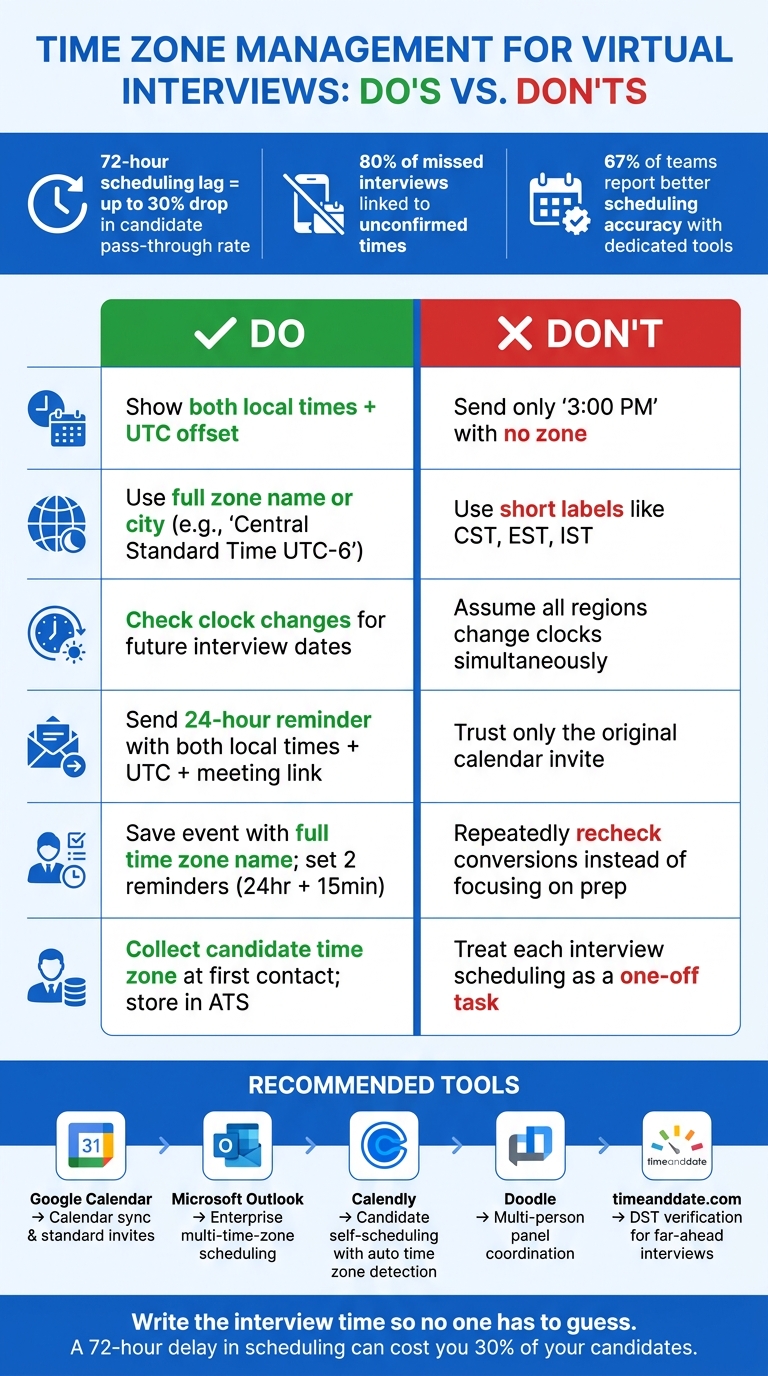
Time Zone Management for Virtual Interviews: Do's vs. Don'ts
Quick Comparison
| Area | What to do | What to avoid |
|---|---|---|
| Time format | Show both local times and UTC | Sending only “3:00 PM” |
| Time zone naming | Use full zone name or city | Using short labels like EST, CST, IST |
| DST handling | Check clock changes for future dates | Assuming all places change at the same time |
| Confirmations | Send a 24-hour reminder with link and local times | Trusting the original invite alone |
| Candidate prep | Save the event in your calendar, practice with AI interview simulations, and set 2 reminders | Rechecking conversions over and over |
| Recruiter workflow | Collect time zone at first contact and keep it in the ATS | Treating each interview like a one-off task |
This article is about one simple idea: clear time handling protects interview attendance, candidate experience, and hiring speed.
sbb-itb-20a3bee
Common Time Zone Mistakes That Disrupt Virtual Interviews
Once the time zone is sorted out, the next problem is how you share and confirm it. Most time-zone mix-ups don't happen because someone is careless. They happen because people assume too much. If an invite says "3 PM" and leaves out the time zone, that's enough to throw the whole interview off course.
A few mistakes show up again and again.
Don't use abbreviations like CST, EST, or EDT. Write the full time zone name and include the UTC offset.
Clock changes add another layer of risk. Different regions move in and out of DST on different dates, and some don't change clocks at all. That means an interview can shift by an hour if both sides aren't checking the same reference.
Timing matters too. Overnight or pre-dawn interviews can hurt focus and judgment, which can affect how a candidate performs and how they're evaluated compared to traditional interview methods.
| Pitfall | What happens | How to prevent |
|---|---|---|
| Assuming local match | Sender assumes recipient shares the same time zone; candidate misses the call entirely. | Always specify the time zone in every communication. |
| Unclear abbreviations | "CST" or "IST" gets interpreted differently across regions, causing weaker candidate trust and high no-show rates. | Use full location names and UTC offsets, such as "Central Standard Time UTC-6." |
| Ignoring DST changes | One party shows up an hour early or late due to seasonal clock shifts, disrupting schedules and delaying hiring cycles. | Use calendar invites that include UTC and adjust automatically for DST. |
| Unreasonable hours | Interview is scheduled during overnight or pre-dawn hours, reducing cognitive performance and skewing candidate assessment. | Identify shared overlap windows; offer multiple time slots. |
| No final confirmation | Neither party double-checks the time before the interview, resulting in missed opportunities and wasted slots. | Send a confirmation 24 hours prior with both local times and a UTC reference. |
A reminder sent 24 hours before the interview, with both local times and a UTC reference, catches most problems before they turn into missed calls. These issues are much easier to avoid when your scheduling rules account for them from the start.
Scheduling Practices That Keep Global Interviews Clear
Avoiding time zone mix-ups is only half the job. The other part is having a scheduling process that makes the right details easy to spot, easy to check, and hard to get wrong.
Use calendars and converters that auto-adjust for time zones
Use tools that catch conversion errors before they ever reach the candidate. Google Calendar and Microsoft Outlook both show events in the recipient's local time by default. Calendly detects the candidate's time zone and displays open slots in local time, which cuts down on back-and-forth. In fact, 67% of teams report better scheduling accuracy when using dedicated tools like Calendly.
For interviews booked far ahead, check DST changes by hand with a DST database. That extra step can save you from a painful last-minute surprise.
| Tool | Best use case |
|---|---|
| Google Calendar | Calendar sync for standard invites and internal coordination |
| Outlook | Enterprise scheduling with multiple time zone views |
| Calendly | Candidate self-scheduling with automatic time zone detection |
| Doodle | Multi-person panel coordination across regions |
| timeanddate.com | DST verification for far-ahead interviews |
Once your tools are set, the next move is picking interview windows that work for both sides.
Set interview windows that work across regions
Set aside weekly time blocks for each region. For example, use morning blocks for EMEA and afternoon blocks for APAC. Aim for the 2-4 hour overlap where working hours meet.
When the time gap is rough, pick a midpoint that pushes a bit outside normal hours for both sides instead of dumping the whole burden on one person. If one region keeps getting the awkward slot, rotate it across rounds. That simple shift shows respect for the candidate's time.
Write confirmations with both local times and a UTC reference
Calendar invites help, but written confirmations stop a lot of avoidable mistakes. They cut down on no-shows and make the process feel organized.
A clear format looks like this: Monday, June 29, 2026, 9:00 AM PT / 12:00 PM ET / 5:00 PM UTC.
Include:
- Each person's city
- The full time zone name or UTC offset
- The video meeting link
- A request for the candidate to confirm the time in their local zone
Research shows 80% of missed interviews are linked to unconfirmed times. For interviews booked well in advance, send the same format again in a second confirmation and add a verification link.
How Candidates Can Prepare for Time-Zone-Sensitive Interviews
Even if the recruiter is organized, showing up at the right time and in the right headspace is still on you. A few small steps before the interview can save you from the usual mistakes.
Verify interview times and save them correctly in your calendar
First, confirm the recruiter’s city. Then convert the interview time once and save it in your calendar with the full time zone name, not just the hour. Use World Time Buddy to double-check it before you save anything. It also helps to set two reminders:
- a 24-hour reminder for prep
- a 15-minute reminder for a tech check
Also, look at whether DST is active on the interview date. That one detail trips people up all the time.
Once the time is set, stop rechecking conversions and put your energy into prep and focus.
Protect your sleep and focus when the interview time is difficult
If the interview lands before sunrise or late in the evening, make it easier on yourself. Keep water nearby and have a light snack so you stay steady during the call. Test your lighting at the exact time of the interview too. If you won’t have natural light, a soft lamp placed in front of you can help cut harsh shadows.
That stuff may seem small, but it shapes how you look on camera and how clearly you think when you’re being evaluated.
And if the proposed time is going to hurt your performance, say so. Ask for a different slot. If the time gap is big, suggest a midpoint time that works better for both sides. If the schedule still looks rough, ask for a better slot before you begin preparing.
Use Acedit to prepare on your own schedule
Use Acedit to practice on your own schedule when time zones squeeze your prep window.
Candidate prep works best when recruiters pair it with a clear scheduling process.
Recruiter Workflows for Global Interview Scheduling
Build a repeatable scheduling process for cross-time-zone hiring
For recruiters, time-zone management should be a repeatable process, not a one-off patch.
Start by collecting the candidate’s time zone at the first touchpoint and saving it in the ATS. Keep it there so it stays with the candidate at every stage.
Use UTC as your internal reference point. Then use local time in candidate-facing messages. In every message, include the full time zone name and UTC offset.
It also helps to define your team’s shared working hours and hold those blocks for panel interviews. For early-stage screening, one-way video or written assessments can take pressure off the calendar. And when overlap is tight, backup options help keep things moving instead of letting the process stall.
Reduce candidate friction with fair scheduling and clear backup plans
Scheduling lag is a real problem. Foundire notes, "A mere 72-hour scheduling lag can drop the candidate pass-through rate by up to 30%, simultaneously inflating the overall cost-per-hire." Speed matters. So does treating people fairly.
One simple fix: don’t keep pushing the worst time slots onto the same region. Rotate early-morning and late-evening coverage across your interviewer pool. That helps protect candidate trust and can cut down on no-shows.
Every invite should also include a backup phone number or alternate video link. That matters more than most teams think, since 80% of technical issues during virtual interviews come from untested tools.
| Scheduling Method | Advantages | Drawbacks | Best Use Case | Risk Level |
|---|---|---|---|---|
| Manual Scheduling | High personalization; handles complex nuances | Slow; high human error rate in time conversion | Executive searches or final interviews | High |
| Calendar Automation | Reduces back-and-forth; auto-detects time zones | Requires strict calendar hygiene from interviewers | High-volume mid-level roles | Low |
| Scheduling Links | Candidates self-serve instantly | Can feel impersonal; lacks panel coordination | Initial screens and 1:1 interviews | Medium |
Document time zone policies for remote hiring programs
Put your rules in one written policy. Cover UTC, the required time format, 24-hour confirmations, reschedule rules, holiday handling, and one scheduling contact.
You should also flag local holidays and observances by region. A slot that looks open on your calendar might land on a day that matters a lot to the candidate.
Then review the process every quarter. Look first at reschedule rates and candidate feedback. Those two signals usually tell you where the friction is.
FAQs
What’s the safest way to write interview times?
Be explicit. Skip vague abbreviations, and always include the time zone, like 10:00 AM EST (New York) or 3:00 PM GMT+1.
For clear communication, write times in full, label AM/PM, use the same time zone format throughout, and put the details in writing. You can use named time zones or UTC offsets, as long as you stay consistent. Scheduling tools that convert time zones on their own can also help cut down on mix-ups.
How far ahead should I recheck for DST changes?
Recheck daylight saving time changes ahead of time, especially for interviews booked far in advance. Make sure daylight saving time will be in effect for everyone involved.
For each interview, put the date and time into a time zone converter and check it against your calendar. This matters most when the interview was booked before a daylight saving shift or includes people in different regions.
What should I do if the interview time hurts my performance?
If the interview time is set in a way that could hurt your performance, don’t just go along with it. A middle-of-the-night interview or a slot that leaves you drained can make it harder to think clearly and show confidence.
Instead, ask for a time that works better so you can do your best. If you’re handling the scheduling, turn down very early or very late options, and use Acedit to stay prepared and organized.